Computers / Keyboards Input
User Manual for Verbatim VAPPP104 Power Pack
Quick guide for the Verbatim VAPPP104 Power Pack. Learn how to charge the power bank, charge your devices, understand LED indicators, and follow safety guidelines.
Quick answers from the manual
Quick answer
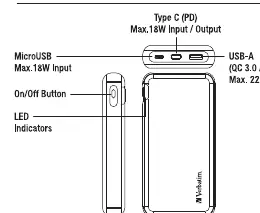
- The Verbatim VAPPP104 is a portable power bank with Type C PD and USB-A QC 3.0 ports. It features LED indicators to show charge status and supports fast charging. p. 1, 3
Key actions
- Charging the power pack p. 4
- Charging devices p. 4
Problems and fixes
Device not charging
Check cable connections and ensure the power pack has sufficient charge.
p. 4Technical specifications
| Parameter | Value | Meaning | Pages |
|---|---|---|---|
| Battery type | Li-Polymer | Lithium-polymer rechargeable battery | p. 3 |
| Total Output | Max 22.5W | Maximum combined power output | p. 3 |
Where to find it in the PDF
- Product Overview and Specs p. 3
- Charging Instructions p. 4
- LED Indicators p. 5
Table of contents
Manual images
Click an image to enlargeQuick Guide
The Verbatim VAPPP104 is a portable power bank designed to charge mobile devices. It features a Type C PD port (Max 18W) and a USB-A QC 3.0 / SuperCharge port (Max 22.5W). Always ensure the device is charged in a well-ventilated area and kept away from extreme heat or moisture.
Safety Precautions
- Do not disassemble, modify, or alter the charging device.
- Keep the power pack away from heat sources, direct sunlight, combustible gas, humidity, and water.
- Do not insert objects into the ports.
- Do not operate the device if it has been dropped or damaged.
- Charge in a well-ventilated area; do not charge under pillows, blankets, or on flammable surfaces.
- Do not charge in environments exceeding 40°C (104°F).
- Keep out of reach of children.
- Unplug the device before maintenance or cleaning.
- Do not short-circuit the power pack.
Package Contents
- 1 x Power Pack
- 1 x USB-A to Type C Cable
Technical Specifications
- Battery type: Li-Polymer
- Operating temperature: 0°C - 45°C
- Cycle time: Above 500 cycles
- Dimensions: 137.2 x 68.3 x 21.5mm
- Weight: 330g
- Input (MicroUSB): 5Vdc/2A, 9Vdc/2A (Max 18W)
- Input (Type C PD): 5Vdc/3A, 9Vdc/2A (Max 18W)
- Output (USB-A QC 3.0): 4.5Vdc/5A, 5Vdc/4.5A, 9Vdc/2A, 12Vdc/1.5A (Max 22.5W)
- Output (Type C PD): 5Vdc/3A, 9Vdc/2A, 12Vdc/1.5A (Max 18W)
- Total Output: Max 22.5W (15W shared when multiple outputs are used)
Charging the Power Pack
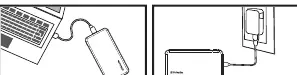
- Connect the Type C side of the supplied cable to the Type C port on the power pack.
- Connect the USB-A side of the cable to a computer USB-A port or a USB AC adaptor.
- The LED indicators will display the battery level.
- All four LED lights will be on when fully charged.
- The LED lights switch off automatically when the charging cable is unplugged.
Charging Devices
- Connect your device to the power pack using your device's regular charging cable.
- Plug the cable into the USB-A or Type C port on the power pack.
- The LED Power Indicator will turn on.
- The LED indicator will switch off automatically when the charging cable is unplugged.
LED Indicators
A flashing white LED light indicates the power pack is charging. Each light represents 25% of the total charge.
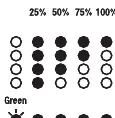
- 4 White Lights: Fully Charged
- 3 White Lights: 75% Charge
- 2 White Lights: 50% Charge
- 1 White Light: 25% Charge
- Green LED: Indicates fast charging
Device Disposal
Please observe local laws when disposing of electronic devices and batteries.
Practical help
Common problems
Power pack not charging
Ensure the charging cable is securely connected to both the power pack and the power source (computer or AC adapter).
Device not charging
Check that the charging cable is securely connected to the power pack's output port and your device. Ensure the power pack has sufficient charge.
Overheating during use
Stop using the device immediately. Ensure you are not charging in environments exceeding 40°C or on flammable surfaces like blankets.
Before use
- Ensure the power pack is fully charged before first use.
- Check that the charging cable is compatible with your device.
- Verify the environment temperature is between 0°C and 45°C.
- Ensure the power pack is not damaged or dropped.
Specs in practice
- USB-A QC 3.0
- Quick Charge port supporting fast output up to 22.5W.
Images and diagrams
- The diagram identifies the MicroUSB input, Type C input/output, USB-A output, On/Off button, and LED indicators.
Model compatibility
- Total output is shared (15W) when more than one output port is used simultaneously.

Manual page author
David Miller
Documentation analyst
Organizes user manual content into clear summaries, with attention to model details, product context, and everyday usability.