Power / USB Chargers
User Manual for Verbatim GaN Charger 165W GNC-165U
Quick start guide and technical specifications for the Verbatim GaN Charger 165W (GNC-165U). Learn how to connect your devices, understand port output capabilities, and follow safety guidelines.
Table of contents
Quick Guide
The Verbatim GaN Charger 165W is designed to charge multiple devices simultaneously using GaN technology. To use the charger, simply plug the integrated UK plug into a wall socket and connect your USB cables and devices to the appropriate ports.
Device Overview
The charger features four output ports:
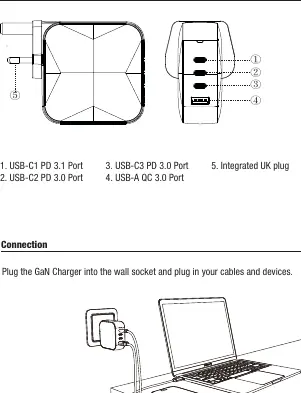
- 1. USB-C1: PD 3.1 Port
- 2. USB-C2: PD 3.0 Port
- 3. USB-C3: PD 3.0 Port
- 4. USB-A: QC 3.0 Port
- 5. Integrated UK plug
Safety Instructions
- Use the product only in dry, indoor environments.
- Keep the device out of the reach of children.
- Do not operate the product in the immediate vicinity of heaters, other heat sources, or in direct sunlight.
- Only use the device under moderate climatic conditions (0°C-35°C, humidity below 80%).
- Do not use the product in areas where electronic products are not permitted.
- Do not use the product in a damp environment and avoid splashing water.
- Do not open the device or continue to operate it if it becomes damaged.
- Do not operate the product continuously, as it is not designed for this.
Care and Maintenance
- Disconnect the device from the mains before cleaning and during prolonged periods of non-use.
- Plug devices directly into the adapter and the adapter directly into the socket.
- To disconnect, remove all devices from the adapter before removing the adapter from the socket.
Specifications
Voltage Input: AC 100-240V 50/60Hz 2.3 A max.
Total Output: 165W max.
Individual Port Outputs:
- USB-C1 PD 3.1: Up to 140W (3.3-21V/5A, 28V/5A)
- USB-C2 PD 3.0: Up to 100W (3.3-21V/5A, 20V/5A)
- USB-C3 PD 3.0: Up to 65W (3.3-11V/5A, 20V/3.25A)
- USB-A QC 3.0: Up to 30W (5V/3A, 9V/3A, 12V/2.5A, 20V/1.5A)
Protection Features: Includes output short circuit protection, over-voltage protection, over-current protection, and over-temperature protection.
Warranty
Verbatim provides a 2-year limited warranty from the date of purchase covering defects in material and workmanship. This warranty excludes batteries and does not cover damage resulting from misuse, neglect, or accident.
Practical help
Common problems
Device not charging
Ensure the charger is securely plugged into the wall socket and the cable is properly connected to both the charger and the device. Check if the device is compatible with the port's power output.
Charger feels hot
The charger may get warm during operation. Ensure it is used in a well-ventilated area and not covered by objects.
Visible damage
Do not use the charger if the casing is cracked or if there is visible damage to the plug or ports. Disconnect immediately.
Before use
- Check that the wall socket is compatible with the charger's plug type.
- Verify that the local voltage/mains frequency is within the 100-240V range.
- Ensure the total power draw of all connected devices does not exceed the 165W limit.
- Inspect the charger and cables for any signs of physical damage.
Specs in practice
- PD 3.1 / PD 3.0
- Power Delivery standards allowing for high-speed charging of compatible devices like laptops and smartphones.
- 165W Total Output
- The maximum combined power the charger can deliver across all ports simultaneously.
Images and diagrams
- The diagram illustrates the port layout: three USB-C ports (top to bottom) and one USB-A port at the bottom.
- The diagram shows the correct connection sequence: plug the charger into the wall, then connect devices via cables.
Model compatibility
- Designed for indoor use only.
- Not designed for continuous, 24/7 operation.
- Do not use with other adapters.

Manual page author
Emily Carter
User documentation editor
Prepares concise manual descriptions and highlights the most useful setup, operation, and maintenance information for readers.