Power / Solar Systems
VEVOR 150W / 300W Foldable Solar Panel User Manual
Quick guide and user manual for the VEVOR 150W and 300W Foldable Solar Panels. Includes setup instructions, charging tips, safety warnings, and technical specifications.
Table of contents
Manual images
Click an image to enlargeQuick guide from the manual
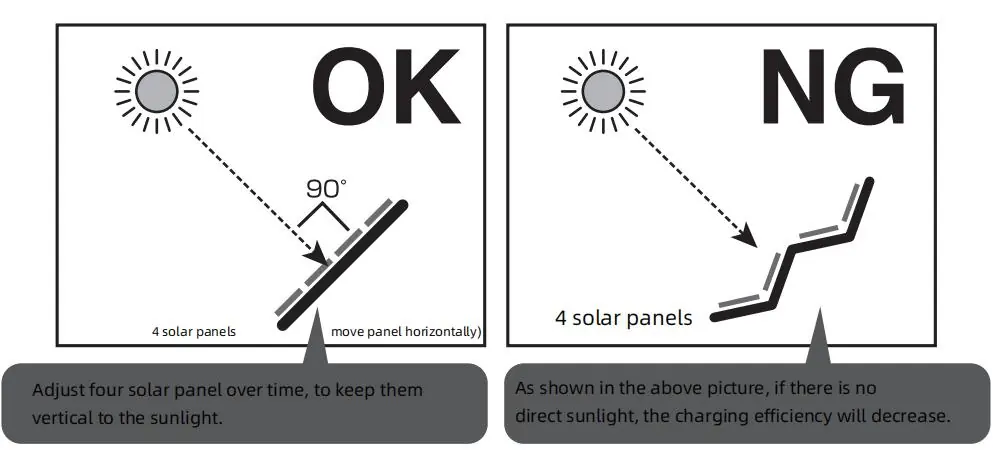
To ensure optimal performance, fully unfold the solar panel and position it so that it is as perpendicular as possible to the sunlight. The charging rate is highly dependent on the intensity and angle of the sun. Avoid placing the panel in the shade, behind glass, or using artificial light sources, as these will significantly reduce or prevent charging.
Safety warnings
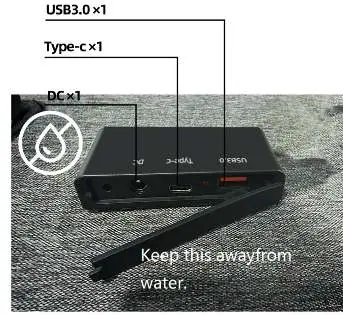
- Waterproof precautions: While the outer fabric and solar panel are waterproof, the USB charging port is not waterproof. Keep the port dry and away from water, high humidity, or snow.
- Heat management: The solar panel and connected devices may generate heat during charging. This is normal. Avoid direct sunlight on the device being charged (e.g., smartphone) to prevent overheating, which can cause malfunctions, fire, or deformation.
- Usage restrictions: Do not use the panel in high-temperature areas such as inside a car, on an engine hood, or on iron surfaces.
- Handling: Do not bend, fold, press, or pull the solar panel. Do not place metal objects between the panel and the device being charged.
- Children: Keep the product out of reach of children to avoid burns or accidents.
Operation
To charge your devices, connect them to the USB, Type-C, or DC interface on the junction box. The panel can charge devices even in standby mode, though charging times may be longer. Ensure the panel is fully opened; charging only a portion of the panel will result in reduced efficiency.
Troubleshooting
If the device is not charging, check the following:
- Ensure the sunlight is hitting the panel directly and is not obstructed by shadows or glass.
- Verify that all panels are fully unfolded.
- Check if the device being charged has stopped the process due to high internal temperature (e.g., iPhones may stop charging if internal temperature exceeds 60°C).
Technical specifications
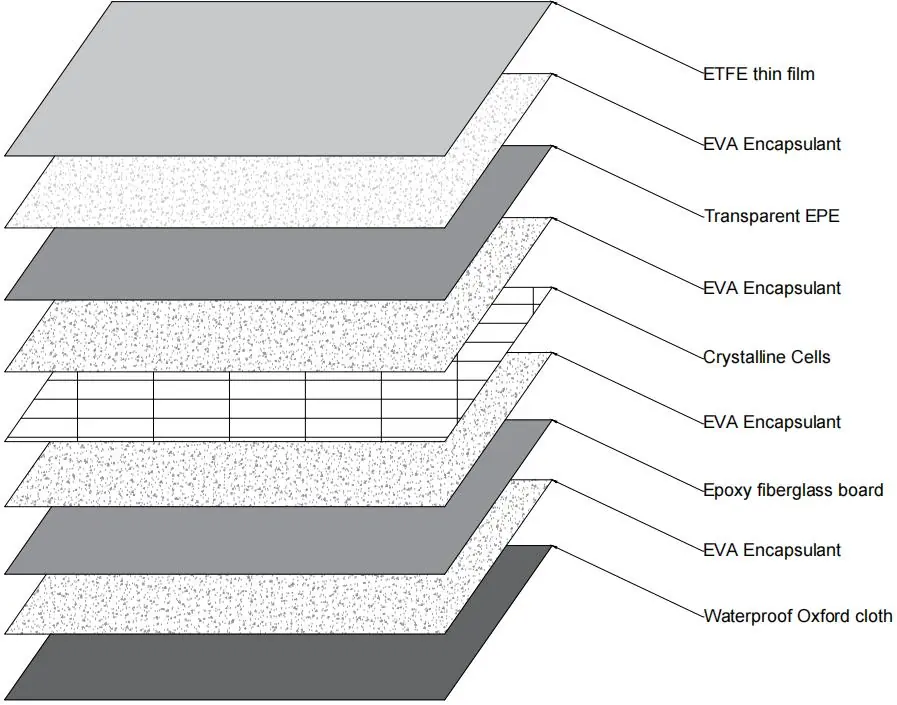
The solar panels are available in 150W and 300W models. Both feature single crystal silicon cells and an IP67 protection grade. Operating temperatures range from -20°C to 65°C. Output interfaces vary by model, with the 150W model including USB, USB(QC3.0), Type-C, and DC ports, while the 300W model uses an MC4 connector.
Manufacturer information
VEVOR
Practical help
Common problems
Device not charging
Ensure the panel is in direct sunlight, not shaded, and not behind glass. Verify that all panels are fully unfolded.
Charging stops unexpectedly
Check if the device being charged has overheated (e.g., >60°C). Move the device to a shaded area while it continues to charge.
Low charging efficiency
Adjust the panel angle to be perpendicular to the sun. Ensure the panel surface is clean and free of stickers or cloth covers.
Before use
- Ensure all solar panels are fully unfolded.
- Check that the USB/charging port is dry.
- Ensure the charging cable is compatible with your device.
- Verify the weather is clear and sunny.
- Position the panel to face the sun directly.
Specs in practice
- Open-circuit Voltage
- The maximum voltage the panel can output without a load.
- Short circuit Current
- The maximum current the panel can output when the terminals are shorted.
- Protection Grade IP67
- Dust-tight and protected against immersion in water (up to 1m).
Images and diagrams
- The panel should be positioned perpendicular to the sun for maximum efficiency.
- The junction box contains USB, Type-C, and DC ports.
Model compatibility
- The USB charging port is not waterproof.
- Charging rate depends on sunlight intensity and angle.
- Accessories other than the panel must be purchased separately.

Manual page author
Michael Turner
Technical manual editor
Reviews PDF manuals for structure, safety notes, and practical product details so readers can find the right information quickly.