Industrial / Material Handling
User Manual for VEVOR 2220A Hand Truck
Quick guide and operating instructions for the VEVOR 2220A hand truck. Learn how to switch between two-wheel and four-wheel modes, load capacities, and folding procedures.
PDF source: Français · summary: English
Quick answers from the manual
Quick answer
- The VEVOR 2220A is a convertible hand truck. It supports a 220 lbs capacity in two-wheel mode and a 500 lbs capacity in four-wheel mode. p. 7
Key actions
- Switching to Four-Wheel Mode p. 4
- Folding the Hand Truck p. 6
First start
- Extending the frame for use p. 3
Show 2 more answers Show less
Technical specifications
| Parameter | Value | Meaning | Pages |
|---|---|---|---|
| Max Load (4-wheel) | 500 lbs | Maximum capacity in trolley form | p. 7 |
| Max Load (2-wheel) | 220 lbs | Maximum capacity in cart form | p. 7 |
Where to find it in the PDF
- Operation Instructions p. 3, 4, 5, 6
- Parameters p. 7
Table of contents
Manual images
Click an image to enlargeQuick guide from the manual
The VEVOR 2220A is a convertible hand truck designed for various transport tasks. It can be used in two configurations: a two-wheel cart for smaller, short-distance loads, and a four-wheel trolley for larger, high-intensity work. Always ensure the load is within the specified weight limits for the chosen configuration.
Operation Modes
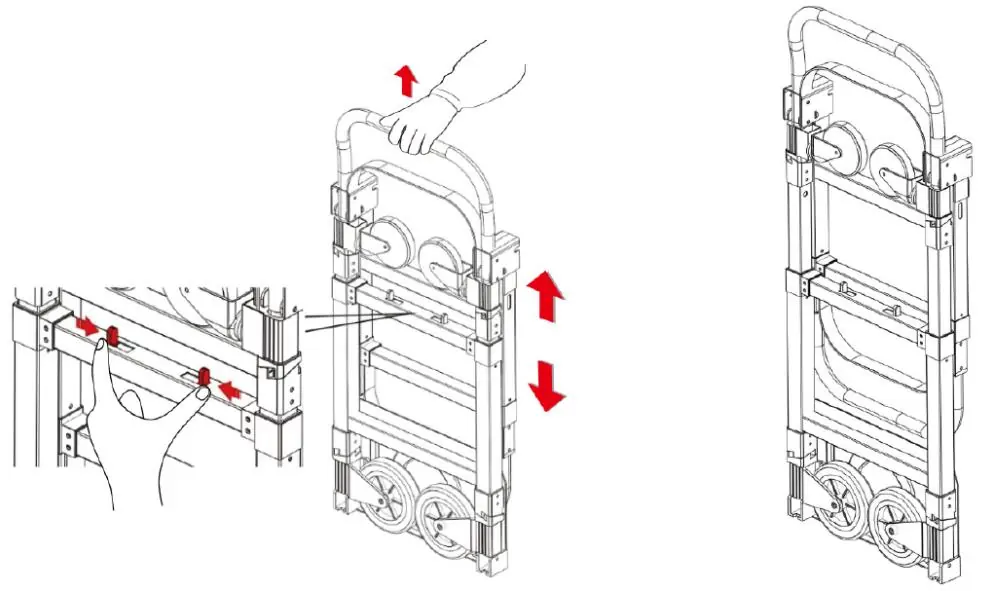
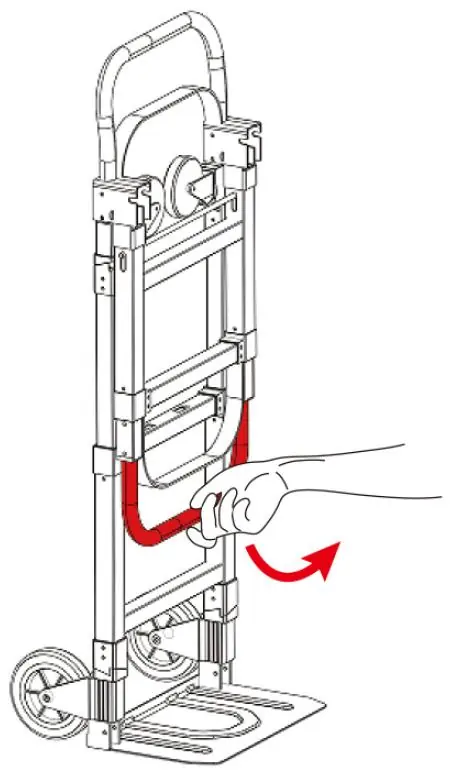
Cart Form (Two-Wheel)
This mode is suitable for carrying a small amount of products over short distances.
- Press the locks to extend the trolley frame.
- Tilt the trolley toward the flat plate and step on the plate with your feet. The wheels will automatically open to both sides.
Trolley Form (Four-Wheel)
This mode is suitable for high-intensity work and larger-volume goods.
- Open the levers to the 90-degree position; they will lock automatically.
- Press the locks to pull out the handrail.
Closing the Hand Truck
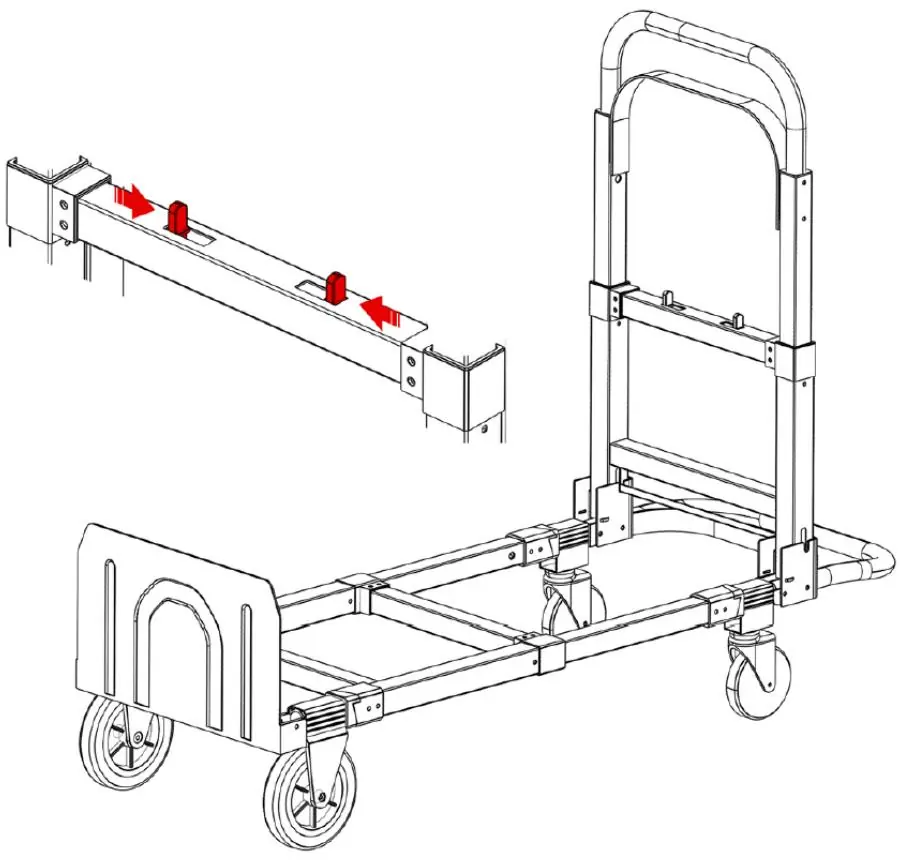
- Press the button to push the handle to the bottom.
- Grasp the steel bars and square tubes tightly, unlock the handle, and fold it.
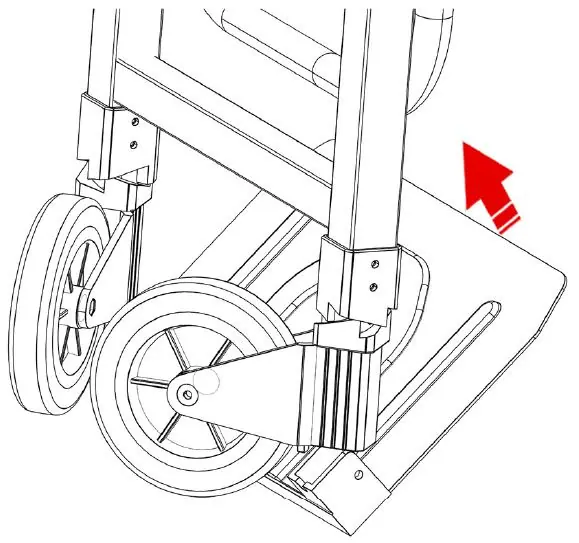
- Fold the shovel board; the wheels will automatically retract.
- Press the button to recycle (collapse) the frame.
Technical Specifications
- Model: 2220A
- Maximum Load (Four-wheel status): 500 lbs
- Maximum Load (Two-wheel status): 220 lbs
- Color: Black
- Included Accessories: 2 x Elastic Strings
Manufacturer information
VEVOR
Practical help
Before use
- Ensure the surface is flat before operation.
- Verify the load weight does not exceed the capacity for the selected mode.
- Ensure all locks and levers are fully engaged before loading.
- Check that the wheels are fully opened in four-wheel mode.
Specs in practice
- Two-wheel Load Capacity
- Maximum weight of 220 lbs for short-distance transport.
- Four-wheel Load Capacity
- Maximum weight of 500 lbs for larger volume goods.
Show more Show less
Images and diagrams
- The manual includes diagrams showing the locking mechanisms for extending the frame and the lever positions for switching between two-wheel and four-wheel modes.
Model compatibility
- Not intended for loads exceeding 500 lbs.

Manual page author
Emily Carter
User documentation editor