Sports / Fitness
VirtuFit Low Entry Bike 1.2i Hometrainer
User manual for the VirtuFit Low Entry Bike 1.2i, covering assembly, safety guidelines, console operation, training programs, and maintenance.
Table of contents
Manual images
Jump to the sectionProduct Overview
The VirtuFit Low Entry Bike 1.2i is a high-quality hometrainer designed for effective indoor cardiovascular workouts. Its low-entry frame design ensures easy access for users of all fitness levels. The bike features a console with multiple training programs, including manual, preset, heart rate control (HRC), and user-defined modes, allowing for a personalized exercise experience.
Safety Guidelines
Before starting any exercise program, consult with a physician, especially if you are over 35 or have pre-existing health conditions. Ensure the bike is placed on a firm, level surface with at least 0.5 meters of clearance around it. Always wear appropriate clothing and ensure all bolts and nuts are securely tightened before use. The maximum user weight is 140 kg. Keep children and pets away from the equipment during operation.
Assembly and Setup
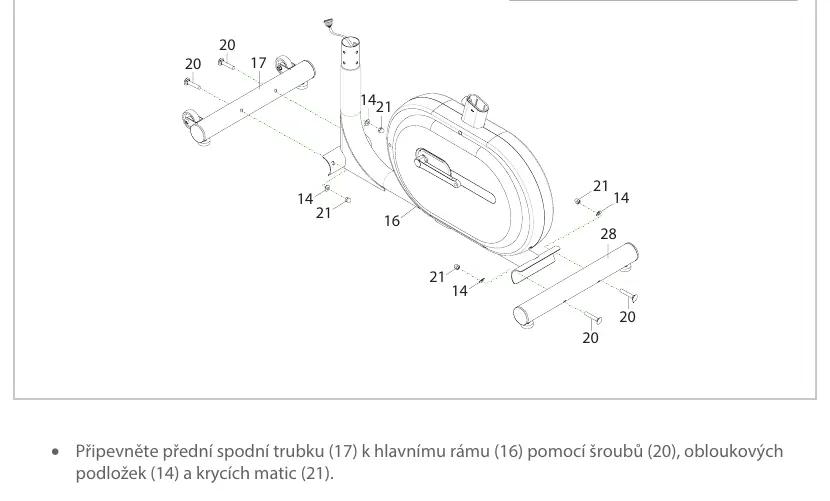
The assembly process involves attaching the front and rear stabilizers to the main frame, installing the seat post and handlebars, and connecting the console and power supply. Ensure all cables are correctly connected to avoid error messages. Use the provided tools for assembly and ensure pedals are tightened securely. Level the bike using the adjustable feet if the surface is uneven.
Console Operation
The console provides real-time feedback on time, speed, distance, calories, pulse, RPM, and watts. Use the START/STOP button to control workouts, and the UP/DOWN buttons to adjust values. The ENTER button confirms settings, while the RECOVERY button tests heart rate recovery levels. The bike supports third-party fitness apps via QR code access.

Maintenance
Perform daily maintenance by wiping the bike clean after each use to remove sweat and dust. Conduct semi-annual maintenance by checking all bolts and nuts for tightness and applying silicone spray to moving parts if necessary. Store the bike in a dry, indoor environment to prevent damage to electrical components.
Manufacturer information
VirtuFit
Practical help
Common problems
Display shows no values
Check sensor cables and connections on the back of the display; adjust the sensor position if necessary.
Clicking sound while pedaling
Remove and re-install the pedals, ensuring they are tightened securely. Note: left pedal tightens counter-clockwise, right pedal clockwise.
Heart rate not displaying
Ensure pulse sensor cables are properly connected and clean the sensors of sweat or dirt.
Console not working
Check if the power cable is correctly connected to the main frame and the electrical outlet.
Before use
- Consult a physician before starting a new exercise program.
- Ensure the bike is on a firm, level surface.
- Check that all bolts and nuts are securely tightened.
- Verify that the area around the bike is clear (at least 0.5m).
- Ensure the power adapter is connected correctly.
- Check that the pedals are tightened securely.
- Ensure the bike is free of dust and debris.
Specs in practice
- Max User Weight
- 140 kg
- Resistance Levels
- 1-10 levels adjustable via the resistance knob.
- Operating Temperature
- 10°C to 35°C
- Storage Temperature
- 5°C to 45°C
Images and diagrams
- Step 1: Attaching stabilizers to the main frame.
- Step 2: Installing the seat post and pedals.
- Step 3: Mounting the handlebars and console.
- Step 4: Final seat adjustment and power connection.
Model compatibility
- Compatible with third-party apps like FitShow, Kinomap, and iConsole.
- Requires a smartphone or tablet with a QR code scanner to access app manuals.

Manual page author
Michael Turner
Technical manual editor
Reviews PDF manuals for structure, safety notes, and practical product details so readers can find the right information quickly.