General / Other Manuals
XDCOLLECTION RCS Recycled Plastic 10,000mAh Solar Powerbank Manual
User manual for the XDCOLLECTION 10,000mAh solar powerbank made from recycled plastic, featuring wireless charging and cable charging instructions.
Table of contents
Product Overview
The XDCOLLECTION 10,000mAh solar powerbank is a versatile portable charger designed for mobile devices. It features both wired and wireless charging capabilities, allowing you to power your devices on the go. The unit is constructed from RCS-certified recycled plastic, reflecting a commitment to sustainable materials.
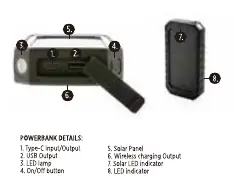
Technical Specifications
The powerbank has a battery capacity of 10,000mAh (37Wh). It supports multiple charging inputs and outputs: Type-C input/output, a standard USB output, and a wireless charging surface. The wireless output supports 5W, 7.5W, and 10W charging speeds depending on the device compatibility.
Charging the Powerbank
You can charge the powerbank using the included Type-C cable connected to a wall charger or computer USB port. Blue indicator lights will blink during the charging process and remain solid when the unit is fully charged. Alternatively, the integrated solar panel allows for charging via direct sunlight. The solar charging indicator will turn green when the panel is active. For optimal performance, charge the powerbank for at least 6 hours or until the first 3 LED lights stay on before the first use.
Charging Your Mobile Device
To charge a device via cable, connect it to the USB port on the powerbank. The device will indicate charging, and a blue light will appear on the powerbank. For wireless charging, ensure your phone is compatible, switch on the powerbank using the power button, and place your device on the wireless charging surface.
Safety and Maintenance
To ensure the longevity of the product, avoid shaking, hitting, or throwing the powerbank. If not used for an extended period, charge and discharge the unit once every three months. Keep the device away from moisture and heat sources. Do not place metal objects, magnets, or magnetic stripe cards between your phone and the wireless charging pad, as these can interfere with the charging process or cause damage. This product is not a toy and should be kept away from children under 7 years of age. Always use certified accessories to maintain safety standards.
Practical help
Common problems
Wireless charging not working
Ensure the phone is compatible, the powerbank is switched on, and no metal objects or magnets are between the phone and the charging surface.
Device not charging properly
Check that the device is accurately placed on the charging surface and verify the charging icon on your phone screen.
Before use
- Charge the powerbank for at least 6 hours before first use.
- Ensure you are using the included or certified charging cables.
- Verify your mobile device is compatible with wireless charging.
- Check that the powerbank has sufficient battery level.
Specs in practice
- Wireless Output: 5W/7.5W/10W
- The power levels supported for wireless charging, depending on the connected device.
Images and diagrams
- 1. Type-C Input/Output port
- 2. USB Output port
- 4. On/Off button
- 5. Solar panel
Model compatibility
- Wireless charging requires a compatible mobile device.
- Some phone cases may block or interfere with wireless charging.

Manual page author
Michael Turner
Technical manual editor
Reviews PDF manuals for structure, safety notes, and practical product details so readers can find the right information quickly.