Mobile / Smartphones
User Manual for Xiaomi 12 Pro Smartphone
Quick start guide and safety information for the Xiaomi 12 Pro smartphone. Learn about device setup, SIM card installation, safety precautions, and regulatory compliance.
Quick answers from the manual
Quick answer
- To start your Xiaomi 12 Pro, long press the power button and follow the on-screen setup instructions. p. 3
Key actions
- Insert SIM card p. 3
First start
- Long press power button, follow on-screen instructions. p. 3
Show 3 more answers Show less
Problems and fixes
Battery replacement
Do not replace the battery yourself; contact an authorized repair center.
p. 4, 5Technical specifications
| Parameter | Value | Meaning | Pages |
|---|---|---|---|
| SAR Head | 0.599 W/Kg | Specific Absorption Rate | p. 6 |
Where to find it in the PDF
- Device Overview p. 2
- Safety Information p. 4, 5
Table of contents
Manual images
Click an image to enlargeQuick Start Guide
To turn on your Xiaomi 12 Pro, long press the power button located on the side of the device. Once powered on, follow the on-screen instructions to complete the initial configuration of your device.
Device Overview
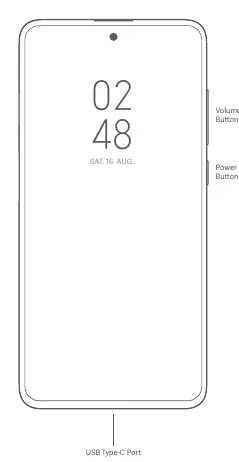
The device features physical buttons on the right side, including volume controls and a power button. The USB Type-C port is located at the bottom of the device for charging and data transfer.
SIM Card Installation
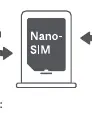
The device supports Dual SIM functionality. Use the SIM card tray to insert your Nano-SIM cards. You can set either card as the primary card for data and calls. Ensure you do not insert non-standard SIM cards, as this may damage the slot.
Safety Information
Please adhere to the following safety guidelines to ensure proper device operation:
- Operating Temperature: Keep the device within the 0°C to 40°C range.
- Battery Safety: Do not attempt to replace the built-in battery yourself. Only use authorized cables and power adapters. Do not charge the device for more than 12 hours.
- Handling: Keep the device dry. Do not disassemble, hit, crush, or burn the battery or the device.
- Usage Restrictions: Avoid using the phone in explosive atmospheres, near medical devices (like pacemakers), or while driving.
Regulatory and Compliance
This device complies with EU and FCC regulations regarding radio frequency exposure (SAR). The device features an electronic label for certification information, which can be accessed via Settings > About phone > Certification.
Manufacturer information
Xiaomi Corporation
Practical help
Common problems
Device will not turn on
Ensure the device is charged and long press the power button.
SIM card not recognized
Ensure you are using a standard Nano-SIM card and it is inserted correctly into the tray.
Battery issues
Do not attempt to replace the battery yourself; contact an authorized repair center.
Before use
- Charge the device using the included cable and power adapter.
- Insert Nano-SIM card into the SIM tray.
- Follow on-screen instructions for initial setup.
- Ensure the device is kept within the 0°C to 40°C temperature range.
Show more Show less
Specs in practice
- SAR Value (Head)
- 0.599 W/Kg (Specific Absorption Rate)
- Operating Temperature
- 0°C to 40°C
Images and diagrams
- The device features volume buttons and a power button on the right side.
- The USB Type-C port is located at the bottom of the device.
Model compatibility
- Supports Dual SIM 5G/4G/3G/2G.
- Wi-Fi 6E connectivity may vary by region.

Manual page author
Michael Turner
Technical manual editor