Mobile / Smartphones
User Guide for POCO F4 Smartphone
Quick start guide for the POCO F4 smartphone. Learn how to power on, configure, and safely use your device, including SIM card installation and safety precautions.
Quick answers from the manual
Quick answer
- To turn on your POCO F4, long press the power button. Follow the on-screen instructions to configure the device. p. 5
Key actions
- Powering on the device p. 5
- Inserting SIM cards p. 4
First start
- Long press the power button to turn on the device and follow on-screen instructions. p. 5
Show 3 more answers Show less
Maintenance and reset
- Do not attempt to replace the battery yourself. Contact an authorized repair center. p. 6
Technical specifications
| Parameter | Value | Meaning | Pages |
|---|---|---|---|
| Operating Temperature | 0°C to 40°C | Safe operating range | p. 6 |
Where to find it in the PDF
- Quick Start Guide p. 1, 5
- Safety Information p. 6, 7
Table of contents
Quick guide from the manual
This guide provides essential information for setting up and safely using your POCO F4 smartphone. Please read all safety information before using your device.
Getting started
To turn on your POCO F4, long press the power button. Once the device is on, follow the on-screen instructions to complete the initial configuration.
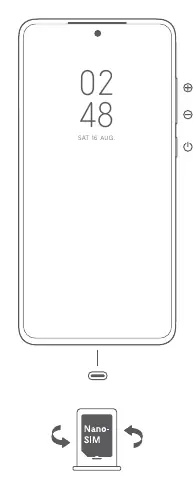
Dual SIM configuration
The POCO F4 supports dual Nano-SIM cards. Key features include:
- Supports dual 5G connectivity.
- Either card can be set as the primary card.
- Supports dual SIM 5G/4G/3G/2G and VoLTE.
Warning: Do not insert non-standard SIM cards into the slot, as this may cause damage.
Safety precautions
To ensure safe operation of your device, please observe the following:
- Operating Temperature: The device should be used within a temperature range of 0°C to 40°C.
- Battery Safety: Do not attempt to replace the built-in battery yourself. Do not disassemble, hit, crush, or burn the battery. If the battery appears deformed or damaged, stop using it immediately.
- Charging: Use only authorized cables and power adapters. Do not charge the device for more than 12 hours.
- Medical Interference: Maintain a minimum distance of 15 cm between your phone and medical devices like pacemakers.
- Environment: Keep the device dry and avoid using it in high-humidity areas like bathrooms.
Regulatory and legal information
This device is compliant with EU regulations. It is restricted to indoor use only when operating in the 5150 to 5350 MHz frequency range. For detailed environmental declarations and certification information, please visit the official Xiaomi website at www.mi.com/en/certification.
Official resources from the manual
Manufacturer information
Xiaomi Corporation
Practical help
Common problems
Device will not turn on
Ensure the device is charged and long press the power button.
SIM card not recognized
Ensure you are using a standard Nano-SIM card and that it is inserted correctly into the slot.
Before use
- Charge the device fully before first use.
- Ensure you have a standard Nano-SIM card.
- Read all safety information provided in the manual.
- Update the operating system using the built-in software update feature.
Show more Show less
Specs in practice
- Operating Temperature
- 0°C to 40°C. Using the device outside this range may cause damage.
Images and diagrams
- The diagram on page 4 illustrates the side buttons (volume and power) and the Nano-SIM card insertion process.
Model compatibility
- Supports dual 5G connectivity depending on country and carrier.
- VoLTE support depends on carrier network deployment.

Manual page author
David Miller
Documentation analyst