Mobile / Smartphones
User Manual for Xiaomi Redmi A2 Smartphone
Quick start guide and safety manual for the Xiaomi Redmi A2 smartphone. Includes setup instructions, charging guidelines, safety precautions, and regulatory information.
PDF source: español · summary: English
Quick answers from the manual
Quick answer
- To turn on your Redmi A2, long-press the Power button. Use the provided charger for power and charging. For FM radio, connect headphones to act as an antenna. p. 1, 5, 12, 16
Key actions
- Powering on the device p. 2, 8, 13
- Charging the battery p. 5, 11, 15
- Using FM Radio p. 5, 11, 16
First start
- Long press the Power button to turn on the device and follow on-screen instructions. p. 2, 8, 13
Show 3 more answers Show less
Problems and fixes
Device malfunction
Contact Mi customer support or take your device to an authorized repair center.
p. 2, 8, 13Technical specifications
| Parameter | Value | Meaning | Pages |
|---|---|---|---|
| Operating Temperature | 0°C - 40°C | Safe operating range | p. 2, 8, 13 |
| Charger Input | 100-240VAC, 50/60Hz, 0.35A | Power input requirements | p. 5, 11, 16 |
| Charger Output | 5V/2A | Power output specifications | p. 5, 11, 16 |
Where to find it in the PDF
- Quick Start Guide p. 1, 7, 12
- Safety Information p. 2, 3, 8, 9
- Regulatory Compliance p. 3, 4, 9, 10
Table of contents
Manual images
Click an image to enlargeQuick Start Guide
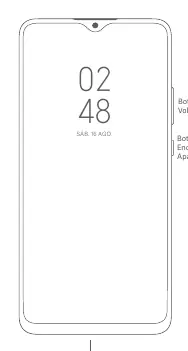
The Xiaomi Redmi A2 is designed for ease of use. To power on the device, long-press the Power button located on the side of the phone. Follow the on-screen instructions to complete the initial configuration.
Charging the Device
To charge the battery, use only the charger provided with the equipment. Connect the USB cable to the phone's USB port and the other end to the charger. Plug the charger into a standard AC power outlet (100-240V). Always disconnect the charger by holding it firmly and pulling it from the outlet; never pull on the cable.
SIM Card Installation
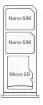
The device features a SIM tray that supports two Nano-SIM cards and one Micro SD card. Do not insert non-standard SIM cards into the tray, as this may cause damage.
Safety Information
Please adhere to the following safety guidelines to ensure proper operation and prevent injury:
- Operating Temperature: Use the device within the range of 0°C to 40°C.
- Battery Safety: Do not attempt to replace the battery yourself. Do not disassemble, crush, or burn the battery. If the battery appears deformed, stop using it immediately.
- Usage Restrictions: Do not use the phone in explosive atmospheres, such as gas stations, or near medical equipment like pacemakers (maintain a minimum distance of 15 cm).
- Accessories: Use only authorized cables, adapters, and batteries compatible with the device.
- Water/Moisture: Keep the device dry. Do not use it in high-humidity areas like bathrooms.
Regulatory and Compliance
This device complies with international standards for radio frequency exposure (SAR). For body-worn operation, maintain a separation distance of at least 5mm from the body. The device supports various frequency bands including GSM, WCDMA, LTE, Bluetooth, and Wi-Fi.
Technical Specifications
The device operates on a 5V/2A power supply. The charger input is 100-240VAC, 50/60Hz, 0.35A. For FM Radio functionality, headphones must be connected as they serve as the antenna.
Manufacturer information
Xiaomi Corporation
Practical help
Common problems
Device not charging
Ensure you are using the provided charger and cable. Check that the connection to the power outlet is secure.
FM Radio not working
Headphones must be connected to the device, as they function as the antenna for the radio.
SIM card tray damage
Do not insert non-standard SIM cards into the tray.
Before use
- Charge the device using the provided charger.
- Ensure the SIM card is a standard Nano-SIM.
- Keep the device away from high-temperature environments.
- Do not attempt to repair or disassemble the device yourself.
Show more Show less
Specs in practice
- Operating Temperature
- 0°C to 40°C; usage outside this range may damage the device.
- Charger Input
- 100-240VAC, 50/60Hz, 0.35A.
- Charger Output
- 5V/2A.
Images and diagrams
- The right side of the device features the Volume button and the Power button.
- The USB port is located at the bottom of the device.
- The SIM tray is designed to hold two Nano-SIM cards and one Micro SD card.
Model compatibility
- Use only authorized accessories compatible with the device.
- The device is restricted to use in specific environments (e.g., hospitals, gas stations).

Manual page author
David Miller
Documentation analyst