Mobile / Smartphones
User Guide for Xiaomi 2210129SG Smartphone
Quick start guide for the Xiaomi 2210129SG smartphone. Includes setup instructions, safety precautions, regulatory information, and technical specifications.
Quick answers from the manual
Quick answer
- To turn on the device, long press the power button. Follow the on-screen instructions to configure the device. p. 2
Key actions
- Access E-label p. 4
First start
- Power on p. 2
Show 2 more answers Show less
Technical specifications
| Parameter | Value | Meaning | Pages |
|---|---|---|---|
| SAR Head | 0.994 W/Kg | Specific Absorption Rate | p. 3 |
Where to find it in the PDF
- Device Layout p. 1
- Safety and Regulatory p. 2, 3, 4
Table of contents
Quick guide from the manual
This guide provides essential information for setting up and safely using your Xiaomi 2210129SG smartphone. For detailed configuration, follow the on-screen instructions upon powering on the device.
Getting started
To turn on your device, long press the power button. Follow the on-screen instructions to complete the initial configuration. The device features a USB Type-C port for charging and data transfer, and volume and power buttons located on the side.
Safety information
Read all safety information before using your device to prevent injury or damage:
- Temperature: The operating temperature range is 0°C to 40°C. Using the device outside this range may cause damage.
- Accessories: Use only authorized cables, power adapters, and accessories. Unauthorized items may cause fire, electric shock, or damage.
- Hearing: To prevent hearing damage, do not listen at high volume levels for long periods.
- Environment: Do not use the phone in explosive atmospheres, such as petrol stations, or near medical equipment like pacemakers (maintain a minimum distance of 15 cm).
Battery and charging
- Do not attempt to replace the battery yourself.
- Disconnect the adapter from both the device and the power outlet after charging is complete.
- Do not charge the device for more than 12 hours.
- The battery must be recycled or disposed of separately from household waste.
- Do not disassemble, hit, crush, or burn the battery.
Regulatory and compliance
This device complies with EU and FCC regulations regarding RF exposure (SAR). The E-label for certification information can be accessed by going to Settings > About phone > Certification.
Manufacturer information
Xiaomi Corporation
Practical help
Common problems
Device does not turn on
Long press the power button to turn on the device.
Battery or charging issues
Use only authorized chargers and cables. Do not charge the device for more than 12 hours.
Interference with medical devices
Maintain a minimum distance of 15 cm between the phone and pacemakers. Do not use near hearing aids or cochlear implants.
Before use
- Ensure the device is charged.
- Insert the SIM card correctly.
- Follow the on-screen configuration instructions.
- Read all safety precautions.
Show more Show less
Specs in practice
- Operating Temperature
- 0°C to 40°C
Images and diagrams
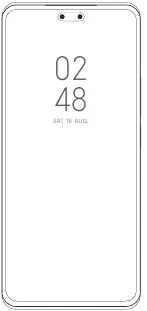
- The device diagram illustrates the location of the volume buttons and power button on the side, and the USB Type-C port at the bottom.
Model compatibility
- 5G connection depends on country, carrier, and user environment.
- Restricted to indoor use only in the 5250 to 5350 MHz frequency range in specific EU countries.

Manual page author
Emily Carter
User documentation editor