Mobile / Smartphones
Quick Start Guide for Xiaomi 12X
A comprehensive quick start guide for the Xiaomi 12X smartphone. This guide includes instructions on device layout, SIM card installation, initial setup, safety precautions, and technical specifications.
Table of contents
Manual images
Click an image to enlargeGetting Started
To turn on your Xiaomi 12X, long press the power button. Follow the on-screen instructions to configure the device for the first time. The device comes pre-installed with MIUI, an Android-based operating system.
Device Layout
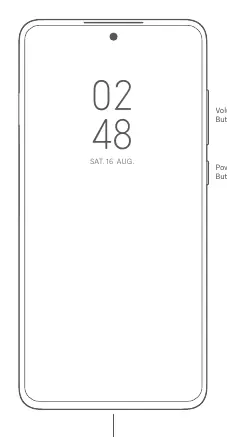
The device features volume buttons and a power button on the right side. The USB Type-C port is located at the bottom of the device for charging and data transfer.
SIM Card Installation
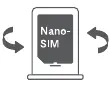
The Xiaomi 12X supports dual Nano-SIM cards. To install, use the SIM card tray. Note that the device supports dual SIM VoLTE and 5G connectivity, which depends on your carrier and location. Do not insert non-standard SIM cards as they may damage the slot.
Safety Information
Please adhere to the following safety guidelines:
- Battery Safety: Do not attempt to replace the battery yourself. Use only authorized cables and power adapters. Do not disassemble, hit, crush, or burn the battery.
- Operating Environment: The operating temperature range is 0°C to 40°C. Using the device outside this range may cause damage.
- Usage: Keep the device dry. Do not use the phone in explosive environments, such as petrol stations. Maintain a minimum distance of 15 cm from pacemakers.
- Charging: Do not charge the device for more than 12 hours. Disconnect the adapter after charging is complete.
Technical Specifications
The device includes an electronic label for certification information, accessible via Settings > About phone > Certification. The included adapter (Model: MDY-12-EG) supports input voltages of 100-240V and output power up to 67.0W Max.
Manufacturer information
Xiaomi Corporation
Practical help
Common problems
Device does not turn on
Long press the power button. If the device remains unresponsive, ensure it is charged using the included adapter.
SIM card not detected
Ensure you are using a standard Nano-SIM card and that it is inserted correctly into the SIM tray.
Device overheating
Avoid using the device in high-temperature environments or while charging. Stop using the device if it appears deformed or damaged.
Before use
- Charge the device using the provided cable and adapter.
- Ensure you have a Nano-SIM card.
- Read all safety information regarding battery handling and temperature limits.
- Verify that the power adapter meets local standards.
Specs in practice
- Operating Temperature
- 0°C to 40°C. Using the device outside this range may damage it.
- Charging Limit
- Do not charge the device for more than 12 hours.
Images and diagrams
- The device layout diagram shows the volume buttons and power button on the right edge.
- The USB Type-C port is located at the bottom center of the device.
- The SIM tray diagram illustrates the correct orientation for Nano-SIM cards.
Model compatibility
- Supports Dual Nano-SIM cards.
- 5G connection depends on country, carrier, and user environment.
- VoLTE depends on carrier network and service deployment.

Manual page author
David Miller
Documentation analyst
Organizes user manual content into clear summaries, with attention to model details, product context, and everyday usability.