Mobile / Smartphones
Xiaomi 15T Safety and Quick Start Guide
Quick start and safety guide for the Xiaomi 15T smartphone. Includes factory reset instructions, SAR information, and regulatory compliance details.
Table of contents
Manual images
Click an image to enlargeQuick Start Guide
To turn on your Xiaomi 15T, long press the power button. Follow the on-screen instructions to configure the device.
Safety Precautions
- Do not use the phone in explosive environments such as petrol stations, fuel storage facilities, or areas with chemical particles in the air.
- Maintain a minimum distance of 15 cm from medical devices like pacemakers to avoid interference.
- Do not use the phone in hospital operating rooms or intensive care units.
- Avoid using the phone outdoors during thunderstorms to prevent lightning strikes.
- Do not use the phone in high-humidity areas like bathrooms to prevent electric shock or fire.
- Turn off the phone when required on aircraft.
Charging and Battery
Charge the device using the included USB cable and a Mi brand charger. The device supports up to 67W (Xiaomi HyperCharge). If using a third-party charger, ensure it complies with USB 2.0 or higher protocols and relevant safety standards (IEC 60950, IEC 62368-1). Do not charge the device for more than 12 hours. Do not attempt to replace the built-in battery yourself.
Factory Reset
To quickly erase local data (accounts, contacts, photos, apps, etc.), navigate to: Settings > About phone > Factory reset.
Regulatory Information
The device complies with EU and FCC regulations regarding RF exposure (SAR). For body-worn operation, maintain a separation of at least 5 mm (EU) or 0.5 cm (FCC). Do not use accessories containing metal components when carrying the device near the body.
Manufacturer information
Xiaomi Corporation
Practical help
Common problems
Device does not turn on
Ensure the battery is charged and long-press the power button.
Charging issues
Use the included cable and a compatible Mi charger. Ensure the charger meets USB 2.0 or higher standards.
Interference with medical devices
Maintain a minimum distance of 15 cm from pacemakers and avoid carrying the phone in a breast pocket.
Before use
- Ensure the device is kept dry.
- Use only authorized cables and power adapters.
- Do not insert non-standard SIM cards into the slot.
- Check that the charger is compatible with local safety standards.
Specs in practice
- 67W HyperCharge
- The maximum supported charging power for the device.
Images and diagrams
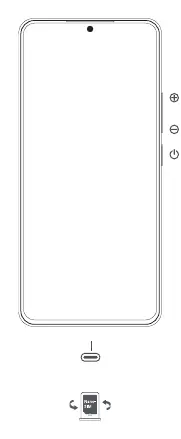
- The device features a power button and volume controls on the side.
- The SIM card slot is located at the bottom of the device.
Model compatibility
- Supports third-party chargers compliant with USB 2.0 or higher and IEC 60950/62368-1 standards.

Manual page author
Michael Turner
Technical manual editor
Reviews PDF manuals for structure, safety notes, and practical product details so readers can find the right information quickly.