Mobile / Smartphones
User Manual for Xiaomi Redmi 14C Smartphone
Quick start guide and safety manual for the Xiaomi Redmi 14C smartphone. Includes setup instructions, charging guidelines, safety precautions, FM radio usage, and regulatory information.
Table of contents
Manual images
Click an image to enlargeQuick Start Guide
To turn on your Redmi 14C, press and hold the Power button. Follow the on-screen instructions to complete the initial setup of your device.
Device Layout
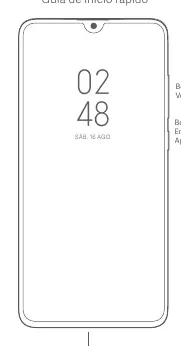
The device features a Volume button and a Power button on the side. The USB Type-C port is located at the bottom. The SIM tray supports two Nano-SIM cards and one MicroSD card.

Charging Instructions
Use only the provided charger and cable to charge your device. Connect the USB cable to the phone's port and the charger, then plug the charger into an AC power outlet. Disconnect the charger once the battery is fully charged. Do not charge the device for more than 12 hours.
Using FM Radio
To use the FM Radio, navigate to Start > Tools > FM Radio. You must connect headphones, as they function as the antenna for the radio.
Important Safety Information
- Operating temperature range is 0°C to 40°C.
- Do not attempt to replace the battery yourself.
- Keep the device dry and do not disassemble it.
- Use only authorized accessories.
- Do not use the phone in explosive environments or near medical equipment like pacemakers (maintain a minimum distance of 15cm).
- Do not use the phone to make calls while it is charging.
Regulatory Information
This device complies with SAR limits. For body-worn operation, maintain a distance of at least 5mm from the body. Use accessories without metal components. The device is restricted to indoor use only when operating in the 5250–5350 MHz frequency range in certain regions.
Manufacturer information
Xiaomi Corporation
Practical help
Common problems
Device not turning on
Ensure it is charged using the provided cable and adapter.
FM Radio not working
Connect headphones, as they act as the antenna.
SIM card not recognized
Ensure the SIM card is standard and correctly inserted into the tray.
Before use
- Charge the device using the provided cable and adapter.
- Insert SIM card and MicroSD card into the tray.
- Press and hold the Power button to turn on.
- Follow on-screen instructions for initial configuration.
Images and diagrams
- The diagram shows the location of the Volume button, Power button, and USB Type-C port.
- The SIM tray diagram illustrates the placement of two Nano-SIM cards and one MicroSD card.
Model compatibility
- Use only authorized cables and power adapters.
- Do not use non-standard SIM cards.

Manual page author
Emily Carter
User documentation editor
Prepares concise manual descriptions and highlights the most useful setup, operation, and maintenance information for readers.