Mobile / Smartphones
User Manual for Xiaomi 15T Smartphone
Quick start guide for the Xiaomi 15T smartphone. Learn how to set up your device, insert a SIM card, follow safety guidelines, and access support.
Table of contents
Quick Start Guide
To turn on your Xiaomi 15T, press and hold the power button. Follow the on-screen instructions to complete the initial setup process. For detailed information, visit the official website at www.mi.com/jp/support/user-guide.
Device Overview
The device features a power button and volume adjustment buttons located on the side. The USB Type-C port is located at the bottom of the device for charging and data transfer.
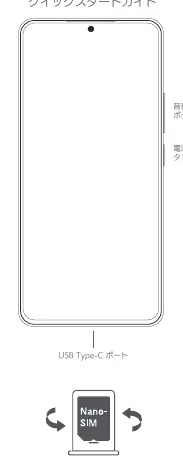
SIM Card Installation
Insert your SIM card into the designated SIM card slot. Ensure you use a standard SIM card; using non-standard cards may damage the slot.
Safety Precautions
- Operating Temperature: Use the device within the range of 0°C to 40°C.
- Disassembly: Do not disassemble, modify, or repair the device yourself.
- Accessories: Use only the provided or compatible AC adapter and cables.
- Battery Safety: Do not replace the internal battery yourself. If the battery shows signs of swelling or damage, stop using the device immediately.
- Charging: Do not charge the device for more than 12 hours. Disconnect the charger once charging is complete.
- Environment: Keep the device dry and avoid placing it in high-temperature environments.
Software and Updates
Use the built-in software update feature on your phone to keep the operating system up to date. Updating via other methods may result in data loss, device damage, or security risks.
Support and Contact
For warranty information and customer support, contact the Xiaomi Japan Customer Service Center.
Xiaomi Japan Customer Service Center:Phone: 0120-767-378 (9:00-18:00, excluding year-end and New Year holidays)Email: [email protected]: www.mi.com/jp
Official resources from the manual
Manufacturer information
Xiaomi Corporation
Practical help
Common problems
Device will not turn on
Press and hold the power button to initiate startup.
Battery or charging issues
Do not charge for more than 12 hours. Use only the original AC adapter and cable.
Software issues
Use the built-in system update feature. Do not attempt unauthorized software modifications.
Before use
- Ensure the SIM card is inserted correctly.
- Verify the operating environment is between 0°C and 40°C.
- Use only the provided AC adapter.
- Check for any physical damage to the device or battery.
Specs in practice
- Operating Temperature
- 0°C to 40°C
- NFC Frequency
- 13.56MHz
- Charging Limit
- Do not charge for more than 12 hours
Images and diagrams
- The device layout shows the power button and volume buttons on the right side.
- The USB Type-C port is located at the bottom center.
- The SIM card slot is accessed via a tray mechanism.
Model compatibility
- Use only original Xiaomi accessories.
- Do not use non-standard SIM cards.

Manual page author
Emily Carter
User documentation editor
Prepares concise manual descriptions and highlights the most useful setup, operation, and maintenance information for readers.