Mobile / Smartphones
User Manual for Xiaomi 12V Max Brushless Cordless Drill
Quick guide for the Xiaomi 12V Max Brushless Cordless Drill. Learn how to operate modes, adjust torque, charge the battery, and troubleshoot common issues.
Table of contents
Manual images
Click an image to enlargeQuick Guide
The Xiaomi 12V Max Brushless Cordless Drill is designed for tightening and loosening screws, as well as drilling holes in wood, metal, plastic, and bricks. It is not suitable for extremely hard materials like concrete or stone. Always ensure the drill bit is appropriate for the material being worked on.
Product Overview
The drill features the following components:
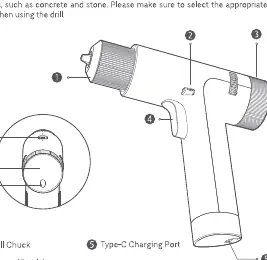
- Drill Chuck: Holds the drill/driver bits.
- Forward/Lock/Reverse Button: Controls rotation direction or locks the trigger.
- Torque/Speed Adjustment Knob: Located at the back, used to adjust settings.
- Trigger: Pressure-sensitive for speed control.
- Type-C Charging Port: Located at the base.
- Function Switch: Toggles between screwing and drilling modes.
- Display: Shows current mode and settings.
- Mode Button: Cycles through available modes.
How to Use
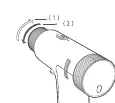
Installing Bits: Turn the drill chuck in the direction shown by arrow (1) to loosen. Insert the bit, then turn in the opposite direction (2) to tighten and secure the bit. Ensure the three jaws are clamping the bit.
Trigger: The trigger is pressure-sensitive; the more you press, the faster the drill rotates.
Forward/Lock/Reverse Button:
- Forward: Push to the far left. The icon will light up on the display.
- Reverse: Push to the far right. The icon will light up on the display.
- Lock: Move to the middle position.
Function Switch:
- Screwing: Push to the screw icon. Use for tightening and loosening screws.
- Drilling: Push to the drill bit icon. Use for drilling holes.
Modes and Display
Screwing Modes:
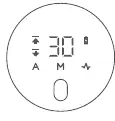
- Automatic mode (A): Automatically stops when resistance is met.
- Pulse mode: Intermittent rotation.
- Manual torque mode (M): 30 adjustable torque levels.
Drilling Modes:
- Full power mode (A): Maximum output.
- Pulse mode: Intermittent rotation.
- Manual speed mode (M): 30 adjustable speed levels.
Charging:
- Low battery: Battery indicator blinks red.
- Charging: Battery indicator breathes red.
- Fully charged: Battery indicator is white.
Note: The drill will not work while charging. Use the provided USB charging cable.
Tips for Beginners
- Manual Mode: Start at a lower torque/speed (level 1-5) and increase gradually if needed.
- Automatic Mode: Ideal for beginners as it stops automatically when the screw is tightened.
- Pulse Mode: Recommended for beginners to avoid slipping and damaging screws or surfaces.
- Safety: Always hold the drill firmly with both hands, especially when using high torque levels (16-30).
Troubleshooting
- Drill stops with E3/E9: Battery is too hot. Let the device cool down to room temperature.
- Drill stops with E1: Battery is depleted. Charge the battery.
- Unable to install bit: Bit size is incorrect. Use a bit <= 10mm.
- Drill won't start: Trigger is locked. Move the forward/lock/reverse button to the left or right.
- Unable to charge: Check if the USB cable is plugged in and using the correct cable.
Specifications
- Model: MJWSZNJYDZ001QW
- Max Torque: 30 N.m
- Battery: 2000 mAh Lithium-ion
- Charging Time: 120-180 min
- Drilling Speed: 0-1400 rpm
- Screwing Speed: 0-370 rpm
- Weight: Approx. 870 g
Manufacturer information
Xiaomi Corporation
Practical help
Common problems
Drill stops rotating with E3 or E9 displayed
The battery is too hot. Leave the device to cool down to room temperature.
Drill stops rotating with E1 displayed
The battery is depleted. Charge the battery.
Unable to install drill bit
The bit size is incorrect. Use a drill bit that is <= 10 mm in diameter.
Drill does not start after pressing the trigger
The trigger is locked. Push the forward/lock/reverse button to the left or right.
Unable to charge the battery
Check if the USB cable is plugged in and ensure you are using the charging cable that came with the drill.
Before use
- Ensure the battery is fully charged.
- Select the correct drill bit (Metal bits are black; Wood bits are silver).
- Check that the forward/lock/reverse button is set to the desired direction (not in the middle lock position).
- Select the appropriate mode (Screwing or Drilling) using the function switch.
- Hold the drill firmly with both hands during operation.
Specs in practice
- Battery Capacity
- 2000 mAh - Total energy storage of the built-in battery.
- Charging Time
- 120-180 minutes to reach full charge.
- Unloaded Rotational Speed
- 0-1400 rpm (drilling) / 0-370 rpm (screwing) - The speed of the chuck without load.
Images and diagrams
- 1: Drill Chuck
- 2: Forward/Lock/Reverse Button
- 3: Torque/Speed Adjustment Knob
- 5: Type-C Charging Port
- 6: Function Switch
Model compatibility
- Only use the genuine battery charger (model: MDY-11-EN) to charge.
- Metal drill bits (black) are only suitable for drilling holes in metal.
- Wood drill bits (silver) are only suitable for drilling holes in plastic and wood.

Manual page author
Michael Turner
Technical manual editor
Reviews PDF manuals for structure, safety notes, and practical product details so readers can find the right information quickly.