Power / USB Chargers
User Manual for Mi 20W Wireless Charging Stand
Quick guide for the Mi 20W Wireless Charging Stand. Learn how to set up, use, and troubleshoot your wireless charger, including adapter requirements and safety precautions.
Quick answers from the manual
Quick answer
- The Mi 20W Wireless Charging Stand is a universal wireless charger. Connect it to a power source using the included USB-C cable and a compatible adapter, then place your Qi-compatible device in the center of the stand. p. 2
Key actions
- Connect the stand to a power supply using the included cable. p. 2
- Place your device in the center of the stand. p. 2
First start
- Connect to power; the LED will blink green three times. p. 2
Problems and fixes
LED blinking green
Remove metal objects from the stand.
p. 3Technical specifications
| Parameter | Value | Meaning | Pages |
|---|---|---|---|
| Input | 5V/2A, 9V/1.6A, 12-16V/1.7A Max. | Power input requirements. | p. 4 |
| Output | 20W Max. | Maximum wireless charging power. | p. 4 |
Where to find it in the PDF
- Product Overview and Instructions p. 2
- Precautions p. 3
- Specifications p. 4
Table of contents
Manual images
Click an image to enlargeQuick guide from the manual
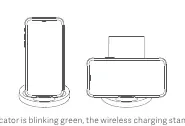
The Mi 20W Wireless Charging Stand is a universal wireless charger that supports both horizontal and vertical device placement. To use it, connect the stand to a power source using the included USB-C cable and a compatible power adapter. Place your Qi-compatible device in the center of the stand to begin charging.
Product Overview
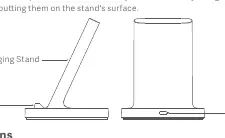
The charging stand features a USB-C port on the back for power input and an LED indicator on the front base to show the charging status.
Setup and Usage
- Connect the charging stand to a power supply using the included genuine charger and USB cable.
- Once connected, the LED indicator will blink green three times.
- Place your Qi-compatible device in the center of the stand.
- The LED indicator will remain green when the stand is in its normal state.
- If the device does not start charging immediately, adjust its position until the charging icon appears on your device screen.
Adapter Requirements
To achieve optimal charging speeds, use a compatible power adapter:
- 5V/1A adapters: Not supported.
- 5V/2A adapters: Support 5W wireless charging.
- QC2.0/QC3.0 (18W and above) adapters: Support 10W wireless charging.
- QC3.0 Class B (27W and above) adapters: Support 20W wireless fast charging (requires a phone that supports 20W fast charging).
Troubleshooting
If the LED indicator is blinking green, the stand has encountered an error and protective measures are active:
- Check for any metal objects on the charging surface and remove them.
- Ensure your device is properly centered.
- If the problem persists, contact the after-sales service department.
Safety Precautions
- Ensure protective cases are non-metallic and 4mm or less in thickness.
- Do not expose the stand to pressure, impact, fire, or water.
- Keep the stand away from extreme heat, humidity, or corrosive environments.
- Do not place magnetic cards (ID or bank cards) near the stand.
- Maintain a distance of at least 20cm between the stand and implanted medical devices (e.g., pacemakers).
- Avoid using the stand on surfaces with poor heat dissipation, such as bed sheets or mouse pads.
Specifications
- Model: WPC02ZM
- Input Port: USB-C
- Input: 5V/2A, 9V/1.6A, 12-16V/1.7A Max.
- Output: 20W Max.
- Transmission Distance: Up to 4mm
- Operating Frequency: 116-148 kHz
- Operating Temperature: 0°C to 35°C
Manufacturer information
Xiaomi Corporation
Practical help
Common problems
LED indicator is blinking green
An error has occurred. Check for metal objects on the charging stand and remove them.
Device does not start charging
Adjust the device's position on the stand until the charging icon appears.
Before use
- Use the included genuine charger and USB cable.
- Ensure the power adapter meets the minimum requirements (5V/2A).
- Ensure the device is Qi-compatible.
- Remove any metal objects from the charging surface.
- Ensure the protective case is non-metallic and under 4mm thick.
Specs in practice
- Transmission Distance
- The maximum distance between the charger and the device is 4mm.
Images and diagrams
- The stand has a USB-C port on the back for power input.
- The LED indicator is located on the front base of the stand.
Model compatibility
- Requires a Qi-compatible device.
- 20W fast charging requires a phone that supports 20W fast charging and a QC3.0 Class B adapter (27W+).

Manual page author
David Miller
Documentation analyst
Organizes user manual content into clear summaries, with attention to model details, product context, and everyday usability.