Power / Power Banks
User Manual for Mi LED Smart Bulb (White and Color) MJDP02YL
Quick guide for the Mi LED Smart Bulb (White and Color) MJDP02YL. Learn how to install, connect to the Mi Home app, integrate with smart assistants, and perform a factory reset.
Quick answers from the manual
Quick answer
- The Mi LED Smart Bulb (White and Color) is a Wi-Fi enabled smart light controlled via the Mi Home / Xiaomi Home app. It is installed by screwing it into an E27 socket. p. 2
Key actions
- Install the bulb p. 2
- Connect to App p. 3
- Factory Reset p. 4
Problems and fixes
Bulb not connecting
Ensure 2.4 GHz Wi-Fi is used; 5 GHz is not supported.
p. 4Maintenance and reset
- Toggle the light switch on and off five times (on for two seconds, off for two seconds). p. 4
Technical specifications
| Parameter | Value | Meaning | Pages |
|---|---|---|---|
| Model | MJDP02YL | Product model number | p. 2 |
| Base | E27 | Socket type | p. 2 |
| Power | 10 W | Rated power consumption | p. 2 |
| Brightness | 800 lumens | Luminous flux | p. 2 |
Where to find it in the PDF
- Specifications and Installation p. 2
- App Connection and Smart Home p. 3
- Factory Reset and Features p. 4
Table of contents
Manual images
Click an image to enlargeQuick Guide
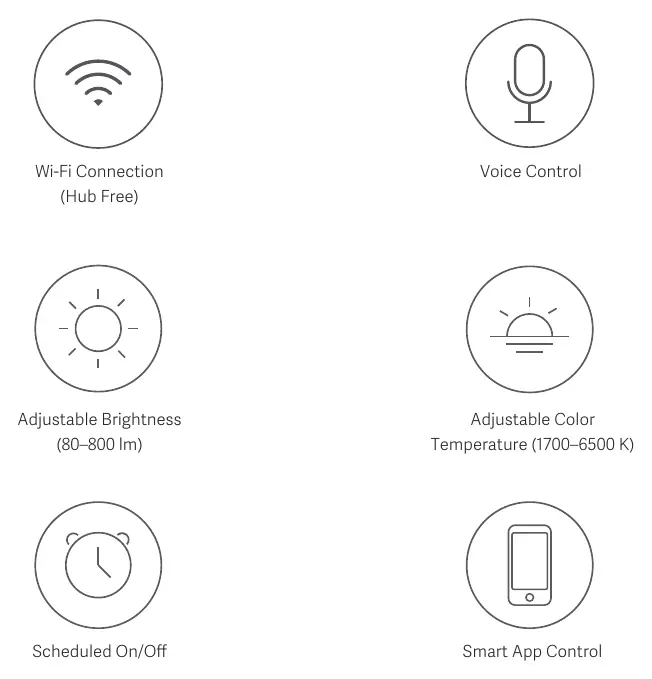
The Mi LED Smart Bulb (White and Color) is a smart lighting solution that connects to your home Wi-Fi network. It allows for remote control, scheduling, and integration with smart home ecosystems like Google Assistant, Amazon Alexa, and Apple HomeKit. Key operations include installing the bulb, connecting it to the Mi Home / Xiaomi Home app, and performing a factory reset if connection issues occur.
Installation
Important: Always ensure the power is turned off before installing, removing, or examining the light bulb to prevent electric shock.
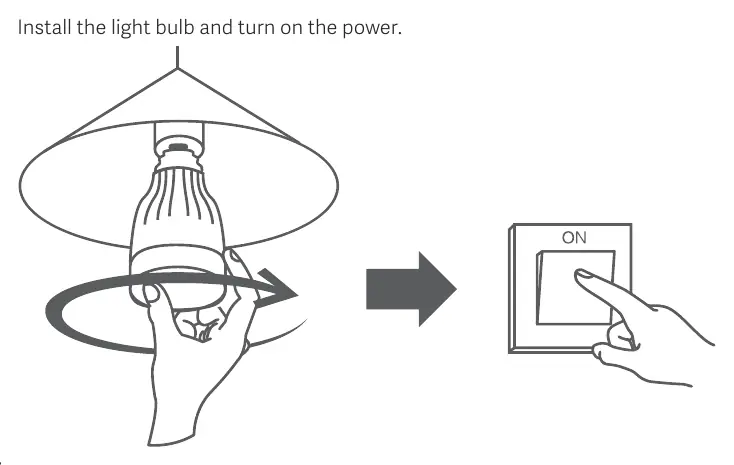
- Ensure the lamp fixture is compatible with an E27 base.
- Screw the light bulb into the socket.
- Turn on the power.
Installation Notes: Do not use this product in a damp environment. Avoid using the bulb in narrow or ill-ventilated lamp shades, as this may cause weak Wi-Fi signals or heat dissipation issues. Do not use with physical dimmer switches.
App Connection
This product requires the Mi Home / Xiaomi Home app for full functionality.
- Download and install the Mi Home / Xiaomi Home app from your app store.
- Open the app and tap the '+' icon in the upper right corner.
- Follow the on-screen prompts to add your device.
Note: The app name may vary by region (e.g., Xiaomi Home in Europe). Ensure your smartphone is connected to a 2.4 GHz Wi-Fi network, as 5 GHz networks are not supported.
Smart Home Integration
Google Assistant: Add the Mi Home / Xiaomi Home service in the Google Assistant app, link your Xiaomi account, and follow the instructions to add the device.
Amazon Alexa: Add the Mi Home / Xiaomi Home skill in the Amazon Alexa app, enable the skill, sign in with your Xiaomi account, and tap DISCOVER DEVICES.
Apple HomeKit: Connect the bulb to the Mi Home / Xiaomi Home app first, then follow the instructions within the app to complete the HomeKit setup.
Factory Reset
If you need to reset the bulb to factory settings:
- Use the physical light switch to turn the bulb on and off five times.
- Keep the bulb on for two seconds and off for two seconds during each cycle.
- The bulb will display a circling multi-colored effect, then reset itself and display a white light after five seconds.
Warnings
- Do not disassemble the product.
- The bulb will heat up during operation; ensure sufficient ventilation.
- For indoor use only.
- Do not use with dimmer switches.
- The light source consists of non-changeable LEDs.
Specifications
- Model: MJDP02YL
- Base: E27
- Rated Power: 10 W
- Luminous Flux: 800 lumens
- Color Temperature: 1700 K - 6500 K
- Connectivity: Wi-Fi IEEE 802.11 b/g/n 2.4 GHz
- Operating Temperature: -10°C to 40°C
- Dimensions: 55 x 120 mm
Manufacturer information
Xiaomi Corporation
Practical help
Common problems
Bulb not connecting to Wi-Fi
Ensure your router is broadcasting a 2.4 GHz network. This device does not support 5 GHz networks.
Bulb flickering or damaged
Do not use the bulb with a physical dimmer switch. Remove the dimmer or use a standard switch.
Weak signal or overheating
Avoid installing the bulb in narrow, enclosed, or ill-ventilated lamp shades.
Before use
- Ensure the power is turned off at the switch.
- Verify the lamp socket is E27 type.
- Download the Mi Home / Xiaomi Home app.
- Ensure your Wi-Fi network is 2.4 GHz.
Specs in practice
- 1700 K - 6500 K
- Adjustable color temperature range from warm yellow to cool daylight.
Images and diagrams
- Installation: Turn off power, screw in bulb, turn on power.
- Factory Reset: Toggle the light switch on and off 5 times (2 seconds each).
Model compatibility
- Requires 2.4 GHz Wi-Fi network.
- Not compatible with physical dimmer switches.
- Compatible with Google Assistant, Amazon Alexa, and Apple HomeKit.

Manual page author
Michael Turner
Technical manual editor
Reviews PDF manuals for structure, safety notes, and practical product details so readers can find the right information quickly.