Electronics / Remote Controls
User Manual for 1MORE iBFree Sport Bluetooth Headphones
Get started with your 1MORE iBFree Sport Bluetooth Headphones (E1018BT). This guide covers pairing, charging, in-line controls, and troubleshooting steps.
Quick answers from the manual
Quick answer
- To pair the headphones, ensure they are on, then press and hold the 'Play' button for 3 seconds until the red and blue lights flash alternately. p. 1
Key actions
- Power On p. 1
- Power Off p. 1
- Reset Pairing History p. 1
First start
- The pairing mode starts automatically the first time it was turned on. p. 1
Problems and fixes
Headphones do not connect
Clear pairing history by holding Vol+ and Vol- for 5 seconds, then restart the device.
p. 1Maintenance and reset
- Clear pairing history by holding Vol+ and Vol- for 5 seconds. p. 1
Technical specifications
| Parameter | Value | Meaning | Pages |
|---|---|---|---|
| Charging time | approx. 2 hours | Time required for a complete charge. | p. 1 |
| Quick charge | 15 minutes | Provides 1 hour of music playback. | p. 1 |
Where to find it in the PDF
- Instruction Manual p. 1
Table of contents
Manual images
Click an image to enlargeQuick Start Guide
This guide provides essential instructions for operating your 1MORE iBFree Sport Bluetooth Headphones. Before first use, it is recommended to fully charge the battery.
Power and Charging
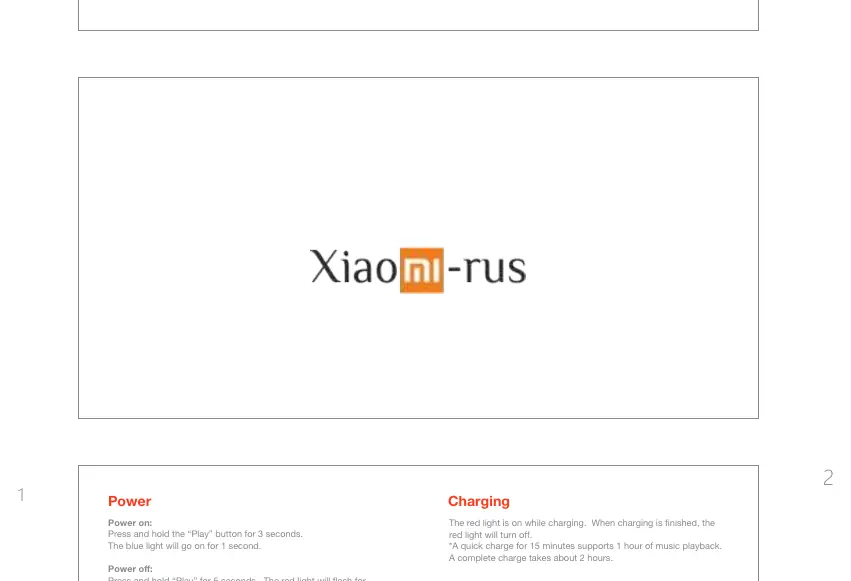
- Power On: Press and hold the Play button for 3 seconds. The blue light will turn on for 1 second.
- Power Off: Press and hold the Play button for 5 seconds. The red light will flash for 1 second.
- Charging: Connect the charging cable. The red light indicates charging is in progress. The light will turn off when charging is complete. A full charge takes approximately 2 hours. A 15-minute quick charge provides 1 hour of playback.
Bluetooth Pairing
The headphones automatically enter pairing mode the first time they are turned on (red and blue lights will flash alternately). To manually enter pairing mode at any time, press and hold the Play button for 3 seconds while the headphones are on.
In-line Controls
The in-line remote allows you to manage phone calls and music playback:
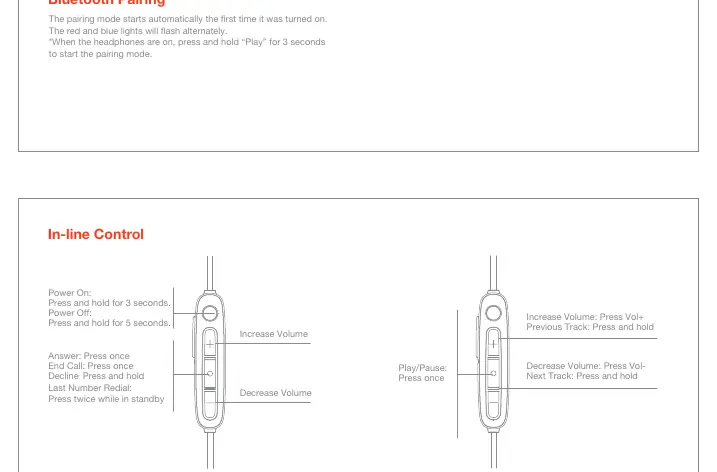
- Phone Controls: Press the Play button once to answer or end a call. Press and hold to decline a call. Press twice while in standby to redial the last number.
- Music Controls: Press the Play button once to play or pause music. Press the Vol+ button to increase volume; press and hold Vol+ to skip to the previous track. Press the Vol- button to decrease volume; press and hold Vol- to skip to the next track.
Extra Functions
- Security Pairing: If your phone uses Bluetooth version prior to 3.0, use the default security code 0000.
- Unpairing: Press and hold both Vol+ and Vol- buttons for 5 seconds to switch the headphones to automatic discovery mode.
- Battery/Volume Display: Currently supported on iOS devices only.
Troubleshooting
- Headphones won't turn on: Ensure the battery is charged. Charge for at least 30 minutes.
- Connection issues: Ensure the headphones are in discoverable mode (red and blue lights flashing). Ensure they are not connected to another device. Clear pairing history by holding Vol+ and Vol- for 5 seconds.
- No sound on Android: After pairing, go to your device's Bluetooth menu, tap the icon next to the headphones name, and ensure the Media Audio option is enabled.
- Low volume: Adjust volume controls on both the headphones and the connected device independently.
Manufacturer information
Xiaomi Corporation
Practical help
Common problems
Headphones will not turn on
Charge the headphones for at least 30 minutes.
Headphones do not connect or take a long time to connect
Clear pairing history by holding Vol+ and Vol- buttons simultaneously for 5 seconds, then restart the device.
Connected to Android but no music plays
Check Bluetooth settings for the device and ensure 'Media Audio' is enabled.
Low volume even when set to maximum on headphones
Adjust the volume on both the connected device and the headphones separately.
Before use
- Fully charge the battery before first use.
- Ensure Bluetooth is enabled on your source device.
- Keep the headphones within range of the device and away from strong interference sources like Wi-Fi.
Specs in practice
- Red light on
- Charging in progress.
- Red light off
- Charging finished.
- Red and blue lights flash alternately
- Pairing mode active.
- Security code 0000
- Required for pairing with Bluetooth devices older than version 3.0.
Images and diagrams
- The in-line control diagram illustrates the specific buttons for volume adjustment, track skipping, and phone call management.
- The power and charging section indicates the LED light behavior for different states.
Model compatibility
- Battery/Volume display is currently supported on iOS only.
- Some in-line remote functions may vary depending on the operating system or third-party music/video apps.

Manual page author
Emily Carter
User documentation editor
Prepares concise manual descriptions and highlights the most useful setup, operation, and maintenance information for readers.