Mobile / Smartphones
User Manual for Xiaomi Redmi A3 Smartphone
Quick start guide and safety manual for the Xiaomi Redmi A3 smartphone. Includes setup instructions, charging guidelines, safety precautions, and regulatory information.
PDF source: español · summary: English
Quick answers from the manual
Quick answer
- The Redmi A3 is a smartphone. To turn it on, long-press the Power button. Use the provided charger for power. For FM radio, connect headphones to act as an antenna. p. 1, 5
Key actions
- Charging the device p. 5
- Using FM Radio p. 5
First start
- Powering on p. 2
Show 4 more answers Show less
Problems and fixes
Battery issues
Do not replace the battery yourself; contact an authorized repair center.
p. 2Maintenance and reset
- Software updates p. 3
Technical specifications
| Parameter | Value | Meaning | Pages |
|---|---|---|---|
| Power Input | 100-240V~, 50/60Hz, 0.35A | Charger input requirements | p. 5 |
| Power Output | 5V 2A | Charger output | p. 5 |
Where to find it in the PDF
- Quick Start Guide p. 1
- Safety Information p. 2, 3
Table of contents
Quick Start Guide
To turn on your Redmi A3, press and hold the Power button. Follow the on-screen instructions to complete the initial setup of your device.
Device Layout
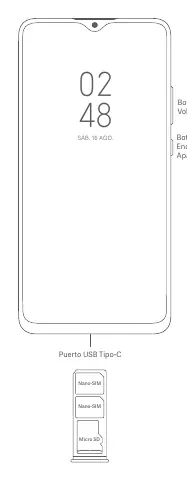
The device features a Power button and Volume buttons on the side. The USB Type-C port is located at the bottom. The SIM tray supports two Nano-SIM cards and a Micro SD card.
Charging Instructions
Use only the provided charger and cable to charge your device. Connect the USB cable to the phone and the charger, then plug the charger into a power outlet (100-240V~). Disconnect the charger once the battery is fully charged. Do not charge the device for more than 12 hours.
Safety Information
- Operating Temperature: The device operates within 0°C to 40°C. Using it outside this range may damage the device.
- Battery Safety: Do not attempt to replace the battery yourself. Do not disassemble, hit, crush, or burn the battery.
- Medical Interference: Maintain a minimum distance of 15 cm from pacemakers. Do not use the phone in hospital operating rooms or near medical equipment.
- General Safety: Keep the device dry. Do not use the phone in explosive environments, such as gas stations.
FM Radio
To use the FM Radio, go to Start > Tools > FM Radio. Headphones must be connected to the device as they function as the antenna.
Regulatory Information
This device complies with SAR limits for general population/uncontrolled exposure. The device is restricted to indoor use only when operating in the 5250–5350 MHz frequency range in specific EU countries.
Manufacturer information
Xiaomi Corporation
Practical help
Common problems
Device does not turn on
Ensure the battery is charged using the provided charger and cable. If the issue persists, contact authorized support.
Interference with medical devices
Maintain a minimum distance of 15 cm between the phone and pacemakers. Use the phone on the ear opposite the pacemaker.
SIM card not recognized or tray damaged
Do not insert non-standard SIM cards into the tray. Ensure the card is properly seated.
Before use
- Charge the device using the included cable and adapter.
- Insert Nano-SIM cards correctly into the tray.
- Read all safety warnings regarding battery and temperature.
- Ensure the power outlet is easily accessible for the charger.
Show more Show less
Specs in practice
- Operating Temperature
- 0°C to 40°C; usage outside this range may damage the device.
- Charging Input
- 100-240V~, 50/60Hz, 0.35A.
- Charging Output
- 5V 2A.
- SAR Limit (10g)
- 2.0 W/kg (Head/Trunk).
Images and diagrams
- The Power button and Volume buttons are located on the right side of the device.
- The USB Type-C port is located at the bottom center.
- The SIM tray is designed to hold two Nano-SIM cards and one Micro SD card.
Model compatibility
- Use only authorized accessories compatible with the device.
- Do not connect incompatible devices.
- Wi-Fi connectivity may vary based on regional availability.

Manual page author
David Miller
Documentation analyst