Mobile / Smartphones
User Guide for Xiaomi Redmi Note 13 5G Smartphone
Quick start guide and safety manual for the Xiaomi Redmi Note 13 5G smartphone. Includes instructions for SIM card installation, device setup, safety precautions, and regulatory information.
Table of contents
Manual images
Click an image to enlargeQuick Guide
This guide provides essential information for setting up and safely using your Redmi Note 13 5G smartphone. For detailed user manuals and updates, visit the official Xiaomi website.
Getting Started
To turn on your device, long press the power button. Follow the on-screen instructions to configure your phone for the first time.
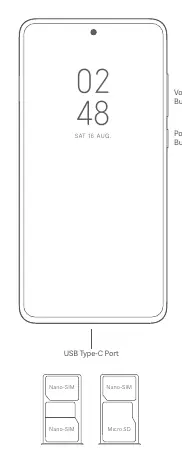
SIM Card Installation
The device supports Nano-SIM cards. Please ensure you use standard SIM cards to avoid damaging the SIM card slot. The tray layout allows for Nano-SIM and Micro SD card configurations.
Safety Precautions
- Operating Temperature: Use the device within the range of 0°C to 40°C.
- Battery Safety: Do not attempt to replace the battery yourself. Only use authorized accessories, cables, and power adapters. Do not charge the device for more than 12 hours.
- Handling: Keep the device dry. Do not disassemble, hit, crush, or burn the battery.
- Usage Restrictions: Do not use the phone in explosive atmospheres, near medical equipment (maintain at least 15 cm distance from pacemakers), or while driving.
- Hearing Protection: Avoid listening at high volume levels for long periods to prevent hearing damage.
Regulatory Information
This device complies with EU regulations and SAR (Specific Absorption Rate) limits. The highest SAR value is 0.943 W/kg. The device is restricted to indoor use only when operating in the 5250 to 5350 MHz frequency range in EU member states.
Technical Specifications
The device supports various frequency bands including GSM, WCDMA, LTE, and 5G NR. Wi-Fi and Bluetooth connectivity are included. 5G connection availability depends on the carrier and local environment.
Manufacturer information
Xiaomi Corporation
Practical help
Common problems
Device will not turn on
Ensure the battery is charged using the included adapter. Long press the power button to initiate startup.
SIM card not recognized
Ensure you are using a standard Nano-SIM card and that it is inserted correctly into the tray.
Device overheating or battery issues
Stop using the device immediately if the battery appears deformed or damaged. Do not attempt to repair it yourself; contact an authorized repair center.
Before use
- Charge the device using the included cable and power adapter.
- Insert the Nano-SIM card into the SIM tray.
- Follow the on-screen setup instructions.
- Review the safety information regarding operating temperatures and battery handling.
Show more Show less
Specs in practice
- Operating Temperature
- 0°C to 40°C; using the device outside this range may cause damage.
- Charging Limit
- Do not charge the device for more than 12 hours.
Images and diagrams
- The side of the device features volume buttons and a power button.
- The bottom of the device contains the USB Type-C port.
- The SIM tray supports Nano-SIM and Micro SD cards.
Model compatibility
- 5G connection depends on country, carrier, and user environment.
- Restricted to indoor use only in the 5250 to 5350 MHz frequency range in EU countries.

Manual page author
David Miller
Documentation analyst