Mobile / Smartphones
User Manual for Xiaomi Redmi Note 14S Smartphone
Quick start guide and safety information for the Xiaomi Redmi Note 14S smartphone. Learn how to set up your device, charge it safely, perform a factory reset, and understand regulatory compliance.
Table of contents
Manual images
Click an image to enlargeQuick guide from the manual
This guide provides essential safety information and basic setup instructions for your Xiaomi Redmi Note 14S. For detailed device configuration, follow the on-screen instructions upon powering on the device.
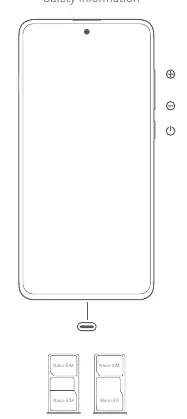
Device Setup
To turn on your device, press and hold the power button. Ensure you insert your SIM card correctly into the SIM card slot. Do not use non-standard SIM cards as they may damage the slot.
Safety Precautions
General Safety: Observe all laws restricting mobile phone use in specific environments. Do not use your phone in explosive atmospheres, such as petrol stations, fuel storage areas, or areas with chemical particles in the air. Turn off your device in blasting areas or where instructed.
Medical Devices: Maintain a minimum distance of 15 cm between your phone and pacemakers to avoid interference. Do not use the phone near hearing aids, cochlear implants, or other medical equipment without consulting your doctor.
Environment: Do not use the phone in high-humidity areas like bathrooms to prevent electric shock or fire. Avoid using the phone outdoors during thunderstorms.
Charging
Use the included USB cable and a compatible charger. The device supports chargers with a maximum output of 50W. For optimal charging speed, use a charger that delivers between 10W and 50W. Always disconnect the charger after use. Do not charge the device for more than 12 hours.

Factory Reset
To erase local data, go to Settings > About phone > Factory reset. This will remove accounts, contacts, photos, videos, apps, backups, and SD card data.
E-label
To access certification information, go to Settings > About phone > Certification, or type "Certification" in the search bar.
Regulatory Information
This device complies with SAR limits for general population exposure. When carrying the device, use a non-metallic holster or clip to maintain a minimum distance of 5 mm from the body (or 1.5 cm for FCC compliance). The device is restricted to indoor use only when operating in the 5250 to 5350 MHz frequency range in EU member states.
Manufacturer information
Xiaomi Corporation
Practical help
Common problems
Device not charging
Ensure you are using a compatible charger (up to 50W) and the included USB cable. Check that the power outlet is working.
Interference with medical devices
Maintain a minimum distance of 15 cm from pacemakers and avoid using the phone near hearing aids or cochlear implants.
Before use
- Ensure the SIM card is inserted correctly (Nano-SIM).
- Charge the device using the included USB cable.
- Read all safety precautions regarding explosive environments.
- Check for software updates in Settings.
Specs in practice
- SAR Limit (10g)
- Specific Absorption Rate limit for head and trunk (2.0 W/kg).
- Charging Power
- Supports fast charging up to 50W via USB PD.
Images and diagrams
- The device layout shows the power button and volume buttons on the side.
- The SIM tray layout supports Nano-SIM and Micro SD cards.
Model compatibility
- Use only chargers compliant with USB 2.0 or higher and IEC 60950/62368-1 standards.

Manual page author
David Miller
Documentation analyst
Organizes user manual content into clear summaries, with attention to model details, product context, and everyday usability.