Electronics / Security Cameras
User Manual for Mi Home Security Camera 1080p (Magnetic Mount)
Quick start guide and user manual for the Mi Home Security Camera 1080p (Magnetic Mount). Learn how to install, set up, reset, and troubleshoot your device.
Table of contents
Manual images
Click an image to enlargeQuick guide from the manual
This guide provides essential information for setting up and using your Mi Home Security Camera 1080p (Magnetic Mount). Ensure you have a stable 2.4GHz Wi-Fi connection and a 5V/1A power adapter before starting. The camera is designed for indoor use and can be mounted on flat surfaces or attached to metallic surfaces using the magnetic base.
Product Overview
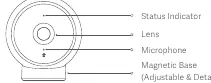
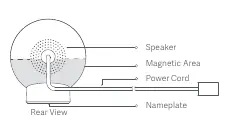
The camera features a status indicator, lens, microphone, and an adjustable/detachable magnetic base on the front. The rear includes a speaker, power cord, and a MicroSD card slot (accessible after detaching the magnetic base) along with a reset button.
Installation
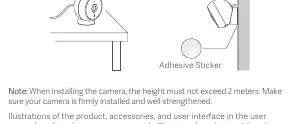
The camera can be placed on flat surfaces like desks, dining tables, or TV cabinets. It can also be attached to metallic surfaces or non-metallic surfaces using the included adhesive sticker. Note: When installing, the height must not exceed 2 meters. Ensure the camera is firmly installed.
Installing a MicroSD card
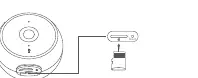
Ensure the camera is unplugged before installing or removing a MicroSD card. Open the waterproof cover of the MicroSD card slot and insert a card (up to 32 GB, U1/Class 10 or higher) with the contact side facing up. The camera can function without a card, but video saving, playback, and time-lapse functions will be unavailable.
How to Use
Connect the power cord and adapter. The camera will turn on automatically. When successfully powered on, the indicator light will turn yellow, and you will hear a voice notification.
Connect with Mi Home/Xiaomi Home App
Download the Mi Home/Xiaomi Home app. Open the app, tap the '+' icon in the upper right corner, and follow the prompts to add your device. Ensure your network connection is stable. The indicator light will change from yellow to blue once the connection is successful.
Resetting the camera
Use a pin or similar tool to press and hold the reset button. Once you hear a voice notification, the camera has been successfully reset. Note: Resetting the camera does not delete data on the MicroSD card.
Precautions
- Operating temperature range: -20°C to 50°C.
- IP65 waterproof rating: Do not expose to extremely humid environments.
- Avoid placing the lens facing or near reflective surfaces (glass, white walls) to prevent overexposure or white images.
- Install in an area with a strong Wi-Fi signal, away from microwave ovens.
Manufacturer information
Xiaomi Corporation
Practical help
Common problems
Camera not connecting to the app
Ensure the Wi-Fi signal is strong and stable. Check that the indicator light is blinking yellow, indicating it is ready for connection.
Image appears too bright or white
Avoid placing the camera lens facing or near reflective surfaces like glass or white walls.
MicroSD card not saving videos
Ensure the card is a qualified brand, has a capacity up to 32GB, and is at least U1/Class 10 speed class.
Before use
- Check package contents: Camera, magnetic base, power cord, adhesive sticker.
- Ensure you have a certified 5V/1A power adapter.
- Download the Mi Home/Xiaomi Home app.
- Ensure a stable 2.4GHz Wi-Fi network is available.
- Verify the installation height does not exceed 2 meters.
Specs in practice
- Viewing Angle
- 170° wide-angle lens for broader coverage.
- Operating Temperature
- -20°C to 50°C, suitable for various indoor environments.
Images and diagrams
- Front View: Identifies the status indicator, lens, microphone, and magnetic base.
- Rear View: Shows the speaker, power cord, and the location of the MicroSD card slot and reset button.
Model compatibility
- Compatible with Android 4.4 & iOS 9.0 or above.
- Requires 2.4GHz Wi-Fi IEEE 802.11b/g/n connection.

Manual page author
Michael Turner
Technical manual editor
Reviews PDF manuals for structure, safety notes, and practical product details so readers can find the right information quickly.