Electronics / Security Cameras
User Manual for Mi Home Security Camera 360° 1080P
Quick guide for the Mi Home Security Camera 360° 1080P. Learn how to install, mount, set up the app, insert a MicroSD card, and troubleshoot indicator lights.
Table of contents
Quick guide from the manual
The Mi Home Security Camera 360° 1080P is designed for indoor use. To get started, download the Mi Home app, power on the device, and follow the in-app prompts. The camera can be placed on horizontal surfaces or mounted on a wall. For recording, insert a compatible MicroSD card (up to 64GB) while the device is powered off. Ensure the camera is placed in an area with strong Wi-Fi signal and away from reflective surfaces to maintain image quality.
Product Overview
The camera features a 360-degree view and includes the following components:
- Front View: Lens, Status Indicator, MIC, and MicroSD slot (accessible by pushing the lens upward).
- Rear View: Loudspeaker, Reset Button, and Micro-USB charging port.
Installation
The camera can be placed on a desk or mounted on a wall. When wall mounting:
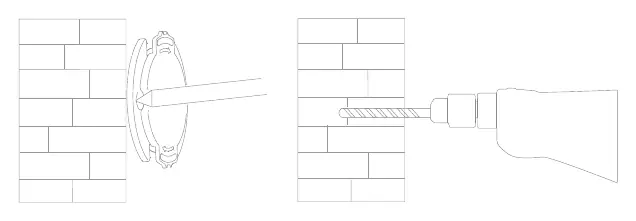
- Use the base of the camera as a template to mark two holes on the wall.
- Drill the holes (approx. 0.24 inches diameter, 0.98 inches depth).
- Insert plastic anchors into the holes.
- Position the base unit with the arrow pointing up and secure it with screws.
- Match the grooves on the bottom of the camera unit with the raised area on the base, press down, and turn to lock.
Note: The wall must be able to support at least triple the product's total weight.
Turning on and Indicator Lights
The device activates automatically when the power cable is connected. If the camera position is incorrect, adjust it via the app; do not rotate the head by force.
Indicator Light Status:
- Steady blue: Connected/Normal status.
- Flashing blue: Network error.
- Flashing orange rapidly: Waiting for connection.
- Flashing orange slowly: System upgrade in progress.
MicroSD Card Installation
To install a MicroSD card:
- Disconnect the power supply.
- Adjust the camera lens upward to reveal the slot.
- Insert the MicroSD card with contact points facing down.
Requirements: Use a genuine card, 64 GB or less, with a reading/writing speed of U1/Class 10 or higher.
Quick Setup
Control your device via the Mi Home app:
- Scan the QR code or download the Mi Home app from the app store.
- Open the app, tap the "+" icon in the upper right corner, and follow the prompts to add the device.
Features
- Automatic Monitoring: Configurable via the app (24-hour, daytime, or nighttime). Detects movement and sends notifications.
- Playback: Requires an installed MicroSD card. Videos are recorded automatically. Use the timeline in the app to select time periods.
- Night Vision: Uses eight infrared illuminators for visibility up to 29.5 feet in the dark.
- Shared Remote Viewing: Share access with friends via the General Settings menu in the app.
Precautions
- Operating Temperature: -14 °F to 122 °F.
- Environment: Do not install in high humidity or allow water to enter.
- Reflective Surfaces: Avoid placing near glass or white walls to prevent overexposed or white images.
- Signal: Keep away from metal structures and microwave ovens.
Specifications
- Model: MJSXJ02CM
- Resolution: 1080P
- Power Input: 5 V 2 A
- Wireless Connectivity: Wi-Fi IEEE 802.11 b/g/n 2.4 GHz
- Expandable Memory: MicroSD card (up to 64 GB)
- Compatibility: Android 4.4, iOS 9.0 or later
Manufacturer information
Xiaomi Corporation
Practical help
Common problems
Indicator light flashing blue
This indicates a network error.
Indicator light flashing orange rapidly
The device is waiting for a connection.
Indicator light flashing orange slowly
The device is performing a system upgrade.
Camera position is incorrect
Adjust the position through the app. Do not attempt to rotate the camera head by force.
Before use
- Ensure the wall can support at least triple the product's total weight.
- Check that the Wi-Fi signal is strong at the installation location.
- Power off the camera before inserting or removing the MicroSD card.
- Use a genuine MicroSD card (64GB or less, U1/Class 10 speed).
- Ensure the camera is not placed near reflective surfaces like glass or white walls.
Specs in practice
- Operating Temperature
- -14 °F to 122 °F
- Wireless Connectivity
- Wi-Fi IEEE 802.11 b/g/n 2.4 GHz
Images and diagrams
- Front View: Shows the lens, status indicator, microphone, and hidden MicroSD slot.
- Rear View: Shows the loudspeaker, reset button, and Micro-USB charging port.
- Wall Mounting: Illustrates using the base as a template to drill holes and secure the unit.
Model compatibility
- Requires Mi Home app.
- Compatible with Android 4.4 and iOS 9.0 or later.
- MicroSD card must be 64GB or less.

Manual page author
Emily Carter
User documentation editor
Prepares concise manual descriptions and highlights the most useful setup, operation, and maintenance information for readers.