Electronics / Security Cameras
YI Outdoor Camera 1080p User Guide
A comprehensive user guide for the YI Outdoor Camera 1080p (H30). Includes setup instructions, app pairing, mounting procedures, placement tips, and technical specifications.
Table of contents
Quick guide from the manual
The YI Outdoor Camera 1080p is designed for outdoor security. Before mounting, it is essential to pair the camera with the YI app while near your router. Ensure your Wi-Fi signal is strong at the installation location and avoid placing the camera in backlight environments or behind barriers.
What is in the box
- YI Outdoor Camera
- Base
- Adapter
- Screwdriver
- Wall anchors (10)
- Mounting screws (10)
- Clips (8)
Product Overview
The camera features a universal sphere mount allowing for 0-360 degree rotation and 0-65 degree tilt. The device includes a built-in microphone and speaker. The TF card slot and reset port are located on the camera body.
Setup and Pairing
- Download the YI App by scanning the QR code or searching in your app store.
- Register for a YI account or log in if you already have one.
- Power on the camera and wait for the prompt voice "waiting to connect".
- In the app, select the device and follow the on-screen instructions.
- Input your Wi-Fi SSID and password.
- Use the camera lens to scan the QR code displayed on your phone screen.
- Once you hear "pairing is successful", the camera is ready to use.
Installation
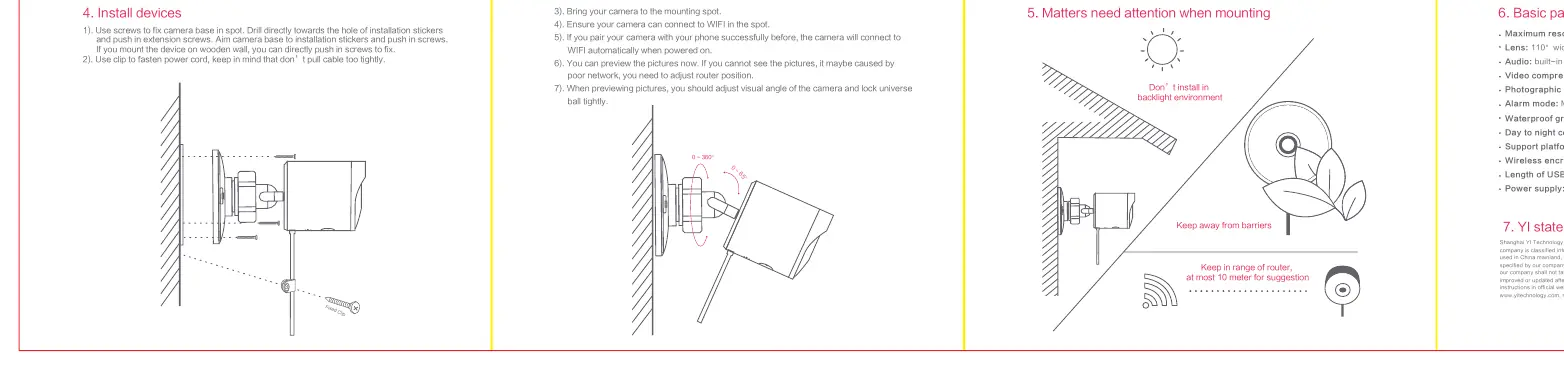
- Plan the cable route from the power outlet to the camera location before mounting.
- Use the provided installation stickers to mark the drill holes.
- Drill holes and insert the wall anchors.
- Fix the camera base to the wall using the provided screws.
- Attach the camera to the base and adjust the visual angle, then lock the universal sphere tightly.
- Use the provided clips to fasten the power cord along the wall, ensuring it is not pulled too tightly.
Placement Tips
- Backlight: Do not install in a backlight environment.
- Wi-Fi Range: Keep the camera within 10 meters of the router for optimal performance.
- Obstructions: Keep the camera away from physical barriers that may block the signal.
Specifications
- Resolution: 1920x1080
- Lens: 110 degree wide angle
- Waterproof Grade: IP65
- Video Compression: H.264 High Profile
- Power Supply: DC5V 1A
- Compatibility: Android 4.1 or later / iOS 8.0 or later
- Wireless Encryption: WEP/WPA/WPA2
Important Notes
Products are classified into China mainland and international versions. Ensure you are using the correct version for your region. For support, visit the official website at www.yitechnology.com or contact [email protected].
Official resources from the manual
Manufacturer information
Xiaomi Corporation
Practical help
Common problems
Cannot see pictures in the app
This may be caused by a poor network connection. Try adjusting the router position or moving the camera closer to the router.
Pairing fails
Ensure the camera says "waiting to connect" and the yellow light is blinking. Verify the Wi-Fi password and ensure the camera lens successfully scans the QR code on your phone.
Before use
- Download the YI App
- Create or log in to a YI account
- Pair the camera with your phone before mounting
- Plan the cable route from the power outlet to the camera
- Check Wi-Fi signal strength at the intended mounting spot
Specs in practice
- 110° Wide Angle
- The field of view of the camera lens.
Images and diagrams
- The universal sphere allows for 0-360 degree rotation and 0-65 degree tilt adjustment.
- The TF card/Reset port is located on the camera body.
Model compatibility
- Requires Android 4.1+ or iOS 8.0+.
- Regional restriction: China mainland version is limited to use in China; international version is required for overseas use.

Manual page author
David Miller
Documentation analyst
Organizes user manual content into clear summaries, with attention to model details, product context, and everyday usability.