Music / Guitar Effects
Xvive P58 Guitar Wireless System User Guide
Quick start guide for the Xvive P58 Guitar Wireless System, covering setup, pairing, charging, tuner operation, and troubleshooting.
Table of contents
Manual images
Click an image to enlargeQuick guide from the manual
The Xvive P58 is a 5.8 GHz wireless system designed for guitars, basses, and other musical instruments. It features a built-in chromatic tuner, 6 selectable channels, and low latency. Ensure the transmitter is kept at least 1 cm away from your body during operation.
Device components
The system consists of a transmitter (A58) and a receiver/tuner. The transmitter features a 6.35 mm TS plug, power switch, channel/mode button, and LED indicators for power, channel, and active/passive mode. The receiver includes a 6.35 mm instrument input, 6.35 mm output, tuner display, channel/scan button, and a USB-C port for charging the transmitter.
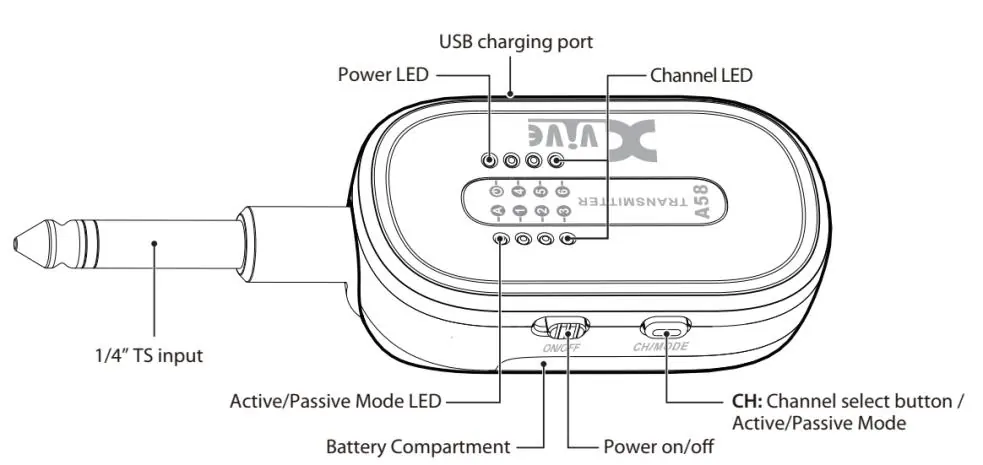
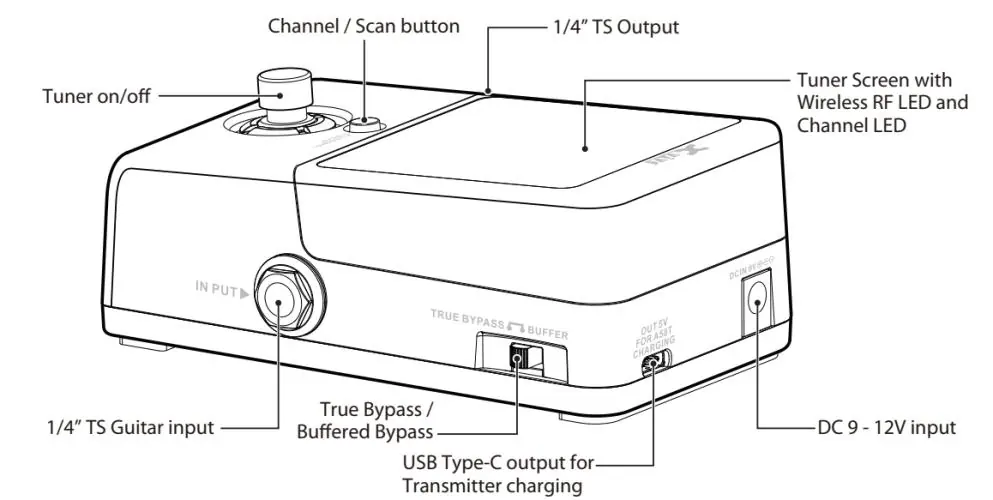
Quick start and pairing
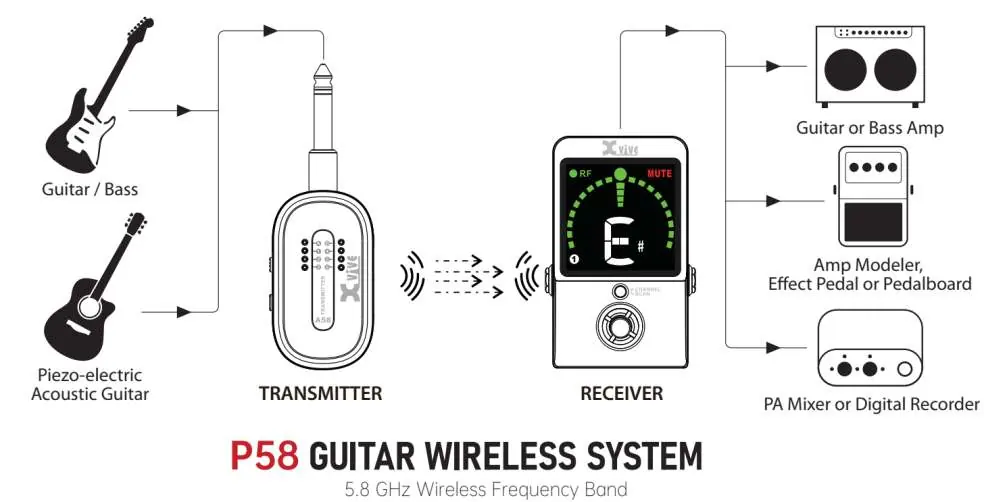
- Plug the transmitter into your instrument's output.
- Connect the receiver output to your amplifier, pedalboard, or audio interface using a 6.35 mm instrument cable.
- Ensure both units are set to the same channel using the channel selection buttons.
- The green RF LED on the receiver will light up steadily when the connection is successful.
Tuner and buffer settings
Activate the tuner by pressing the footswitch on the receiver; this will mute the output signal. The receiver also features a switch to toggle between True Bypass and Buffered Bypass, which is useful when using long cables or multiple pedals.
Charging and power
The receiver requires a 9-12 V DC power supply (minimum 200 mA). The transmitter can be charged via the USB-C port on the receiver (requires a 12 V/400 mA or 9 V/500 mA power supply for the receiver) or via a standard 5 V/2 A USB power source. Always turn off the transmitter while charging to preserve battery life.

Troubleshooting
- No sound: Check connections, power switches, instrument volume, and ensure both units are on the same channel.
- Distorted signal: Switch the transmitter to Active Mode if your instrument has high output.
- Weak signal: Ensure the transmitter is in Passive Mode if using a passive instrument.
- Unstable signal: Perform a channel scan by holding the channel button on the receiver for 3 seconds.
Practical help
Common problems
No sound
Check that both units are powered on, correctly connected, and set to the same channel. Ensure the instrument volume is turned up.
Distorted audio
If your instrument has high output, switch the transmitter to Active Mode.
Weak signal
If using a passive instrument, ensure the transmitter is set to Passive Mode.
Unstable signal (blinking RF LED)
Keep the receiver at least 3 meters away from Wi-Fi routers. Perform a channel scan by holding the receiver's channel button for 3 seconds.
Before use
- Ensure the transmitter is charged.
- Verify that the receiver is connected to a 9-12 V DC power supply.
- Check that both transmitter and receiver are set to the same channel.
- Ensure the transmitter is set to the correct mode (Active/Passive) for your instrument.
- Keep the transmitter at least 1 cm away from your body.
Specs in practice
- 5.8 GHz Band
- Provides a less congested frequency range compared to 2.4 GHz, reducing interference.
- True Bypass / Buffered
- True Bypass provides a clean signal path; Buffered is recommended for long cable runs or complex pedal setups.
Images and diagrams
- The transmitter connects directly to the instrument output.
- The receiver connects to amplifiers or pedalboards via a standard 6.35 mm instrument cable.
- The receiver can charge the transmitter via a USB-C cable when the receiver is powered by a 9-12 V supply.
Model compatibility
- Compatible with both active and passive pickups.
- Up to six P58 systems can be used simultaneously in the same area.

Manual page author
Emily Carter
User documentation editor
Prepares concise manual descriptions and highlights the most useful setup, operation, and maintenance information for readers.