Music / Instruments
Xvive Echoman V21 Analog Delay Pedal User Manual
Quick guide for the Xvive Echoman V21 Analog Delay pedal. Learn how to connect, adjust delay, modulation, and chorus/vibrato settings for your guitar.
Table of contents
Quick Start Guide
To begin using the Xvive Echoman V21, connect a 9V DC center-negative power supply to the power-in jack. Connect your guitar or instrument to the input jack and your amplifier to the output jack. If the power polarity is incorrect, the pedal will not function but will not be damaged.
Controls, Inputs and Outputs
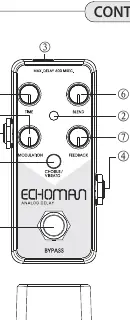
- TRUE BYPASS Footswitch: Toggles the pedal effects on and off.
- ON/OFF LED: Illuminates when the pedal is active. Blue indicates Chorus modulation, Red indicates Vibrato.
- DC IN Power Jack: Requires a 9-volt DC-regulated AC power supply with a minimum of 80 mA current (barrel positive, center negative).
- INPUT Jack: 1/4 inch mono audio jack for your instrument.
- OUTPUT Jack: 1/4 inch mono audio jack for your amplifier.
- BLEND Knob: Mixes the input level and delay level.
- FEEDBACK Knob: Adjusts the feedback of delay effects.
- TIME Knob: Adjusts the delay time (Max 600ms).
- MODULATION Knob: Adjusts the Chorus or Vibrato effect depth.
- CHORUS/VIBRATO Switch: Toggles between Chorus (blue) and Vibrato (red) modes.
Sound Settings
Chorus Effects
Set the TIME knob very short. Keep the BLEND knob below 12 o'clock to ensure the dry signal is audible. Keep the FEEDBACK knob below 12 o'clock to maintain control over the sound. Adjust the MODULATION knob to your preference.
Vibrato Effects
In this mode, only the delayed signal is modulated. Start with the MODULATION and FEEDBACK knobs around 1 o'clock, and the TIME and BLEND knobs around 10 o'clock. Adjust to taste.
Reverb Effects
Set the DELAY knob short and the MODULATION knob all the way down or low. Set the BLEND knob around 10 o'clock to start. Set the FEEDBACK knob around noon, and turn it higher (just before self-oscillation occurs) to achieve a bathtub reverb effect. This can be varied by adjusting the TIME and MODULATION settings.
Practical help
Common problems
Pedal does not turn on or produce sound
Verify that the power supply is 9V DC, center-negative, and provides at least 80mA. Check that the instrument is connected to the Input and the amplifier to the Output.
Sound is uncontrolled or oscillating
Reduce the FEEDBACK knob setting. If using Reverb settings, ensure the FEEDBACK is set just below the point of self-oscillation.
Before use
- Use a 9V DC-regulated power supply with minimum 80 mA current.
- Ensure the power plug is barrel positive and center negative.
- Connect instrument to the 1/4 inch mono Input jack.
- Connect amplifier to the 1/4 inch mono Output jack.
- Ensure the footswitch is toggled to the ON position (LED illuminated).
Specs in practice
- Max Delay Time
- 600ms
- Input Impedance
- 900K
- Power Requirement
- 9V DC, min 80mA, center negative
Images and diagrams
- The pedal features 10 numbered controls including a footswitch, LED indicator, power jack, input/output jacks, and knobs for Blend, Feedback, Time, Modulation, and mode selection.
Model compatibility
- Designed as a monaural version of the Memory Analog Delay.
- Compatible with standard 9V DC guitar pedal power supplies.

Manual page author
Emily Carter
User documentation editor
Prepares concise manual descriptions and highlights the most useful setup, operation, and maintenance information for readers.