Smart Home / Smart Locks
Yale YL 1020FHK Smart Lock
Quick guide for the Yale YL 1020FHK smart lock. Learn how to register fingerprints, set passwords, manage users, configure system settings, and troubleshoot common issues.
Table of contents
Manual images
Click an image to enlargeQuick guide from the manual
The Yale YL 1020FHK smart lock allows access via fingerprint, password, card, WeChat, or physical key. The factory default password is 123456. It is essential to register at least one administrator to secure the lock; once an administrator is added, the default password is automatically deleted. The system supports up to 250 users (9 administrators and 241 normal users). If the battery is depleted, use the USB emergency power supply port to unlock the door.
Smart lock diagram
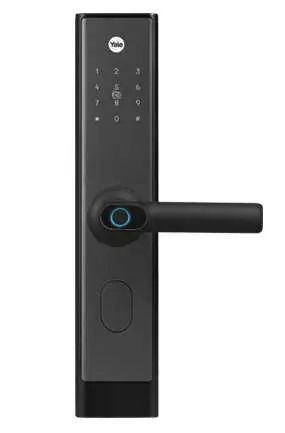
The lock features a keypad/card reader on the front panel, a fingerprint sensor integrated into the handle, a safety button, and a deadbolt. An emergency power supply port is located on the exterior for low-battery situations.
Management and operation
To enter the management menu, touch the screen, press the * key, and then the # key. Enter the administrator information to proceed. The system uses voice announcements for menu navigation. Press the # key to enter a sub-menu or replay the current menu, and the * key to return to the previous menu.
- Fingerprint user: Select the option to add or delete fingerprint users. Follow the voice prompts to enter the user number (001-003 for admins, 004-100 for normal users) and confirm with your fingerprint.
- Password user: Similar to fingerprint registration, enter the user number and set the password.
- Key card users: Follow the menu prompts to register or delete key cards.
System settings
Access the system settings menu to configure the following:
- Time setting: Set the date and time for the lock.
- Passage mode: Allows the lock to remain unlocked without verification.
- Unlock mode: Choose between single opening mode or dual-open mode (requires two users to unlock).
- Volume setting: Adjust voice volume (High, Middle, Low, Mute).
- System initialization: Perform a factory reset.
- Language: Toggle between Chinese and English.
Other features
- Anti-peeping password: You can enter random numbers before and after your actual password to prevent others from seeing your code. Ensure the correct password is included in the sequence and press # to confirm.
- Alarms: The lock features a low voltage alarm (below 4.5V), an input error alarm (locks for 3 minutes after 5 failed attempts), and an anti-pry alarm if the lock is forcibly removed.
- Exit: The system automatically exits if there is no operation for more than 10 seconds.
WeChat unlocking
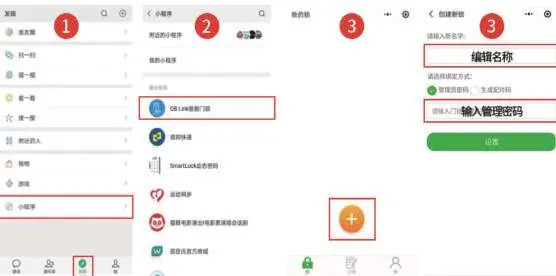
The lock supports WeChat integration. Scan the QR code to enter the WeChat mini-program, add the lock, and manage passwords or generate temporary access codes remotely.
Maintenance and management
Keep the lock surface clean using a soft, dry cloth. Avoid using water, alcohol, or acidic chemicals. If the door is deformed, the lock tongue may not extend properly; adjust the door strike plate if necessary. For low battery, use the USB emergency power supply to unlock, then replace the batteries immediately.
Technical parameters
- Opening methods: Fingerprint, Password, Card, WeChat, Key.
- Capacity: 250 groups (9 admins, 241 normal users).
- Password length: 6-9 digits.
- Working power: 4.5V - 6.5V.
- Working temperature: -25°C to 70°C.
- Working humidity: 20% - 93% RH.
Practical help
Common problems
System locked after 5 failed attempts
The system enters a 3-minute lockout period. Wait for 3 minutes or re-power the device to restore normal operation.
Low battery warning
When power is below 4.5V, the lock will prompt 'Insufficient battery'. Use the USB emergency power supply to unlock, then replace batteries.
Lock tongue does not extend or pop out
This is often caused by door deformation. Adjust the position of the door strike plate to reduce friction.
Cannot delete administrator
The currently logged-in administrator cannot delete their own number.
Before use
- Change the default factory password (123456) immediately.
- Register at least one administrator user.
- Set the current date and time in the system settings.
- Ensure batteries are installed correctly.
- Test the lock operation before closing the door.
Specs in practice
- Working Power
- 4.5V to 6.5V; ensure batteries are within this range.
- Password Length
- Supports 6 to 9 digits for security.
- Working Temp
- -25°C to 70°C; suitable for most indoor and outdoor environments.
Images and diagrams
- Keypad/Card Reader: Used for entering passwords and scanning access cards.
- Fingerprint Sensor: Located on the handle for convenient access.
- Emergency Power Supply: USB port located on the exterior for use when batteries are dead.
- Safety Button: Located on the indoor handle.
Model compatibility
- Supports Fingerprint, Password, Card, WeChat, and physical Key.
- Anti-peeping function allows adding random digits before/after the password.

Manual page author
Emily Carter
User documentation editor
Prepares concise manual descriptions and highlights the most useful setup, operation, and maintenance information for readers.