Home / Security
Immax NEO PRO Smart Door Lock 07815L
Quick guide for the Immax NEO PRO Smart Door Lock (07815L). Includes installation steps, app pairing, calibration, and maintenance instructions.
Table of contents
Quick guide from the manual
The Immax NEO PRO Smart Door Lock (07815L) is a Bluetooth-enabled smart lock. Before use, ensure you have 4x AA batteries (not included) and the Immax NEO PRO app installed on your smartphone. The device requires calibration after installation to function correctly. If the lock rotation direction is incorrect, it can be adjusted in the app settings.
Installation
The lock is suitable for almost all types of locks. Choose the installation method that matches your door type:
- Method A: Standard installation. Clean the surface, use the template for positioning, and secure the mounting plate.
- Method B: Alternative installation. Adjust based on door thickness and use the appropriate gasket.
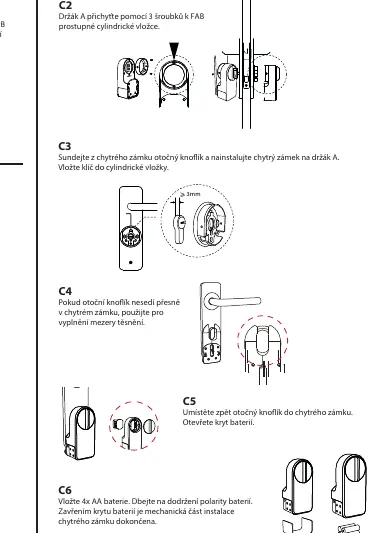
- Method C: Cylinder lock installation. Attach the holder to the cylinder insert and mount the lock.
Always ensure the batteries are inserted with the correct polarity. If the rotary knob does not fit perfectly, use the provided gaskets or clamps to fill the gap.
App Setup and Pairing
- Download the Immax NEO PRO app from the App Store or Google Play and register an account.
- Ensure Bluetooth is enabled on your mobile phone.
- Put the lock into pairing mode by pressing the SET button for at least 5 seconds.
- In the app, tap the "+" icon, select "Add Device," and wait for the lock to be detected. If not found, select it from the "Other Products (BLE)" list.
- To add to a smart gateway, select the gateway in the app, click "Add Device," and choose "Associate Bluetooth Device."
Calibration and Usage
Calibration is mandatory before the first use. In the device tab within the app, go to Settings and select Calibration. Ensure the device is properly installed on the door lock before starting. You can lock/unlock the door via the app, the rotary knob, or the keypad accessory.
Maintenance and Safety
- Cleaning: Wipe with a soft cloth. Do not use solvents, aggressive cleaners, or coarse materials.
- Batteries: If you hear a beep, the battery is low and needs replacement. Always replace all batteries at once. Do not use rechargeable batteries.
- Safety: Keep out of reach of children due to small parts. Do not disassemble the product. Installation should be performed by a person with appropriate electrical certification.
Manufacturer information
Immax
Practical help
Common problems
Rotation is opposite to the door lock direction
Go to settings in the app and set the rotation direction to 'unlock counterclockwise'.
Device beeping
The battery is low; replace all 4 AA batteries.
App does not find the device
Ensure Bluetooth is enabled on your phone and press the SET button for 5 seconds to enter pairing mode.
Lock is too high
Use the provided reducers on the mounting plate before attaching the smart lock.
Before use
- Check door thickness and select the appropriate gasket.
- Ensure 4x AA batteries are available (not included).
- Install the Immax NEO PRO app.
- Ensure Bluetooth is enabled on your smartphone.
- Perform calibration in the app settings before first use.
Specs in practice
- Battery life
- Up to 300 days, depending on usage frequency.
Images and diagrams
- A1-A5: Standard installation steps using the template.
- B1-B5: Installation steps for specific door types requiring thickness adjustment.
- C1-C6: Installation steps for cylinder locks.
Model compatibility
- Suitable for almost all types of locks.
- Requires Immax NEO PRO app for full functionality.
- Compatible with smart gateways supporting BLE devices.

Manual page author
Michael Turner
Technical manual editor
Reviews PDF manuals for structure, safety notes, and practical product details so readers can find the right information quickly.