Home / Door Hardware
Lockwood 001Touch Plus Smart Deadlatch User Manual
Quick start guide and user manual for the Lockwood 001Touch Plus Smart Deadlatch. Learn how to set master codes, manage user PINs and key tags, configure app connectivity, and troubleshoot security features.
Quick answers from the manual
Quick answer
- This manual provides instructions for installing, configuring, and operating the Lockwood 001Touch Plus Smart Deadlatch, including setting master/user codes, connecting to the Yale Home App, and troubleshooting. p. 1, 2
Key actions
- Set or change the Master Code p. 7
- Connect to the Yale Home App p. 8, 9
- Add a User Code p. 10
- Add a Key Tag p. 13
First start
- Change the Master Code p. 7
- Connect to Yale Home App p. 8
Problems and fixes
Incorrect PIN Lockout
Present a valid Key Tag or unlock via the App.
p. 19
Discharged Batteries
Place a 9V battery onto the emergency power supply terminal on the front body.
p. 20Error codes
| Code | Meaning | Action | Pages |
|---|---|---|---|
| 3 (flashing) | Incorrect PIN entered 5 consecutive times, resulting in a 3-minute lockout. | Present valid Key Tag or unlock via the App. | p. 19 |
Maintenance and reset
- Resetting the Lock to factory defaults p. 21
Technical specifications
| Parameter | Value | Meaning | Pages |
|---|---|---|---|
| Front Body Dimensions | 64mm(W) x 153mm(H) x 51mm(D) | Physical size of the front unit. | p. 22 |
| Back Body Dimensions | 68mm(W) x 120mm(H) x 21mm(D) | Physical size of the back unit. | p. 22 |
| Battery | 4EA 1.5V AA alkaline batteries | Power source requirements. | p. 22 |
Where to find it in the PDF
- Introduction and Safety p. 3, 4
- Getting Started and Configuration p. 5, 6, 7, 8
- Security Features p. 18, 19, 20, 21
- Specifications p. 22
Table of contents
Manual images
Click an image to enlargeQuick guide from the manual
The Lockwood 001Touch Plus Smart Deadlatch is a digital lock that can be operated via PIN code or Key Tag. For enhanced functionality, including remote access and app control, the Yale Home Module must be installed. Important: You must change the default master code (123456) immediately during installation for security reasons. If the lock is tampered with or the wrong PIN is entered 5 times, a 3-minute lockout or alarm will trigger.
Getting to know your lock
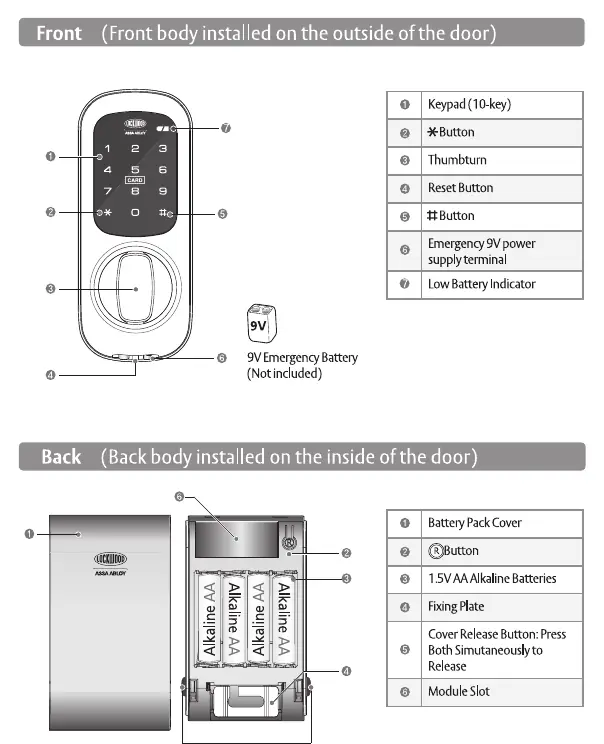
The lock consists of a front body (outside) and a back body (inside). The front body features a touchscreen keypad, an emergency 9V power terminal, and a low battery indicator. The back body houses the battery pack, the reset button, and the slot for the optional Yale Home Module.
Opening the lock
To open the door, touch the keypad with your palm to wake it up. Enter your valid user code followed by the * key, or present a registered Key Tag to the lock. Turn the thumbturn to retract the latch and open the door.
Master code setup
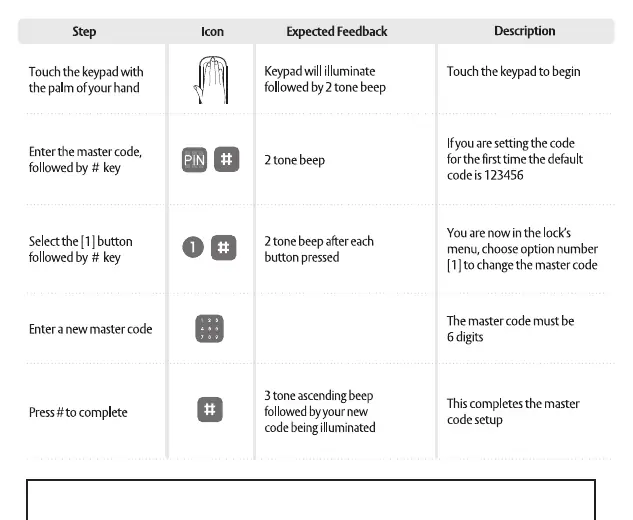
The master code is required to configure the lock, including adding or removing users. To set or change it: touch the keypad to wake it, enter the current master code followed by #, press 1 then #, enter a new 6-digit master code, and press # to complete.
Yale Home App integration
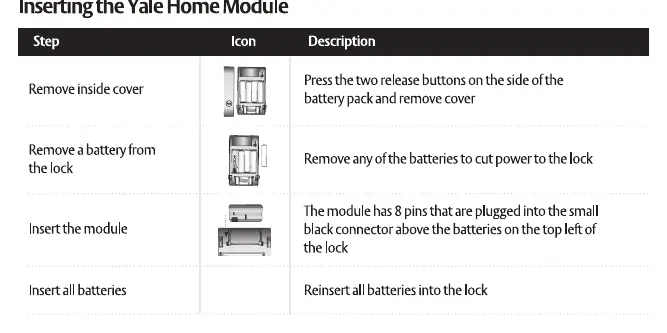
To use the Yale Home App, you must insert the Yale Home Module into the back body of the lock. Once installed, download the Yale Home App from the Google Play Store or Apple App Store. Note that registering the lock with the app enables 'App mode', which prevents credential registration via the keypad; it is highly recommended to manage all credentials through the app once connected.
Managing user codes and key tags
The lock supports up to 20 unique user codes (4-10 digits) and 20 Key Tags. To add a user code: wake the keypad, enter the master code followed by #, press 2 then #, press 1 then #, enter the slot number (1-20) followed by #, enter the new code, and press #. To add a Key Tag, use the same process but select option 0 then 1 in the menu, and present the tag when prompted.
Settings
You can customize several settings via the keypad menu:
- Auto Re-lock: Toggle between ON and OFF modes.
- Re-lock Time: Adjust the time the lock stays unlocked after opening (7-60 seconds).
- Volume: Choose between silent, quiet, or loud modes.
Security features
The lock includes an 80dB damage alarm if someone attempts to remove the lock from the door. If an incorrect PIN is entered 5 consecutive times, the lock will enter a 3-minute lockout period.
Emergency power and battery
The lock is powered by 4x 1.5V AA alkaline batteries. If the batteries fail, you can provide emergency power by placing a 9V battery onto the emergency power supply terminals on the front body. Do not use rechargeable batteries.
Resetting the lock
If you lose the master code, you can reset the lock to factory defaults. Remove the inside cover, remove one battery, press and hold the R button, re-insert the battery while holding the button, and wait for the lock to beep 12 times followed by a 3-tone ascending beep.
Practical help
Common problems
Incorrect PIN lockout
If the wrong PIN is entered 5 consecutive times, the lock will lockout for 3 minutes. Use a valid Key Tag or the App to unlock.
Low battery
Replace all 4 batteries when the low battery indicator illuminates or you receive a warning via the Yale Home App.
Forgotten master code
Perform a factory reset to restore the master code to the default '123456'.
Before use
- Ensure you have 4x 1.5V AA alkaline batteries.
- Change the default master code (123456) immediately during installation.
- If using the Yale Home App, purchase and install the Yale Home Module.
- Record user codes and key tags in the User Credential Log.
Specs in practice
- Operating Temperature
- -15°C to 55°C.
- Battery Life
- Approximately 1 year (based on 10 uses per day).
- Emergency Power
- 9V battery terminal on the front body.
Images and diagrams
- Front body: Keypad, emergency 9V terminal, low battery indicator.
- Back body: Battery pack, reset button, module slot.
Model compatibility
- Yale Connect Bridge is required for remote control and access.
- Yale Home App functionality requires the Yale Home Module.

Manual page author
David Miller
Documentation analyst
Organizes user manual content into clear summaries, with attention to model details, product context, and everyday usability.