Computers / Mobile Computers
Zebra Android 13 Release Notes
Comprehensive release notes and upgrade guide for Zebra Android 13 NGMS. Includes migration instructions, software packages, compatibility details, and resolved issues for various Zebra mobile computers.
Table of contents
Important Information for Android 13 Update
This document provides release notes for the Zebra Android 13 NGMS (Next Generation Mobile Services) update. It is critical to follow the migration guidelines to avoid data loss. Starting from Android 11, Delta Updates must be installed in sequential order (ascending oldest to newest). A Full Update can be used to jump to any available LifeGuard Update.
Migration and Data Protection
Upgrading from Android 11 or lower to Android 13 or 14 may cause a data reset due to Google-mandated encryption updates. To perform a migration without data loss, use the Zebra Conversion Package (ZCP). The correct ZCP OS must be selected based on the current source BSP on the device. Refer to the compatibility tables in the full document to identify the correct package for your device's current OS version.
Software Packages
The update includes several package types:
- Full package update: For complete system updates.
- Delta package: For updating from a specific previous release.
- Reset Packages: Includes EnterpriseReset (erases User Data Partition only) and FactoryReset (erases User Data and Enterprise Partitions).
Device Compatibility
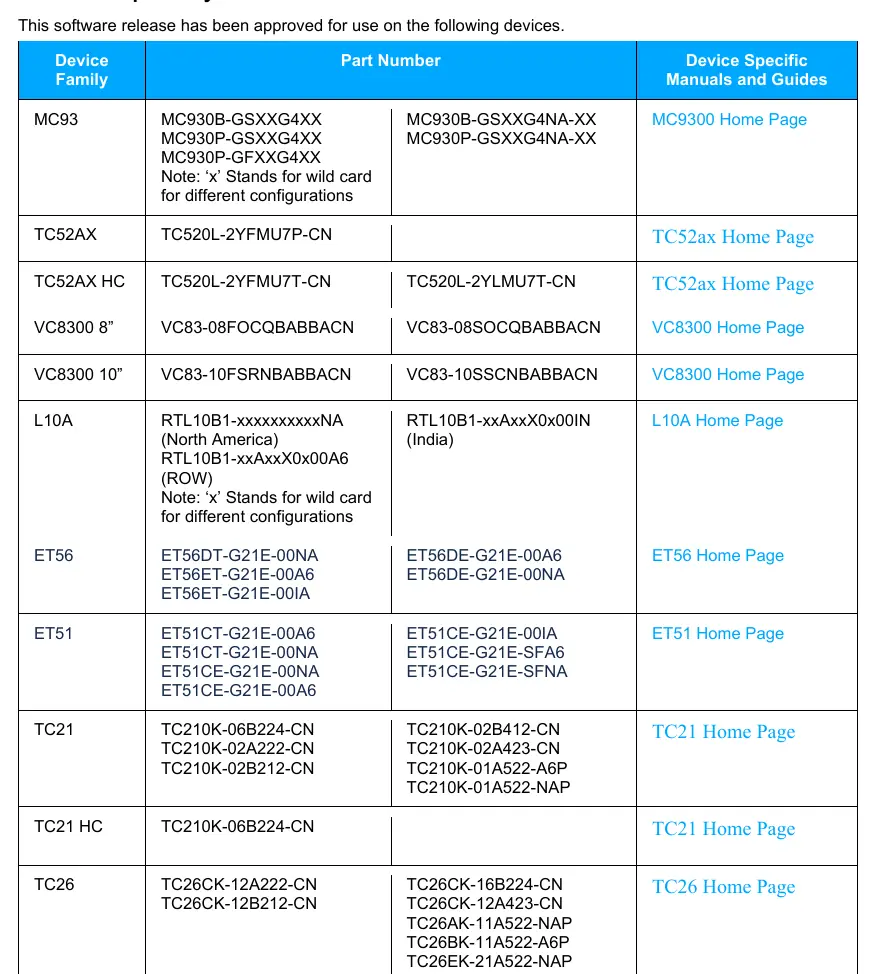
This release supports a wide range of Zebra mobile computers, including the MC9300, TC8300, VC8300, L10A, ET51, ET56, TC52AX, TC21, TC26, TC52, TC52x, TC57, TC72, TC77, and WT6300 families. Always verify your specific device part number against the compatibility list in the Addendum section of the manual before proceeding with any updates.
New Features and Enhancements
The Android 13 release introduces several enhancements across various management tools:
- MX 15.1 & 14.0: Includes new capabilities for Network Connection Manager, Access Manager, UI Manager, and Display Manager.
- DataWedge: Added support for USB SNAPI scanners, pre-defined vibration patterns, and new Point & Shoot features.
- WWAN: Improved support for preferred APN settings and carrier requirements.
- Battery Management: New features to improve battery life cycle and consumption measurement.
Resolved Issues
This release addresses numerous Software Problem Reports (SPRs), including fixes for Wi-Fi connectivity, scanner performance, audio quality during VoIP calls, and various system stability improvements. Please refer to the detailed list in the document for specific SPR numbers and their corresponding fixes.
Usage Notes
Note that the Setup Wizard Bypass feature has been discontinued on devices running Android 13 and later due to Google's privacy requirements. Additionally, specific hardware versions (such as new Power Amplifier devices) may have restrictions on which build versions can be installed.
Manufacturer information
Zebra Technologies
Practical help
Common problems
Data loss during OS upgrade
Use the Zebra Conversion Package (ZCP) for migration from Android 11 or lower to Android 13/14.
Setup Wizard bypass not working
This feature is discontinued on Android 13 and later due to Google privacy requirements.
Device reboots or freezes
Ensure the correct BSP version is installed and check for specific SPR fixes related to your device model.
Before use
- Verify device compatibility in the Addendum section.
- Identify the correct ZCP OS for your current source BSP.
- Back up all critical data before starting any OS update.
- Check if your device requires a specific LifeGuard update version.
- Ensure the device is charged or connected to power.
Model compatibility
- Supports a wide range of Zebra mobile computers including MC9300, TC series, and ET series.
- Specific hardware versions (e.g., new Power Amplifier SKY77652) have specific build restrictions.
- Downgrading to older OS versions may result in NFC functionality issues.

Manual page author
David Miller
Documentation analyst
Organizes user manual content into clear summaries, with attention to model details, product context, and everyday usability.