Computers / Mobile Computers
Zebra Android 14 Release Notes 14-28-03.00-UG-U42-STD-ATH-04
Comprehensive release notes and update guide for Zebra Android 14 (14-28-03.00-UG-U42-STD-ATH-04). Includes mandatory OS update instructions, security patches, new features, and device compatibility for TC53, TC58, TC73, TC78, TC22, HC20...
Table of contents
Quick Guide: Mandatory OS Update Requirements
This release requires specific update paths depending on your current OS version and device model. Failure to follow these steps may result in update failure.
- For TC53, TC58, TC73, TC78 (Updating from A11): Ensure the device has the A11 May 2023 LG BSP Image (11-21-27.00-RG-U00-STD) or a greater A11 BSP version installed before upgrading to this A14 release.
- For TC53, TC58, TC73, TC78, ET60, ET65 (Updating from A13): Ensure the device has the Android 13 September LifeGuard release (13-33-18) or higher installed.
- For EM45, EM45 RFID, TC22, TC27, HC20, HC50, HC25, HC55 (Updating from A13): It is mandatory to first install the March 2025 Android 13 LifeGuard release (13-39-18) or newer before proceeding with any updates to the Android 14 OS.
Overview
This document provides release notes for the Zebra Android 14 GMS release (14-28-03.00-UG-U42-STD-ATH-04). This build includes security updates compliant with the Android Security Bulletin of May 01, 2025, along with various feature enhancements and resolved issues.
Security Updates
This build includes LifeGuard Update 14-28-03.00-UG-U42, which provides security updates compliant with the Android Security Bulletin of May 01, 2025. Users are advised to check for mandatory prerequisite LifeGuard releases before applying this update.
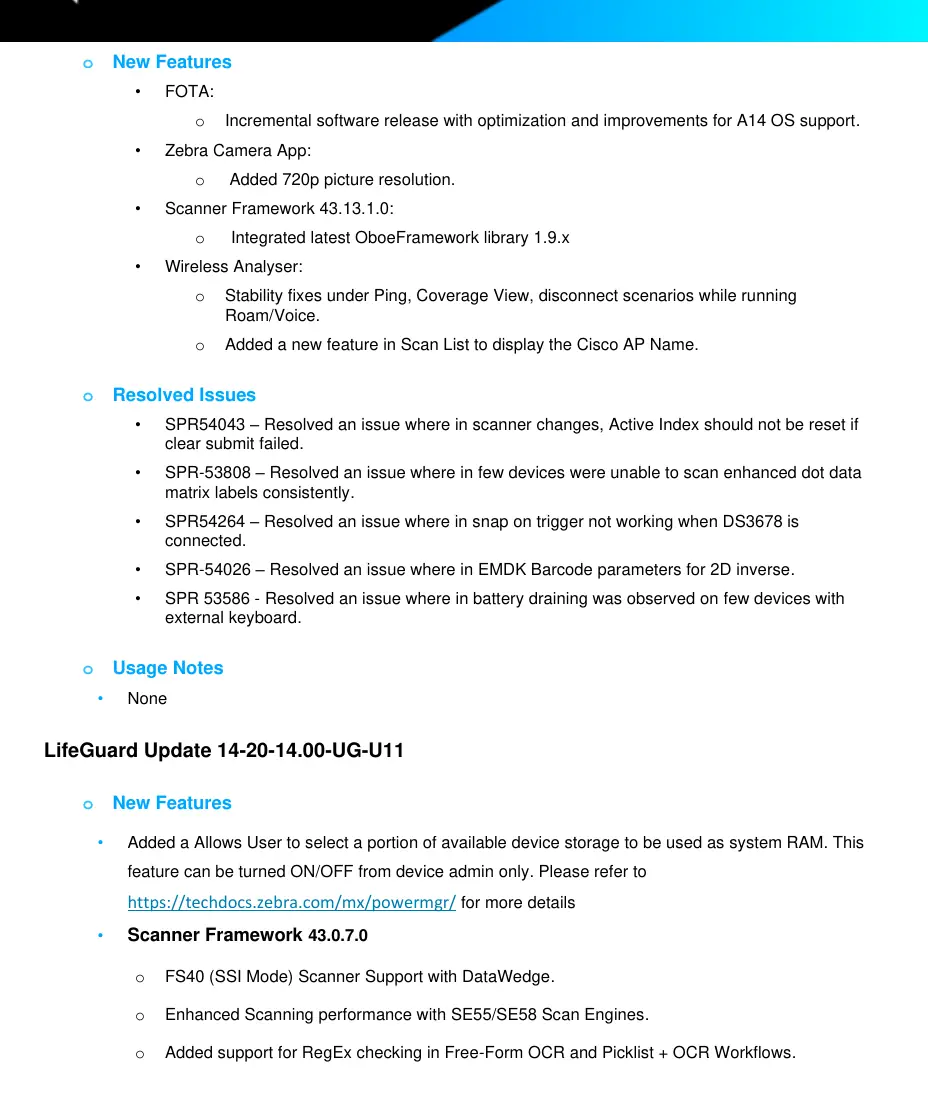
New Features
- Camera: Added support for a new 16MP rear camera module on supported devices.
- Scanner Framework: Integrated OboeFramework library 1.9.x and enhanced scanning performance.
- Wireless Analyzer: Includes a full-functional real-time WiFi analysis and troubleshooting tool.
- DataWedge: New Point & Shoot feature allows simultaneous capture of barcodes and OCR.
- System: Added ability to select a portion of device storage to be used as system RAM (requires device admin).
Resolved Issues
- Fixed issues related to scanner active index resetting.
- Resolved battery draining observed on devices with external keyboards.
- Fixed issues with camera preview when COPE mode is enabled.
- Resolved various issues with DataWedge, including barcode highlighting localization and document capture templates.
- Fixed random double decode issues on physical scan buttons for TC22/TC27 and HC20/HC50.
Known Constraints
- Battery Stats: Limitation of battery statistics in COPE mode.
- System Settings: Reduced settings with Accessibility allows users to access application permissions using Privacy Indicators.
Device Compatibility
This software release is approved for the following device families: TC53, TC58, TC73, TC73-5430, TC78, TC78-5430, TC22, HC20, HC50, TC27, HC25, HC55, EM45, EM45 RFID, ET60, ET65, and KC50.
Manufacturer information
Zebra Technologies
Practical help
Common problems
Device stuck in boot screen
Resolved in update (SPR-54771 / SPR-54518). Ensure the latest update is applied.
Setup Wizard Bypass not working
Discontinued on Android 13 and later due to mandatory privacy requirements from Google.
Battery draining with external keyboard
Resolved in update (SPR 53586).
Before use
- Verify current OS version (A11 or A13).
- Ensure device is on the list of supported models.
- For TC22, TC27, HC20, HC50, HC25, HC55, EM45: Install March 2025 Android 13 LifeGuard release (13-39-18) first.
- For TC53, TC58, TC73, TC78: Ensure A11 May 2023 LG BSP Image or A13 September LifeGuard release is installed.
- Download the appropriate update package (Full or Delta) from the Zebra portal.
Specs in practice
- Android Version
- 14
- Security Patch Level
- May 01, 2025
- Linux Kernel
- 5.4.281-qgki
Model compatibility
- Supported devices: TC53, TC58, TC73, TC78, TC22, HC20, HC50, TC27, HC25, HC55, EM45, ET60, ET65, KC50.

Manual page author
Michael Turner
Technical manual editor
Reviews PDF manuals for structure, safety notes, and practical product details so readers can find the right information quickly.