Computers / Mobile Computers
Zebra Wi-Fi 6E Best Practices Guide
A comprehensive guide for configuring Zebra mobile computers (TC53, TC58, TC73, TC78) for optimal performance on Wi-Fi 6E networks, including Aruba infrastructure settings, security, and channel management.
Table of contents
Manual images
Click an image to enlargeQuick Guide
This guide provides deployment best practices for the 6GHz radio band with co-located AP infrastructure and Zebra mobile computers (TC53, TC58, TC73, TC78). It covers recommended device settings, infrastructure configuration, security protocols, and regulatory information to ensure optimal performance in enterprise environments.
Device Settings
Zebra devices support various configurations for 6GHz deployment. Key recommendations include:
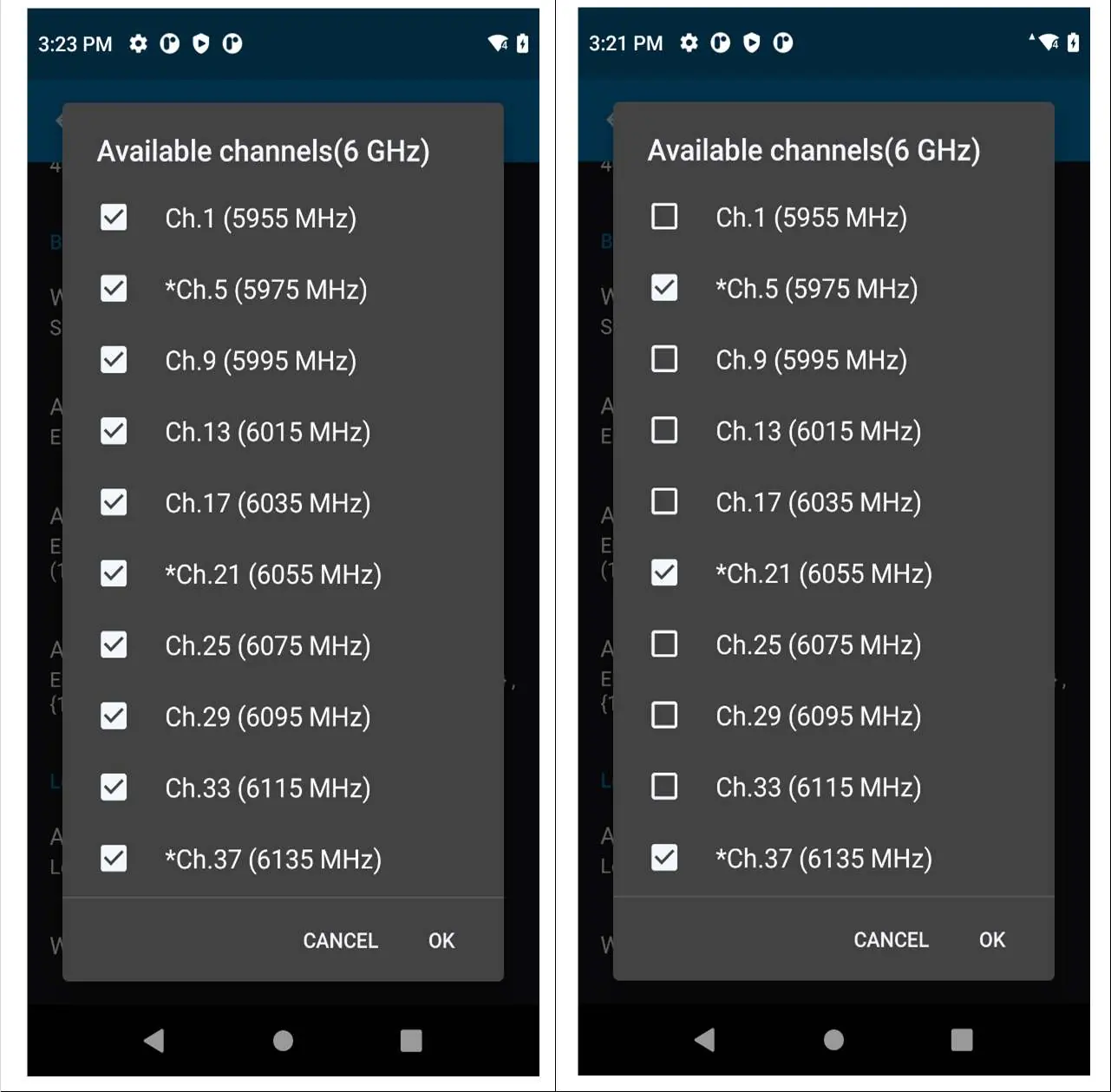
- Channel Mask: Use country-specific allowed PSC channels for 6GHz.
- Band Selection: Use Auto/all channels, or specifically 2.4GHz and 6GHz, or 5GHz and 6GHz.
- Power Save: TWT (Target Wake Time) is recommended for dense environments to optimize battery life.
- 802.11k/v/w: Keep these features enabled to improve roaming and network discovery.
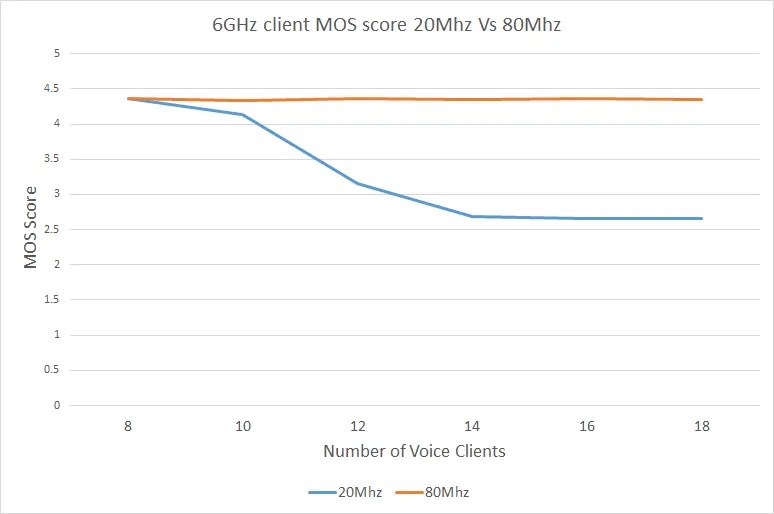
- Channel Width: 20/40/80/160MHz are supported, with 80MHz recommended for better user experience.
Infrastructure Recommendations
For co-located APs, the following settings are recommended:
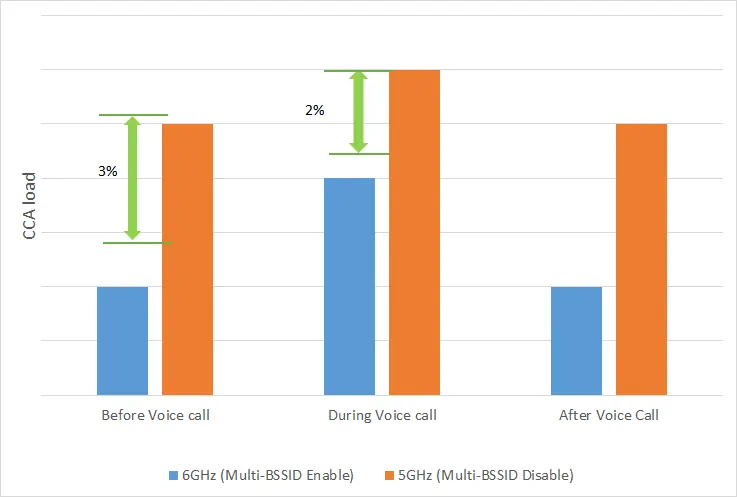
- Channel Width: 80MHz.
- TWT & Broadcast TWT: Enable.
- Multiple BSSID: Enable.
- Data Rates: For voice deployment, use 12 Mbps as the minimum bitrate.
Aruba-specific recommendations include enabling Regulatory Domain and QBSS IE.
Security Recommendations
6GHz networks enforce robust security and do not support legacy open or WPA2 combinations. Zebra clients support:
- WPA3 Enterprise: Requires PMF (Protected Management Frames). 192-bit mode is optional.
- WPA3 Personal: Uses SAE (Simultaneous Authentication of Equals) with PMF required.
- Enhanced Open: Based on OWE (Opportunistic Wireless Encryption) standard.
Channel and Regulatory Information
The 6GHz band covers 1200MHz (5.925GHz to 7.125GHz). Key points:
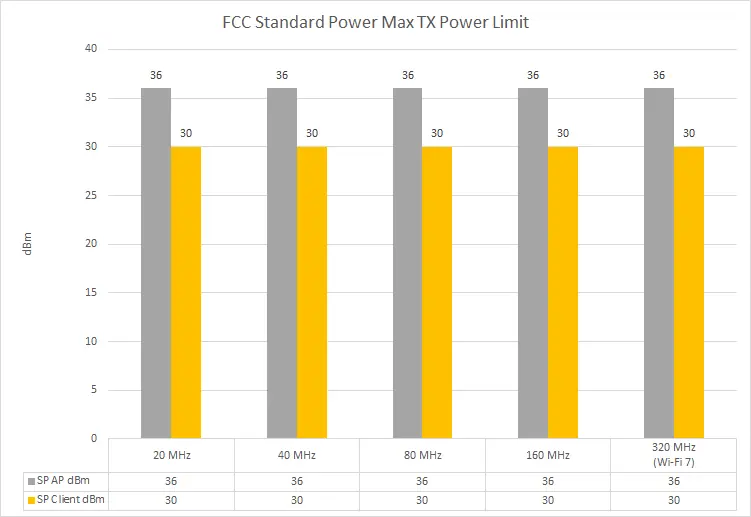
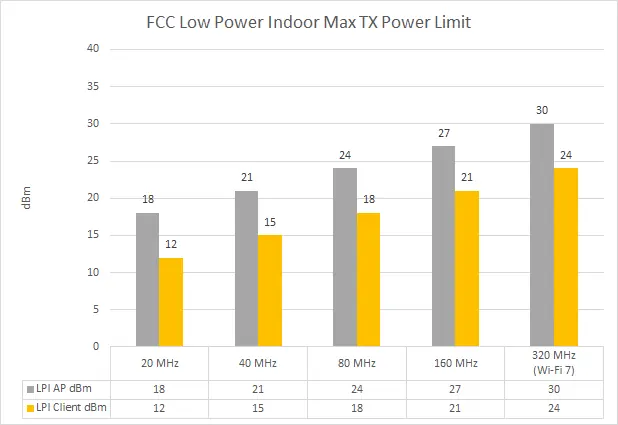
- PSC Channels: 15 channels are designated as Preferred Scanning Channels (PSC). Deploying APs on PSC channels improves discovery speed.
- Standard Power (SP): Requires access to an AFC system. Client devices must set max transmit power 6dB below the AP.
- Low Power Indoor (LPI): Indoor only, no AFC required.
Performance Optimization
To maintain high performance, especially for voice and video:
- Band Preference: Zebra devices intelligently prefer 6GHz over 5GHz to utilize cleaner channels and higher bandwidth.
- Reduced Neighbor Report (RNR): Essential for faster out-of-band discovery of 6GHz networks.
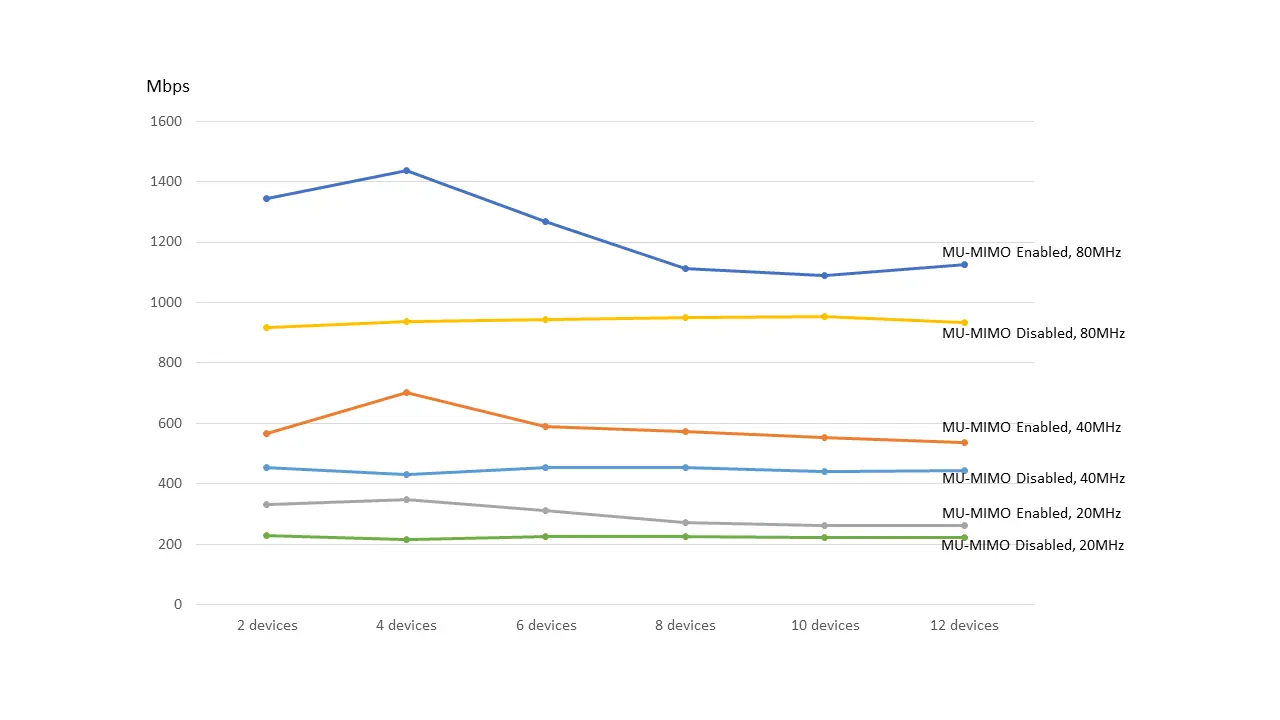
- MU-MIMO: Highly effective for high-throughput applications. Performance gains are highest with 4-6 participating devices.
Manufacturer information
Zebra Technologies
Practical help
Common problems
Slow roaming or network discovery
Ensure 802.11k and 802.11v features are enabled on the network.
Poor voice quality
Use 80MHz channel width and set 12 Mbps as the minimum bitrate for voice networks.
Slow 6GHz network discovery
Enable 'PSC Enforcement' on the WLAN controller to optimize scanning.
Before use
- Verify your device model (TC53, TC58, TC73, TC78).
- Ensure your infrastructure supports Wi-Fi 6E/6GHz.
- Check if your region supports 6GHz bands.
- Configure WPA3 security (Enterprise or Personal) as required.
- Verify that APs are deployed on PSC channels for faster discovery.
Images and diagrams
- Channel Selection: Shows how to identify PSC channels in Android settings.
- Throughput Charts: Illustrate performance benefits of 80MHz channel width.
- Power Limits: Graphs showing max TX power for Standard Power and Low Power Indoor modes.
Model compatibility
- Compatible with Zebra TC53, TC58, TC73, and TC78 mobile computers.
- Requires Wi-Fi 6E capable AP infrastructure.

Manual page author
Emily Carter
User documentation editor
Prepares concise manual descriptions and highlights the most useful setup, operation, and maintenance information for readers.