Electronics / Speakers & Soundbars
User Manual for Zebronics Juke Bar 6500 Soundbar
Quick guide for the Zebronics Juke Bar 6500 soundbar. Learn how to set up, mount, connect via Bluetooth, USB, ARC, or Optical, and troubleshoot common audio issues.
Table of contents
Manual images
Click an image to enlargeQuick Start Guide
The Zebronics Juke Bar 6500 is a soundbar system with a subwoofer. To get started, plug the power cord into a wall outlet (220V-240V). Press the Standby button on the soundbar or remote to turn it on. Use the INPUT button to cycle through modes: BT (Bluetooth), AU (AUX), USB, OPt (Optical), and Hd (TV ARC). The current mode will appear on the LED display.
Safety Instructions
- Do not dismantle the product or expose it to rain, moisture, or direct heat.
- Ensure proper ventilation: keep at least 20 cm of space above and 5 cm on each side of the unit.
- Do not place the unit on an amplifier or receiver.
- If the power cord is damaged, it must be replaced by a qualified service agent.
- Clean only with a dry cloth; do not use chemical solvents.
Product Overview
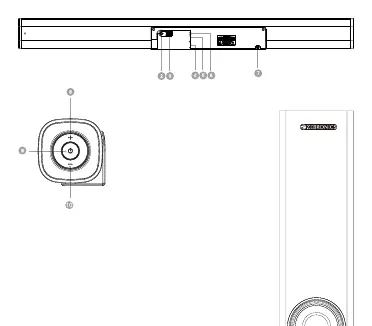
The soundbar features an LED display, volume controls, and a standby button. The rear panel includes ports for SUB OUT, USB, LINE IN (AUX), OPTICAL, TV (ARC), and AC IN.
Remote Control
The remote allows full control of the system:
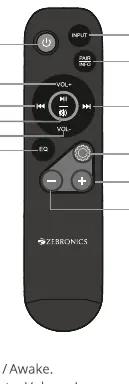
- Standby: Power on/off.
- VOL+/VOL-: Adjust master volume.
- INPUT: Switch between modes (AUX, USB, TV ARC, OPT, BT).
- EQ: Switch between Music, Movie, Voice, Live, and Sports modes. Hold for 2 seconds to reset to defaults.
- Setup: Adjust bass, mid, treble, and surround levels using the + and - buttons.
- Playback Controls: Play/Pause, Previous/Next track (USB and BT modes only).
- PAIR: Hold for 2 seconds to pair or reconnect Bluetooth devices.
Positioning the Soundbar
Flat Surface: Place the soundbar horizontally on a flat surface like a TV unit. Ensure it is centered with the TV screen and has space for airflow.
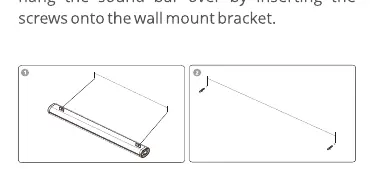
Wall Mounting: If you are not confident in mounting the unit, seek professional assistance. Use the wall bracket on the soundbar to mark holes on the wall. Use plastic anchors and screws. Attach the provided EVA pads to the wall mount bracket to ensure a minimum 15mm distance from the wall.
Connecting the Soundbar
Bluetooth: Switch to BT mode. The LED will flicker. Select "ZEB-JUKE BAR 6500" on your device. Once paired, the LED will stop flickering.
USB: Insert a USB flash drive containing MP3 files. The system will automatically switch to USB mode and play music.
TV (ARC): Connect the soundbar to the TV using a high-speed TV (ARC) cable. Ensure the TV's audio output is set to "External Dolby" or "Auto" mode.
Optical: Connect the optical cable from the TV's optical digital output to the soundbar's optical input. Set the TV's audio output to "Dolby" or "Auto".
AUX: Connect your device using an AUX cable to the LINE IN port.
Troubleshooting
- No sound: Check if the correct input is selected, the volume is up, and cables are securely connected. Ensure TV audio output is set to PCM or Auto.
- Bluetooth issues: Ensure the device is not paired with another unit, move the device closer, or restart the pairing process.
- Remote not working: Check batteries and ensure there is a clear line of sight to the soundbar sensor.
Specifications
- Total Output Power: 120W (Soundbar 60W + Subwoofer 60W)
- Driver Size: Subwoofer 13.33cm, Soundbar 6.35cm x 2
- Frequency Response: 55Hz-20kHz
- Bluetooth Version: 5.0
- Supported Inputs: AUX, USB, Optical, TV (ARC)
- Max USB Memory: 32GB
Practical help
Common problems
No sound output
Check if the correct input source is selected, the mute function is off, and all cables are securely connected. Ensure TV audio output settings are set to PCM, Dolby, or Auto.
Cannot connect via Bluetooth
Ensure the soundbar is in BT mode and the device is within range. If already paired with another device, unpair it first. Restart the soundbar and try pairing again.
Remote control not responding
Replace the batteries. Ensure there is no obstruction between the remote and the soundbar sensor, and avoid strong lighting interference.
No sound in USB mode
Ensure the USB drive contains only MP3 files. Other file formats are not supported.
Before use
- Verify your local power supply matches the unit's requirement (220V-240V).
- Ensure the soundbar has at least 20cm of clearance above and 5cm on the sides for ventilation.
- Remove the protective caps from the optical cable before connecting.
- Set your TV's digital audio output to 'Auto' or 'Dolby' when using ARC or Optical connections.
- Place the unit on a dry, stable surface away from water sources.
Specs in practice
- Total Output Power
- 120W total (60W soundbar + 60W subwoofer) for room-filling audio.
- Bluetooth v5.0
- Provides stable wireless connectivity for streaming audio from smartphones and tablets.
- Frequency Response
- 55Hz-20kHz, covering the full range of audible sound.
Images and diagrams
- The rear panel diagram identifies the ports for USB, AUX, Optical, TV (ARC), and AC power input.
- The remote control diagram maps buttons for input selection, EQ modes, and bass/treble adjustments.
- Wall mounting diagrams illustrate the spacing requirements and the use of EVA pads for proper airflow.
Model compatibility
- USB mode only supports MP3 audio files.
- TV (ARC) requires an ARC-compliant TV and a high-speed HDMI cable.
- Optical connection requires the TV to have an optical digital output.

Manual page author
Emily Carter
User documentation editor
Prepares concise manual descriptions and highlights the most useful setup, operation, and maintenance information for readers.