Electronics / Speakers & Soundbars
User Manual for Zebronics ZEB-JUKE BAR 100A Soundbar
Quick guide for the Zebronics ZEB-JUKE BAR 100A Soundbar. Learn how to set up, connect via Bluetooth, HDMI ARC, USB, or AUX, and troubleshoot common audio issues.
Table of contents
Manual images
Click an image to enlargeQuick guide from the manual
The Zebronics ZEB-JUKE BAR 100A is a soundbar system with a dedicated subwoofer. To get started, connect the power adapter to a wall outlet. The soundbar will enter standby mode. Use the power button on the unit or remote to turn it on. The LED indicator changes color to show the active input mode: Blue for Bluetooth, Green for AUX, Cyan for HDMI (ARC), Yellow for Coaxial, and Pink for USB.
Safety Instructions
- Do not dismantle the product or expose it to rain or moisture.
- Ensure at least 20 cm of space above and 5 cm on each side of the unit for proper ventilation.
- Do not place the unit near water sources, heat sources, or in areas with constant vibration.
- Always pull the plug directly from the wall outlet, never pull on the cord.
- Refer all servicing to qualified personnel.
Product Overview
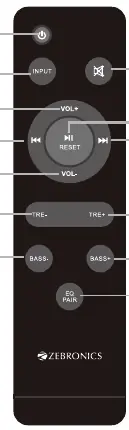
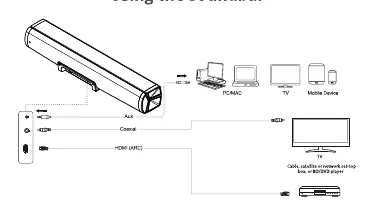
The soundbar features a main unit and a subwoofer. The rear panel of the soundbar includes ports for AUX, Coaxial, HDMI (ARC), USB, and DC IN. The front panel features an LED indicator. The remote control provides full playback control, including volume, track navigation, EQ modes, and bass/treble adjustments.
Positioning the Soundbar
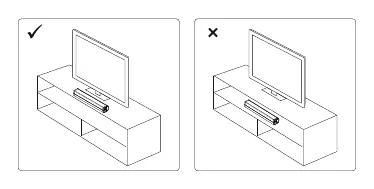
Place the soundbar horizontally on a flat surface, such as a TV unit or shelf, and align it centrally with the TV screen. Ensure there is space between the speaker and the wall for optimal sound output and airflow. Do not place the unit inside a closed cabinet.
Operation
Powering On/Off
Plug the power adapter into a wall outlet. Short-press the power/standby button on the soundbar or remote to turn it on. To turn off, press the standby button or unplug the unit.
Bluetooth Connection
Use the Input button on the remote to select BT mode (Blue LED). Activate Bluetooth on your mobile device and select ZEB-JUKE BAR 100A. Once paired, you will hear a tone.
USB Mode
Plug a USB flash drive containing MP3 files into the USB port. The soundbar will automatically switch to USB mode (Pink LED). Playback will start automatically.
HDMI (ARC) Mode
Connect the soundbar to your TV using a High-Speed HDMI cable. Select HDMI (ARC) mode (Cyan LED). Ensure your TV is set to PCM output format in its audio settings.
AUX and Coaxial Modes
Use the Input button to select the respective mode (Green for AUX, Yellow for Coaxial). Connect the appropriate cable to the corresponding input port on the soundbar.
Troubleshooting
- No sound: Check if the correct input source is selected, increase volume, ensure cables are connected securely, and verify the TV is set to PCM output if using HDMI ARC.
- Bluetooth issues: Ensure the device is within range, not connected to another device, and that Bluetooth is enabled.
- Remote not working: Check batteries, ensure the remote is not obstructed, and avoid using it in direct sunlight or strong lighting.
- Distorted sound: Ensure the TV volume is not muted and the soundbar volume is adjusted correctly.
Specifications
- Output Power: 60W Total (36W Subwoofer + 12W x 2 Soundbar)
- Connectivity: Bluetooth v5.0, HDMI (ARC), Coaxial, USB, AUX
- Power Source: 24V 1.25A
- Supported File Format: MP3 (USB)
- Max USB Memory: 32 GB
Practical help
Common problems
No sound output
Check if the correct input source is selected, increase volume, ensure cables are connected securely, and verify the TV is set to PCM output if using HDMI ARC.
Cannot connect via Bluetooth
Ensure the device is within range, not connected to another device, and that Bluetooth is enabled on your source device.
Remote control not working
Check batteries, ensure the remote is not obstructed, and avoid using it in direct sunlight or strong lighting.
Before use
- Verify power supply voltage matches local standards.
- Ensure at least 20cm space above and 5cm on sides for ventilation.
- Place on a dry, stable surface.
- Check that the TV/device is set to PCM output format for HDMI ARC.
- Ensure USB drive contains only MP3 files.
Specs in practice
- Output Power
- 60W total (36W Subwoofer + 12W x 2 Soundbar).
- Connectivity
- Supports Bluetooth v5.0, HDMI (ARC), Coaxial, USB, and AUX.
- Power Source
- Requires 24V 1.25A DC power.
Images and diagrams
- LED indicators change color based on mode: Blue (BT), Green (AUX), Cyan (HDMI ARC), Yellow (Coaxial), Pink (USB).
- Remote control includes dedicated buttons for EQ, Treble/Bass adjustment, and Input selection.
Model compatibility
- USB mode supports MP3 files only.
- HDMI ARC requires an ARC-compliant TV.
- Some computers may require manual audio output settings.

Manual page author
Michael Turner
Technical manual editor
Reviews PDF manuals for structure, safety notes, and practical product details so readers can find the right information quickly.