Power / Batteries & Chargers
User Manual for Zebronics ZEB EnergiPod 10R2 Power Bank
Quick guide for the Zebronics ZEB EnergiPod 10R2 power bank. Learn how to charge the device, use the built-in cables, and understand the LED display and technical specifications.
Table of contents
Quick guide from the manual
The Zebronics ZEB EnergiPod 10R2 is a 10000mAh power bank featuring a 22.5W maximum output and rapid charging capabilities. It includes an LED percentage display and multiple built-in output cables (USB, Micro USB, Type-C, and Lightning). To charge the power bank, connect the Type-C end of the charging cable to the power bank and the USB end to a compatible charger.
Port Descriptions
The device is equipped with the following ports and indicators:
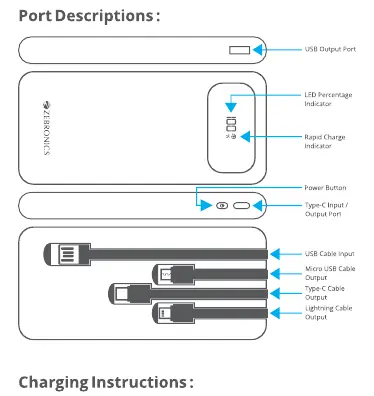
- USB Output Port: For charging external devices.
- LED Percentage Indicator: Displays the current battery level.
- Rapid Charge Indicator: Shows when fast charging is active.
- Power Button: Used to activate the display and check battery status.
- Type-C Input/Output Port: Used for both charging the power bank and charging devices.
- Built-in Cables: Includes USB input, Micro USB output, Type-C output, and Lightning output cables.
Charging Instructions
Charging the Power Bank
Connect the Type-C end of the charging cable to the power bank's Type-C port and the USB end to a wall charger or adapter. The LED display will indicate the charging progress.
Charging Your Device
Connect the appropriate cable (Type-C, Micro USB, or Lightning) to your device and the USB or Type-C end to the power bank's output ports. The power bank will automatically detect the device and begin charging.
Note: Simultaneous usage of the power bank output provides a standard 5V DC output.
Specifications
- Battery Capacity: 10000mAh
- Max Output: 22.5W
- Charging Time: Approximately 3 hours and 26 minutes
- Dimensions: 6.7 x 2.1 x 14.8 cm
- Weight: 233g
Safety Precautions
- Avoid using the product in high-temperature or high-humidity environments.
- Do not disassemble the product, as this will void the warranty.
- Charge the product only with a power adapter that meets the specified output requirements.
- Do not dispose of the product in fire due to the risk of explosion.
Practical help
Common problems
Power bank is not charging
Ensure you are using a compatible power adapter and that the cable is securely connected to the Type-C input port.
Device is not charging when connected
Check if the cable is securely connected to both the power bank output port and your device. Ensure the power bank has sufficient battery charge.
Before use
- Charge the power bank fully before its first use.
- Check the LED display to verify the current battery percentage.
- Ensure the power adapter used for charging meets the required specifications.
- Inspect the built-in cables for any signs of damage.
Specs in practice
- 22.5W Max Output
- The maximum power delivery capability for fast charging supported devices.
Images and diagrams
- The port diagram identifies the location of the USB output, LED display, power button, and Type-C input/output port.
- The cable diagram shows the integrated USB, Micro USB, Type-C, and Lightning output cables.
- The charging diagram illustrates the connection path from the wall adapter to the power bank.
Model compatibility
- Compatible with mobile phones and tablets.
- Simultaneous usage of multiple outputs provides standard 5V DC output.

Manual page author
Emily Carter
User documentation editor
Prepares concise manual descriptions and highlights the most useful setup, operation, and maintenance information for readers.