Electronics / Security Systems
Zebronics ZEB-PODS 141R Wireless Earbuds User Manual
Quick guide for Zebronics ZEB-PODS 141R wireless earbuds. Learn how to pair, control music, manage calls, switch modes, and charge your device.
Table of contents
Quick guide from the manual
The Zebronics ZEB-PODS 141R are wireless earbuds featuring Bluetooth v5.3, Environmental Noise Cancellation (ENC), and a gaming mode. To begin using the device, ensure it is charged using a DC 5V power adapter. The earbuds automatically enter pairing mode when removed from the charging case.
Bluetooth Pairing
- Remove both earbuds from the charging case.
- The earbuds will pair with each other automatically within 5 seconds.
- Open the Bluetooth settings on your phone or device.
- Select ZEB-PODS 141R from the list of available devices to connect.
Earbud Controls
The earbuds feature a Multi-Function Button (MFB) for various operations:
- Power On: Press and hold the MFB on either earbud for 3 seconds.
- Power Off: Press and hold the MFB on either earbud for 5 seconds.
- Play/Pause Music: Single tap the MFB on either side.
- Previous/Next Track: Double tap the MFB on the Left or Right side.
- Volume Adjustment: Triple tap the MFB on the Left or Right side.
- Voice Assistant: Long press the MFB on the left earbud for 3 seconds (if compatible).
Call Management
- Answer Call: Single tap the MFB on either side.
- Reject Call: Single tap the MFB on either side, or press and hold on either side.
Mode Switching
- Equalizer/Sound Monster Mode: Single tap followed by a long press for 3 seconds on either side.
- Gaming/Music Mode: Press and hold the MFB on the left earbud.
Charging Instructions
Charging the Case: Connect the provided Type-C cable to the charging port on the case and plug the other end into a DC 5V adapter. The Red LED will blink while charging and glow constantly when fully charged.
Charging the Earbuds: Place the earbuds into their respective slots in the charging case and close the lid. Charging begins automatically.
Specifications
- BT Version: v5.3
- Supported Profiles: HFP, A2DP, AVRCP
- Driver Size: 10 mm
- Speaker Impedance: 32 Ohm
- Playback Time: 7 hours (at 50% volume)
- Charging Time: 50 min (earphones), 2 hours (case)
- Weight: 38g
Practical help
Common problems
Earbuds not pairing with each other
Ensure both earbuds are taken out of the charging case simultaneously; they should pair with each other within 5 seconds.
Charging issues
Ensure you are using a DC 5V power adapter. Check that the Type-C cable is securely connected to the case.
Before use
- Charge the charging case fully using a DC 5V adapter.
- Ensure the earbuds are removed from the case to initiate pairing mode.
- Check that your device's Bluetooth is enabled.
- Verify the earbuds are placed correctly in the case slots for charging.
Specs in practice
- Rapid Charging
- A 10-minute charge provides approximately 120 minutes of usage.
Images and diagrams
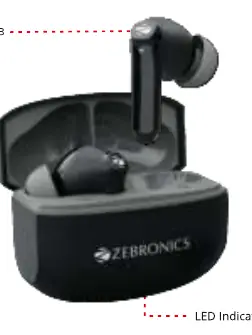
- The MFB (Multi-Function Button) is located on the top stem of the earbud.
- The LED indicator is located on the front of the charging case.
Model compatibility
- Voice assistant activation depends on the compatibility of your connected device.
- Gaming mode and EQ modes are controlled via specific touch gestures on the earbuds.

Manual page author
Emily Carter
User documentation editor
Prepares concise manual descriptions and highlights the most useful setup, operation, and maintenance information for readers.