Power / Batteries & Chargers
User Manual for Zebronics ENERGIPOD 10R1 Power Bank
Quick guide for the Zebronics ENERGIPOD 10R1 Power Bank. Learn how to charge your devices, understand LED indicators, and view technical specifications for this 10000mAh portable charger.
Table of contents
Manual images
Click an image to enlargeQuick guide from the manual
The Zebronics ENERGIPOD 10R1 is a 10000mAh power bank designed for mobile and tablet charging. Key operations include charging the power bank itself via the Type-C input and charging your devices using the USB or Type-C output ports. Always ensure the power adapter used for charging the power bank meets the required specifications.
Product features
- 22.5W (Max.) Output
- Rapid Charge support
- LED Percentage Display
- PD 3.0 Type C Input & Output Port
- Over Charge, Overload, and Short Circuit Protection
Specifications
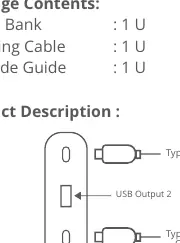
- Battery Capacity: 10000mAh
- Type-C1 Input: DC 5V/3A, 9V/2A, 12V/1.5A
- Type-C2 Input: DC 5V/2.4A
- Output 1 (Type C): DC 5V/3A, 9V/2.22A, 12V/1.67A, 3.3~11V/2A PPS
- Output 2 (USB): DC 5V/3A, 9V/2A, 12V/1.85A
- Charging Time: Approx. 3h 26m
- Dimensions: 6.7 x 1.7 x 13.8 cm
- Weight: 207 g
Charging the power bank
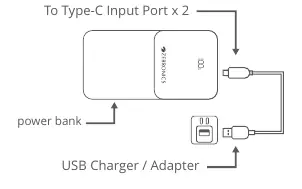
Connect the Type C end of the charging cable to the power bank and the USB end to a compatible power adapter. You can also charge through the built-in USB cable.
Charging your device
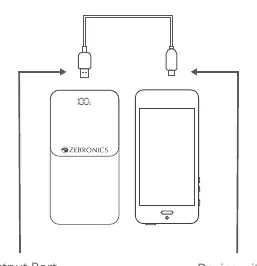
Connect the Type C/USB end of the charging cable to your device and the USB/Type C end to the output ports of the power bank.
Safety precautions
- Avoid using the product in high-temperature or high-humidity environments.
- Do not disassemble the product, as this voids the warranty.
- Risk of explosion if disposed of in fire.
Practical help
Common problems
Product not charging
Ensure the power adapter output is compatible with the Type-C input requirements.
Warranty void
Do not attempt to disassemble the product.
Safety hazard
Do not dispose of the power bank in fire due to explosion risk.
Before use
- Read the user manual carefully.
- Ensure the environment is not high-temperature or high-humidity.
- Use a compatible power adapter for charging the power bank.
- Check the LED display for battery status.
Specs in practice
- Battery Capacity
- 10000mAh total energy storage.
- Output 1 (Type C)
- Supports up to 22.5W and PPS for fast charging.
- Charging Time
- Approximately 3 hours and 26 minutes to fully charge the power bank.
Images and diagrams
- The power bank features a Type-C input/output port, a Type-C2 input, and a USB output port.
- Charging the power bank requires connecting the Type-C end to the power bank and the USB end to a charger.
- Charging a device requires connecting the cable between the power bank output port and the device.
Model compatibility
- Compatible with mobile phones and tablets.
- Supports PD 3.0 fast charging.

Manual page author
David Miller
Documentation analyst
Organizes user manual content into clear summaries, with attention to model details, product context, and everyday usability.