Industrial / Air Purifiers
User Manual for Abestorm DecDust 1350/1350IG Air Filtration System
Comprehensive user manual for the Abestorm DecDust 1350/1350IG air filtration system. Includes installation instructions, safety guidelines, operation procedures, maintenance steps, and troubleshooting.
Table of contents
Manual images
Click an image to enlargeQuick Guide
The Abestorm DecDust 1350/1350IG is an industrial air filtration system designed to filter dust particles above 1μm. Important: Two people are required for installation. The unit must be installed at least 7 feet above the floor and at least 3 feet away from corners or vents. Do not operate the unit without a filter installed. The 1350IG model includes an additional ozone removal function (plasma).
What's in the Box
- DecDust 1350/1350IG unit
- 4x MERV-11 Filters
- 4x Hanging pieces, nuts, hooks, and hanging chains
- 4x Screws, expansion bolts, and screw hooks
- Controller with 2x AAA batteries
- User Manual
Specifications
- Power: 115V/60Hz, 1.5Amps Max
- Air Flow: 1050 CFM (Low) / 1350 CFM (High)
- Filtration: MERV-11 (90% 3-10 micron, 85% 1 micron)
- Dimensions: 20.5" x 20.5" x 9.8"
- Weight: 27 lbs
Safety Rules
Electrical Safety: The unit must be grounded. Do not modify the plug. Use a separate electrical circuit protected with a 15A time-delayed fuse. Do not use extension cords.
Operational Safety: Do not use in the presence of flammable liquids or gases. Wear a face mask and safety goggles when working in dusty environments. Keep the unit away from poisonous gases or chemical risks.
Installation
Method #1: Hanging
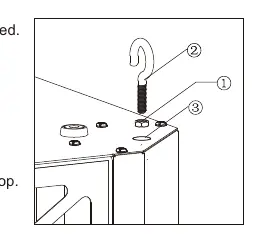
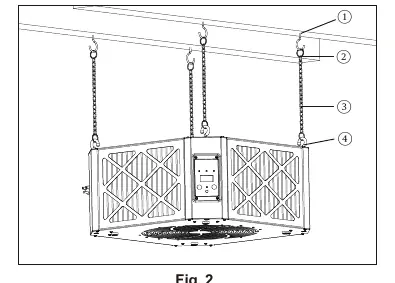
- Thread locknuts onto the hangers.
- Thread hangers into the four mounting holes on the top of the cabinet.
- Tighten the locknut against the cabinet top.
- Attach chains to the ceiling hooks and connect the hangers to the chains.
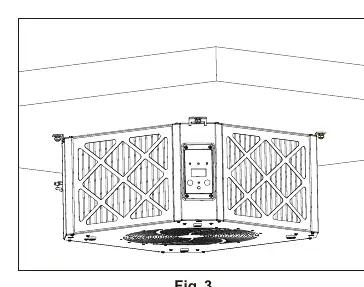
Method #2: Ceiling Mount
- Install mounting brackets on the equipment using M4 screws.
- Mark the ceiling (recommended 18.9" x 18.9" spacing).
- Drill holes and install expansion screws.
- Lift the unit and secure it to the ceiling using the nuts.
Operation
The unit can be operated via the control panel or remote control. It features a power-off memory function.
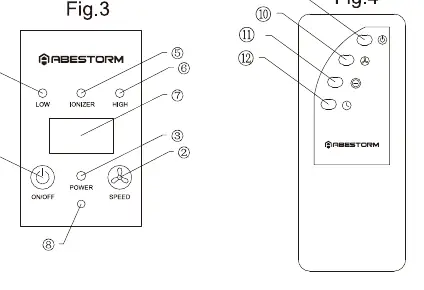
- Power: Press the On/Off button.
- Speed: Press the Speed button to toggle between Low and High.
- Ionizer (1350IG only): Press the Ionizer button on the remote.
- Timer: Press the timer shutdown button to set a shutdown time from 01H to 09H.
Maintenance
Filter Replacement: Periodically check filters. If clogged, airflow is reduced. Power off the unit, remove the old filter, and insert a new one in the indicated direction. Wear a mask and gloves during this process.
Troubleshooting
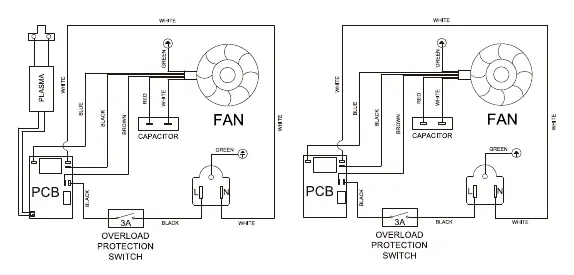
- Noise: The filter may be blocked. Replace the filter.
- Power Off: If the unit shuts down, check for excessive current or circuit issues. Disconnect power, press the circuit breaker on the unit to reset, and restart.
- Remote Issues: If the operating distance is short, replace the remote batteries and clean the infrared receiver on the control panel.
Manufacturer information
Abestorm
Practical help
Common problems
Excessive noise during operation
The filter is likely blocked. Replace the filter.
Unit shuts down unexpectedly
Overload protection may have triggered. Disconnect power, press the circuit breaker on the unit to reset, and restart.
Remote control not responding or short range
Replace the AAA batteries in the remote and clean the infrared receiver on the control panel.
Before use
- Ensure the power source is 115V/60Hz.
- Verify that filters are installed correctly.
- Ensure the unit is mounted at least 7 feet above the floor.
- Maintain at least 3 feet of clearance from corners and vents.
- Ensure at least two people are available for installation.
Specs in practice
- 1050CFM/1350CFM
- Air flow capacity for Low and High speed settings.
Images and diagrams
- Fig 1: Hanging installation using locknuts and hangers.
- Fig 2: Ceiling placement using wood screw hooks and chains.
- Fig 3: Mounting bracket installation for ceiling mounting.
- Fig 4: Control panel and remote control button layout.
Model compatibility
- The DecDust 1350 model does not support the Ionizer function.
- Do not use extension cords with this unit.
- Only use accessories approved by Abestorm to maintain warranty.

Manual page author
Michael Turner
Technical manual editor
Reviews PDF manuals for structure, safety notes, and practical product details so readers can find the right information quickly.