Home Appliances / Dehumidifiers
User Manual for Abestorm Hurricane 140P Dehumidifier
Quick guide for the Abestorm Hurricane 140P commercial dehumidifier. Includes installation steps, control panel operation, maintenance procedures, and troubleshooting for error codes.
Table of contents
Manual images
Click an image to enlargeQuick guide from the manual
The Abestorm Hurricane 140P is a commercial dehumidifier designed to control humidity in conditioned spaces. Key operational requirements include placing the unit on a level surface, connecting it to a grounded 15-amp circuit, and ensuring proper drainage. The unit features an integrated humidistat and condensate pump. Always unplug the unit before performing any maintenance.
Installation
Proper installation is critical for efficient operation:
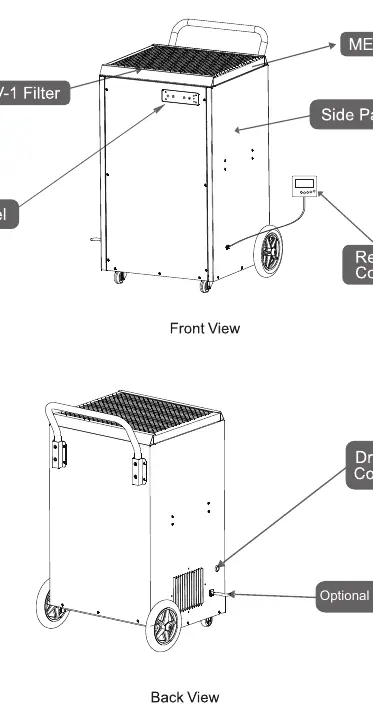
- Placement: Place the dehumidifier on a level surface. Do not place it directly on a vapor barrier; use blocks or pavers if necessary.
- Drainage: Locate the unit near a suitable drain. Connect the included 16.4' drain hose to the quick connector on the unit. The built-in pump supports a drainage height of 14.7'.
- Power: Plug the unit into a grounded 15-amp circuit. Do not use extension cords or plug adapters.
- Stabilization: If the unit was flipped or turned, place it upright and wait at least 2 hours before powering it on.
Operation
The control panel allows you to manage humidity levels and drainage:
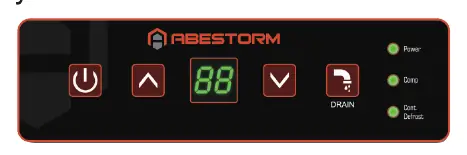
- Power Key: Turns the unit on and off. There is a 1-minute fan delay upon shutdown.
- Arrow Buttons: Use the up and down arrows to set the desired humidity setpoint (36%-90%).
- Continuous Mode: Use the down arrow to set the humidity below 36% to enter continuous operation.
- Manual Drain Button: Press this button to manually remove water from the pump reservoir, especially before moving or storing the unit.
Maintenance
Regular maintenance ensures longevity and performance:
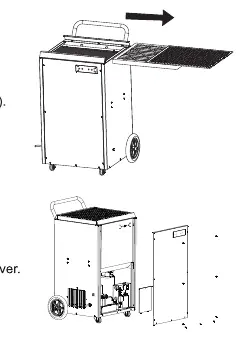
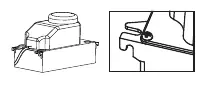
- Cleaning the Body: Use a soft, damp cloth. Do not use soaps or solvents.
- Coil Maintenance: Clean coils once per year using an approved, self-rinsing, foaming coil cleaner.
- Filter Cleaning: Remove the prefilter and vacuum or wash with warm water. Replace MERV-1/MERV-10 filters at least once per year.
- Pump Maintenance: The pump requires routine cleaning to prevent dirt and slime buildup. Follow the detailed steps in the manual to remove the pump and flush the reservoir with a bleach or vinegar solution.
Troubleshooting
If the unit displays an error code, refer to the following:
- E1: Humidity sensor or communication error. Check sensor wire connections.
- E4: Pump problem. Verify pump installation, check for obstructions in the drain line, or reset the unit.
- LO: Room temperature is below 35.6°F.
- HI: Room temperature is above 105°F.
- E5: Refrigerant leak. Contact your installer.
Manufacturer information
Abestorm
Practical help
Common problems
Display is Blank
Verify that both ends of the power cord are plugged in and check for a power outage.
No AirFlow
Clean the filter or clear any blockages at the air inlet or outlet.
E4 Error Code (Pump Alarm)
Reset the unit by unplugging it. Check if the pump is operational by pressing the drain button. Clean the discharge line if obstructed.
LO/HI Error Codes
The room temperature is outside the operating range (35.6°F - 105°F). Adjust the room temperature accordingly.
Before use
- Place the unit on a level surface.
- Ensure the power supply is 115V/60Hz/Single Phase.
- Connect to a grounded 15 amp circuit.
- Connect the drain hose to the quick connector.
- Wait 2 hours if the unit was tilted or flipped before powering on.
Specs in practice
- Operating Temp
- 35.6°F to 105°F.
Images and diagrams
- Control Panel: Includes Power, Up/Down arrows, and Manual Drain button.
- Unit Diagram: Illustrates the location of filters, control panel, and drain hose connection.
Model compatibility
- Requires a grounded electrical connection.
- Do not use with extension cords or plug adapters.
- Not for use in rooms with outdoor pools or spas.

Manual page author
Emily Carter
User documentation editor
Prepares concise manual descriptions and highlights the most useful setup, operation, and maintenance information for readers.