Computers / Laptops
Acer Aspire 1810T/1410 Series Quick Guide
Quick guide for the Acer Aspire 1810T/1410 series notebook, covering hardware components, hotkeys, connectivity, and technical specifications.
Table of contents
Product Overview
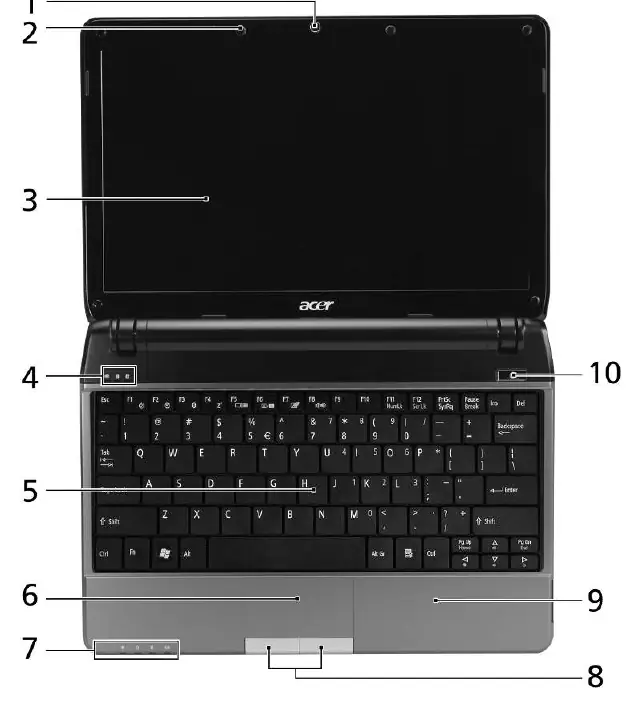
The Acer Aspire 1810T/1410 series is a compact notebook designed for mobile computing. This guide provides an introduction to the device's physical features, including the integrated webcam, microphone, touchpad, and various status indicators located on the front panel. The device features a comfortable palmrest and a full-sized keyboard for efficient data entry.
Getting Started and Operation
To begin using your notebook, ensure it is set up according to the included starter poster. The system includes preloaded documentation accessible via the Start menu under AcerSystem. Users can manage system functions using hotkeys by holding the Fn key in combination with F1-F8 or arrow keys to control power management, display output, screen brightness, volume, and wireless connectivity.
Connectivity and Ports
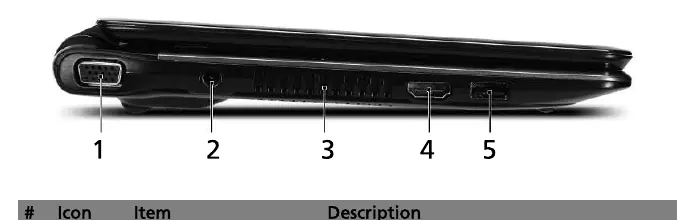
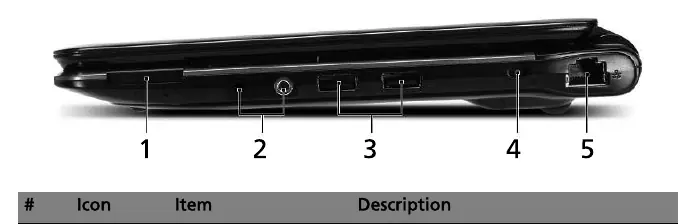
The notebook is equipped with a variety of ports to support peripherals and external displays:
- Left side: VGA port, DC-in jack, HDMI port, and USB 2.0 port.
- Right side: Multi-in-1 card reader, audio jacks (headphone/speaker/line-out with S/PDIF and microphone-in), USB 2.0 port, Kensington lock slot, and Ethernet (RJ-45) port.
Maintenance and Safety
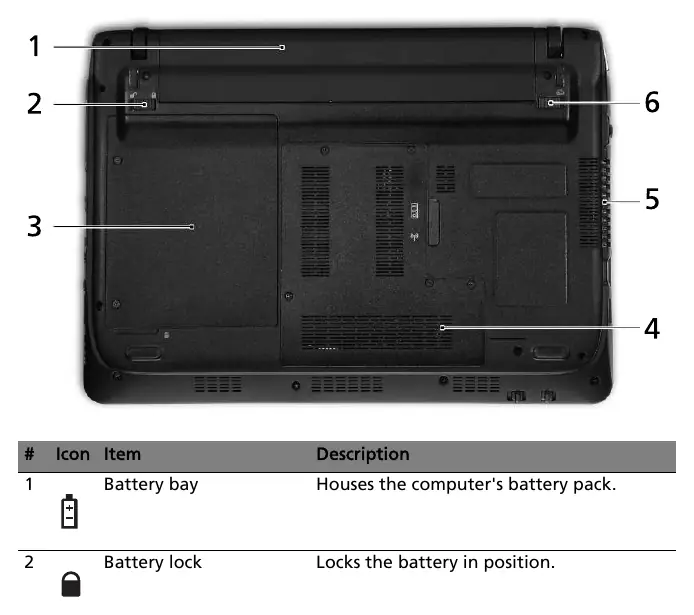
Proper maintenance is essential for longevity. Ensure that the ventilation slots on the side and base of the unit remain unobstructed to prevent overheating. The battery can be removed by using the battery release latch on the base. Always refer to the preloaded AcerSystem User Guide for detailed information on data recovery, system utilities, and safety notices.
Technical Specifications
The series supports Intel Core 2 Solo or Celeron processors, up to 4GB of DDR2 memory, and various display options. Communication features include integrated webcam, WLAN, and optional Bluetooth or WWAN. The device operates within a temperature range of 5°C to 35°C and humidity levels between 20% and 80%.
Related manuals
Related manuals from the same brand or category.
Computers / Laptops
Acer Nitro V 16S User's Manual
ACERDocuments / Warranty Safety
Acer Nitro 16S AI User Manual
ACERHome Appliances / Washing Machines
Acer Nitro V 16S User Manual
ACERGeneral / Other Manuals
Acer NITRO 16S AI User Manual
ACERComputers / Laptops
LG gram 16ZB90R-G.AP78G Business Edition Notebook
LGComputers / Laptops
ASUS VivoBook Pro 16X OLED N7600PC-L2029T Laptop Overview
ASUSComputers / Laptops
Alienware 16X Aurora AC16251 Owner's Manual
AlienwareComputers / Laptops
LG 16T90R Series Notebook User Guide
LG
Manual page author
Emily Carter
User documentation editor
Prepares concise manual descriptions and highlights the most useful setup, operation, and maintenance information for readers.