Hvac / Air Conditioners
ACiQ Concealed Duct Air Handler Remote Controller Owner’s Manual
Comprehensive owner's manual for the ACiQ concealed duct air handler remote controller, covering setup, operation, advanced functions, and troubleshooting.
Table of contents
Manual images
Jump to the sectionProduct Overview
This manual provides instructions for the ACiQ concealed duct air handler remote controller, compatible with models including ACiQ-09CD-HH-MB through ACiQ-60CD-HH-MB. The remote controller is designed to provide precise control over your air conditioning unit, offering various modes and advanced features to ensure optimal comfort and energy efficiency.
Getting Started
Before using the remote controller, ensure that two R03/LR03 dry batteries are correctly inserted into the battery compartment, matching the polarity symbols. The remote has a signal receiving range of 8 meters. For optimal performance, avoid mixing old and new batteries, and remove them if the remote will not be used for more than two months. Direct sunlight or obstructions like curtains can interfere with the infrared signal.

Basic Operation
The remote controller allows you to select between AUTO, COOL, DRY, HEAT, and FAN modes. In AUTO mode, the unit automatically selects the operation based on the set temperature. You can adjust the temperature between 17°C and 30°C (62°F-86°F) in 1°C increments. Fan speeds can be adjusted to LOW, MED, HIGH, or AUTO, though fan speed cannot be changed in AUTO or DRY modes.
Advanced Functions
The remote includes several advanced features to enhance your experience:
- Swing Function: Controls horizontal and vertical louver movement for better airflow distribution.
- Sleep Function: Adjusts temperature settings to save energy during sleeping hours.
- Follow Me: Uses the remote's built-in sensor to measure ambient temperature at your location, ensuring comfort where you are.
- Turbo Function: Enables the unit to reach the preset temperature in the shortest possible time.
- Clean Function: Automatically cleans the heat exchanger to prevent bacteria growth.
- ECO Function: Adjusts settings for energy-efficient operation during cooling.
- Lock Function: Prevents accidental changes to settings by locking the buttons.
Maintenance and Safety
To maintain the remote controller, keep it dry and away from extreme temperatures. If the unit does not respond, ensure the batteries are fresh and the signal path is clear. When disposing of batteries, follow local environmental regulations. If the indoor unit does not support a specific function, pressing the corresponding button on the remote will have no effect.
Manufacturer information
ACiQ
Practical help
Common problems
Remote signal not received
Ensure you are within 8 meters of the unit and that there are no obstructions like curtains or direct sunlight blocking the infrared receiver.
Unit not responding to button press
Check if the indoor unit supports the selected function; if not, the button will have no effect. Also, check battery levels.
Insufficient cooling/heating capacity
If using the Silence function, the compressor operates at low frequency, which may reduce capacity. Disable Silence mode to restore full power.
ECO mode stops unexpectedly
Modifying the mode or adjusting the set temperature to less than 24°C (75°F) will automatically stop ECO operation.
Before use
- Ensure the air conditioner is plugged in and power is available.
- Insert two R03/LR03 batteries into the remote control.
- Check that the battery polarity matches the symbols in the compartment.
- Ensure the remote is within 8 meters of the indoor unit.
- Remove any obstructions between the remote and the unit's receiver.
Specs in practice
- Signal Receiving Range
- The maximum distance (8m) from which the remote can effectively communicate with the indoor unit.
- Operating Temperature Range
- The range (17-30°C / 62-86°F) within which you can set the desired room temperature.
Images and diagrams
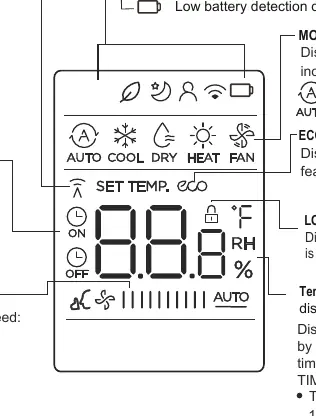
- The remote display shows active modes (AUTO, COOL, DRY, HEAT, FAN), fan speed, and set temperature.
- Transmission indicator lights up when a signal is successfully sent to the indoor unit.
- The display indicates active features like Sleep, Follow Me, and ECO.
- The fan speed display shows bars representing LOW, MED, HIGH, or AUTO settings.
- The LOCK icon appears on the screen when the button lock function is activated.
Model compatibility
- Button designs may vary slightly depending on the specific model.
- If the indoor unit lacks a specific feature, the corresponding button on the remote will not function.
- For cooling-only models, HEAT and AUTO modes are not available.
- The user manual for the indoor unit takes precedence if there are discrepancies with the remote controller manual.

Manual page author
Emily Carter
User documentation editor
Prepares concise manual descriptions and highlights the most useful setup, operation, and maintenance information for readers.