Home / Weather Stations & Thermometers
AcuRite 06042M Rain Gauge Station User Manual
Quick guide for the AcuRite 06042M Rain Gauge Station. Learn how to set up your wireless sensor, calibrate the rain gauge, manage historical rainfall data, and troubleshoot common connectivity issues.
Table of contents
Manual images
Click an image to enlargeQuick Start Guide
To begin using your AcuRite Rain Gauge Station, ensure all components are synchronized before final installation. The most critical step is matching the A-B-C switch settings on the display, wireless sensor, and rain gauge. Use fresh alkaline batteries (lithium batteries are required for the sensor in temperatures below -4°F / -20°C). Once batteries are installed, the units will synchronize automatically within a few minutes.
Components and Setup
The system consists of a display unit, a wireless sensor, and a self-emptying rain gauge.
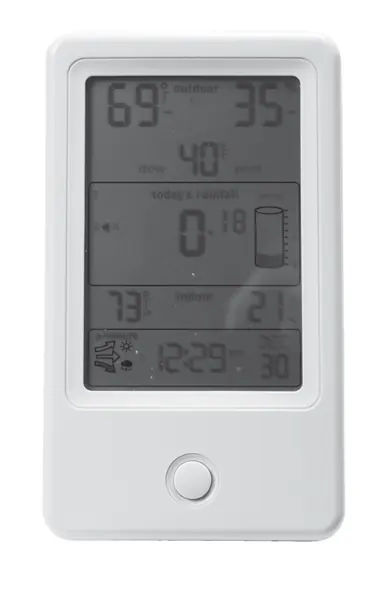
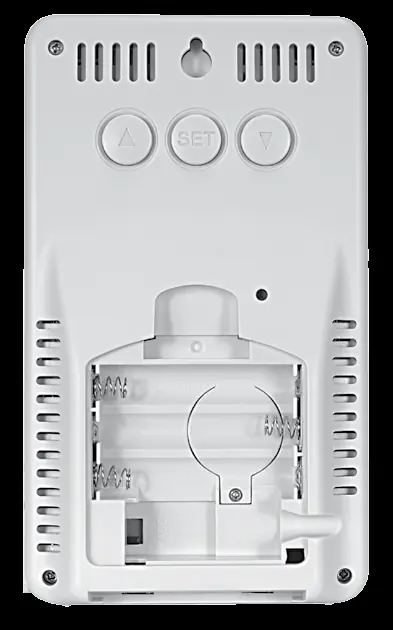
- Display Unit: Features an Intelli-Time clock that auto-updates for Daylight Saving Time. Use the buttons on the back to set preferences, view records, and calibrate data.
- Wireless Sensor: Transmits outdoor temperature and humidity data. Ensure the A-B-C switch matches the display.
- Rain Gauge: Collects and measures rainfall. It must be placed on a flat, level surface.
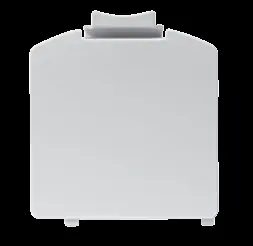
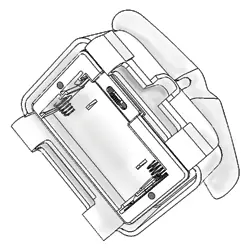
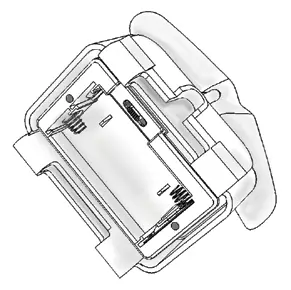
Battery Installation: Remove the battery covers on all units. Set the A-B-C switch to the same letter (A, B, or C) on all three devices. Insert batteries according to the polarity (+/-) diagrams. Replace covers securely.
Placement Guidelines
Proper placement is critical for accuracy and wireless range:
- Display: Place in a dry area free of dirt and dust.
- Wireless Sensor: Place outdoors in a shaded area with good airflow, protected from direct weather elements.
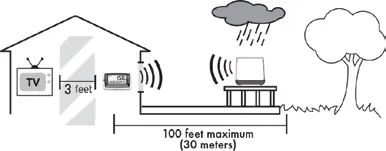
- Rain Gauge: Must be placed on a flat, level surface at least 3 feet (0.9 m) above the ground.
- Interference: Keep all units at least 3 feet (0.9 m) away from electronic devices like TVs, computers, and microwaves.
- Range: The display and rain gauge must be within 100 feet (30 m) of each other. The display and wireless sensor must be within 330 feet (100 m) of each other.
Operation and Features
Rain Alarm: You can program a daily rain alarm. When the programmed rainfall value is reached, the display will emit an audible alert and flash the rainfall total. The alarm resets automatically at midnight.
Rainfall Tracking: Press the button on the front of the display to cycle through historical records, including previous day, current week, monthly totals, current year, and previous year.
Calibration
Temperature & Humidity: To calibrate, press and hold the ▲, ▼, and SET buttons for 10 seconds. Use the ▲ or ▼ buttons to adjust the value, then press SET to confirm.
Rain Gauge: If the rain gauge is inaccurate, you can calibrate it using a plastic cup with a pinhole. Fill the cup with 1 cup (8 oz) of water and let it drip into the gauge. Adjust the two calibration screws beneath the tipping lever if the display does not register 1.68" (42.67 mm) after the cup is empty. Turn screws counter-clockwise to increase rainfall readings and clockwise to decrease them.
Maintenance and Troubleshooting
Maintenance: Clean the display and sensor with a soft, damp cloth. Do not use caustic cleaners. The rain gauge must be brought indoors during freezing temperatures to prevent water expansion from cracking the plastic.
Troubleshooting: If you experience no wireless reception, ensure the units are within range and away from electronic interference. If the outdoor temperature or humidity is flashing, perform a hard reset by removing batteries from both units, waiting a few minutes, and reinstalling them.
Manufacturer information
AcuRite
Practical help
Common problems
No wireless sensor or rain gauge reception (no bars)
Relocate the display and/or sensor to be within range. Ensure units are at least 3 feet away from electronics. Check battery levels.
Outdoor temperature/humidity flashing or showing dashes
Indicates wireless interference. Bring units indoors, remove batteries from both, reinstall, and let them sit near each other for a few minutes to reconnect.
Rain gauge inaccurate
Ensure it is on a flat, level surface. Perform the manual calibration procedure using the calibration screws beneath the tipping lever.
Rain gauge freezing
Bring the rain gauge indoors during freezing temperatures. Water expansion can crack the plastic and cause permanent damage.
Before use
- Remove the protective film from the LCD screen.
- Set the A-B-C switch to the same letter on the display, sensor, and rain gauge.
- Install fresh alkaline batteries (use lithium for the sensor in cold weather).
- Place the rain gauge on a flat, level surface.
- Ensure all units are within the specified wireless range.
Specs in practice
- A-B-C Switch
- ID code that must match across all units to ensure they synchronize.
- Intelli-Time Clock
- Pre-programmed clock that automatically updates for Daylight Saving Time.
Images and diagrams
- Display Back: Shows the location of the A-B-C switch, battery compartments, and setup buttons.
- Rain Gauge Setup: Illustrates how to open the cover and access the internal battery box.
- Placement Diagram: Shows the required 3-foot distance from electronics and maximum wireless range.
Model compatibility
- Sensor requires lithium batteries for temperatures below -4°F (-20°C).
- Rain gauge must be brought indoors during freezing temperatures.

Manual page author
Emily Carter
User documentation editor
Prepares concise manual descriptions and highlights the most useful setup, operation, and maintenance information for readers.