Automotive / Vehicle Monitors
User Guide for AiM Solo 2/Solo 2 DL, EVO4S, XLog and ECULog Kit for Suzuki
Installation and configuration guide for AiM Solo 2, Solo 2 DL, EVO4S, XLog, and ECULog kits on Suzuki motorcycles. Includes connection steps, part numbers, bracket assembly, and RaceStudio 3 software setup.
Quick answers from the manual
Quick answer
- To connect the AiM device, locate the white diagnostic connector under the bike seat, remove the black rubber cap, and plug in the AiM cable. Configure the device using RaceStudio 3 software. p. 4, 5
Key actions
- Install the bracket using the provided screws and washer. p. 3
- Configure ECU settings in RaceStudio 3. p. 5
First start
- Set ECU Manufacturer to 'Suzuki' and select the appropriate protocol (SDS_protocol or SDS 2 Protocol) in the 'ECU Stream' tab. p. 5
Problems and fixes
Bracket does not fit
The bracket is not compatible with Suzuki GSX-R 1000 (2005-2008) or Suzuki GSX-R 1300 Hayabusa Gen. 2 (2008-2016).
p. 3Technical specifications
| Parameter | Value | Meaning | Pages |
|---|---|---|---|
| SDS_Protocol | Standard | Protocol for most models. | p. 6 |
| SDS 2 Protocol | Advanced | Protocol for GSX-R 1000 from 2017. | p. 5, 8 |
Where to find it in the PDF
- Models and years p. 2
- Kit content p. 3
- Connection p. 5
- Protocols p. 6, 8
Table of contents
Manual images
Click an image to enlargeQuick guide from the manual
This document provides installation and configuration instructions for AiM data loggers (Solo 2, Solo 2 DL, EVO4S, XLog, ECULog) on Suzuki motorcycles. Important: AiM recommends not removing the stock dashboard, as this may disable bike functions or safety controls. The installation bracket provided is specific to certain models and years; please verify compatibility before installation.
Kit content and part numbers
The installation kit for the bracket (Part number: X46KSSGSXR) includes:
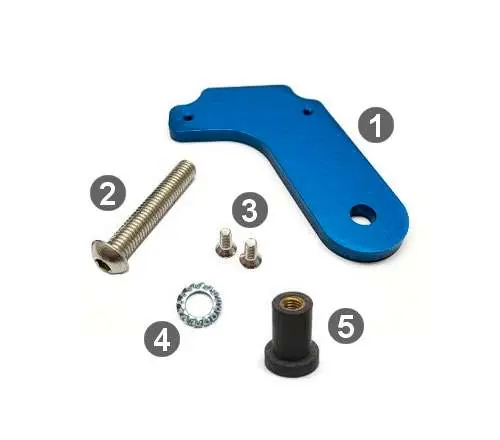
- 1 bracket
- 1 Allen screw with rounded head M8x45mm
- 2 Allen screws with flat head M4x10mm
- 1 toothed washer
- 1 rubber dowel
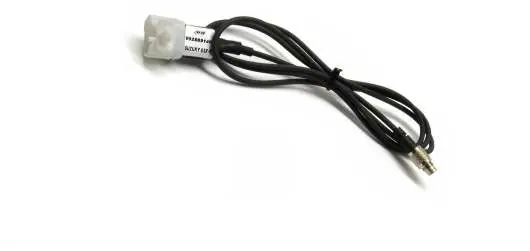
The connection cable part number is V02569140. A combined kit (bracket + cable) is available under part number V0256914CS.
Installation
To connect the AiM device to the bike ECU:
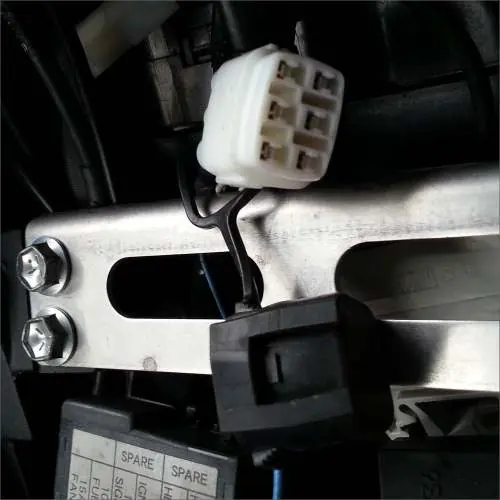
- Locate the white diagnostic connector placed under the bike seat.
- Remove the black rubber cap from the connector.
- Connect the AiM cable to the Suzuki connector.
Configuration with RaceStudio 3
Before connecting the device to the ECU, configure the settings in the RaceStudio 3 software under the ECU Stream tab:
- ECU Manufacturer: Select "Suzuki".
- ECU Model: Select "SDS_protocol" for most models, or "SDS 2 Protocol" specifically for the Suzuki GSX-R 1000 from 2017 onwards.
Suzuki protocols
The device supports two main protocols, which determine the data channels received:
- Suzuki – SDS_Protocol: Provides standard channels like RPM, throttle position, gear, battery voltage, coolant temperature, intake air temperature, manifold air pressure, and fuel injector data.
- Suzuki – SDS 2 Protocol: Provides extended channels including front/rear wheel speed, ignition angles, and specific sensor voltages.
Technical note: Not all data channels are validated for every model or variant. Some channels are model and year specific. Certain channels (e.g., SDS SPEED F, SDS SPIN RATE) require connection to a Yoshimura ECU to function.
Practical help
Common problems
Bracket incompatibility
The installation bracket does not fit Suzuki GSX-R 1000 (2005-2008) or Suzuki GSX-R 1300 Hayabusa Gen. 2 (2008-2016).
Data channels not working
Verify if the channel is supported by your specific bike model/year. Some channels (e.g., SDS SPEED F) require a Yoshimura ECU.
Before use
- Verify your bike model and year compatibility.
- Ensure you have the correct bracket (Part: X46KSSGSXR).
- Locate the white diagnostic connector under the bike seat.
- Install RaceStudio 3 software on your computer.
- Do not remove the stock dashboard.
Specs in practice
- SDS_Protocol
- Standard protocol for most Suzuki models.
- SDS 2 Protocol
- Required for Suzuki GSX-R 1000 from 2017 onwards.
Images and diagrams
- The bracket assembly diagram shows the correct placement of the bracket, screws, washer, and rubber dowel.
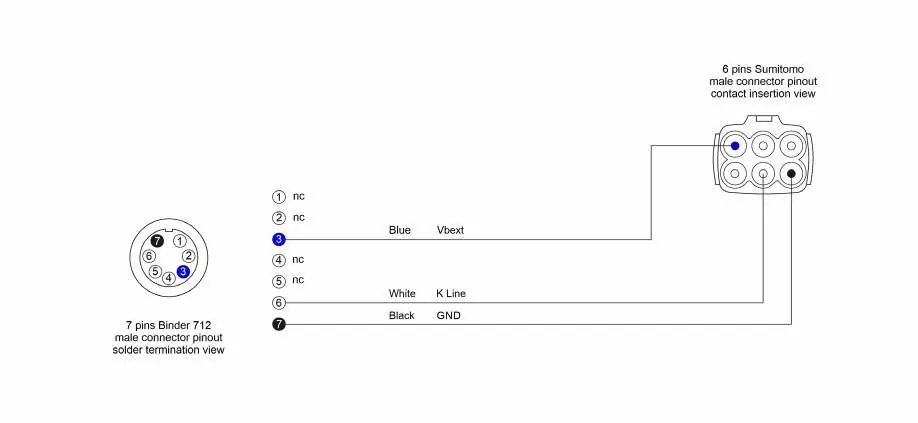
- The cable pinout diagram illustrates the connection between the 7-pin Binder 712 connector and the 6-pin Sumitomo connector.
Model compatibility
- Compatible with GSX-R 600 (2004-2023), GSX-R 750 (2004-2017), GSX-R 1000 (2005-2023), and GSX-R 1300 Hayabusa Gen. 2 (2008-2016).

Manual page author
Emily Carter
User documentation editor
Prepares concise manual descriptions and highlights the most useful setup, operation, and maintenance information for readers.