Automotive / Vehicle Monitors
Installation Guide for Motive Cable 3034 Vehicle Gateway
Step-by-step installation guide for the Motive Cable 3034 Vehicle Gateway in Volvo and Mack 2018+ vehicles. Includes wiring, mounting, and system setup instructions.
Quick answers from the manual
Quick answer
- The Cable 3034 is a vehicle gateway installation kit for Volvo/Mack 2018+ trucks. Installation involves connecting to the J1939 bus and power connectors, mounting the gateway, and verifying connections via indicator lights and the Motive Driver App. p. 1, 2, 3, 4
Key actions
- Remove the access panel on the dashboard. p. 2
- Connect the Motive cable to the J1939 bus and power connector (F87). p. 2, 3
- Mount the Vehicle Gateway near the windshield. p. 3
First start
- The left indicator light turns green after approximately one minute, indicating a successful GPS/GNSS connection. p. 4
Problems and fixes
GPS/GNSS performance degradation
Ensure the vehicle gateway has a clear line of sight to the sky.
p. 4Where to find it in the PDF
- Installation Steps p. 2, 3
- System Setup p. 4
Table of contents
Manual images
Click an image to enlargeQuick guide from the manual
This document provides instructions for installing the Motive Cable 3034 Vehicle Gateway in Volvo and Mack 2018+ vehicles. The process involves connecting the gateway to the vehicle's J1939 bus and power systems, mounting the unit, and verifying the connection via indicator lights and the Motive Driver App.
Safety and preparation
Before beginning the installation, ensure the vehicle is in a safe state:
- Ensure the parking brake is engaged.
- Turn off the engine.
- Turn off the main power switch (if available).
Installation steps
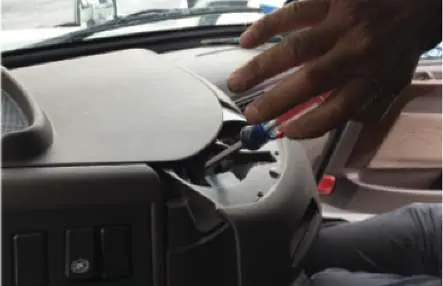
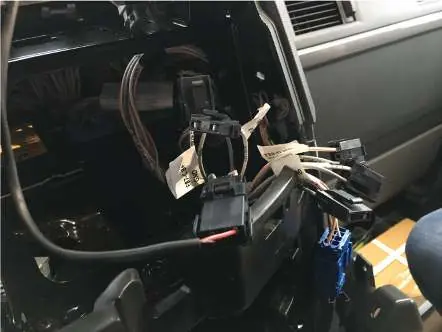
- Access Panel: Remove the access panel located on the top center of the dashboard on the right side of the steering wheel. A screwdriver may be required.
- J1939 Connection: Locate the two identical J1939 connectors (DL1 and DL3) in the center console. Detach the terminating resistor from the DL1 J1939 bus connector. Do not discard the resistor.
- Cable Connection: Attach the male end of the Motive cable to the female end of the truck's J1939 bus connector. Attach the terminating resistor to the female end of the Motive cable to close the circuit.
- Power Connection: Plug the power connector from the Motive cable into an open battery connector in the access panel. Use one of the two connectors labeled F87.
- Mounting: Attach the 15-pin connector to the Vehicle Gateway. Secure it using the thumbscrews. Clean the mounting area with the provided alcohol swabs, remove the adhesive backing, and mount the gateway near the windshield, at least 12 inches away from metal components.
System setup and indicators
Once connected, the system will initialize:
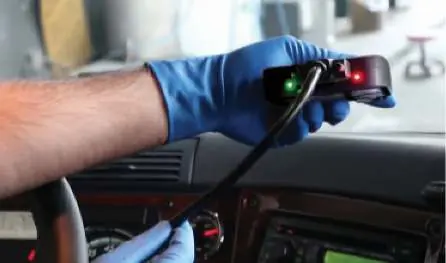
- Indicator Lights: Upon plugging in, lights will flash and turn solid red. After approximately one minute, the left-side indicator will turn green, indicating a successful GPS/GNSS connection.
- App Connection: Once the driver connects to the Vehicle Gateway using the Motive Electronic Logbook App (available on iOS and Android), the right-side indicator will turn green, indicating a successful Bluetooth connection.
Support
For further assistance, please contact Motive support at 855-434-3564 or email [email protected].
Practical help
Common problems
GPS/GNSS performance issues
Ensure the vehicle gateway has a clear line of sight to the sky.
Cable damage during mounting
If mounting inside a panel, ensure the cable is not pinched.
Before use
- Engage the parking brake.
- Turn off the engine.
- Turn off the main power switch (if available).
- Have a screwdriver ready for the access panel.
- Clean the mounting area with alcohol swabs.
Images and diagrams
- J1939 connectors (DL1 and DL3) are located in the center console.
- Power connectors are located in the access panel; use one labeled F87.
- Left indicator light shows GPS/GNSS status; right indicator light shows Bluetooth status.
Model compatibility
- Compatible with Volvo and Mack 2018+ vehicles.

Manual page author
Michael Turner
Technical manual editor
Reviews PDF manuals for structure, safety notes, and practical product details so readers can find the right information quickly.