Power / Power Supplies
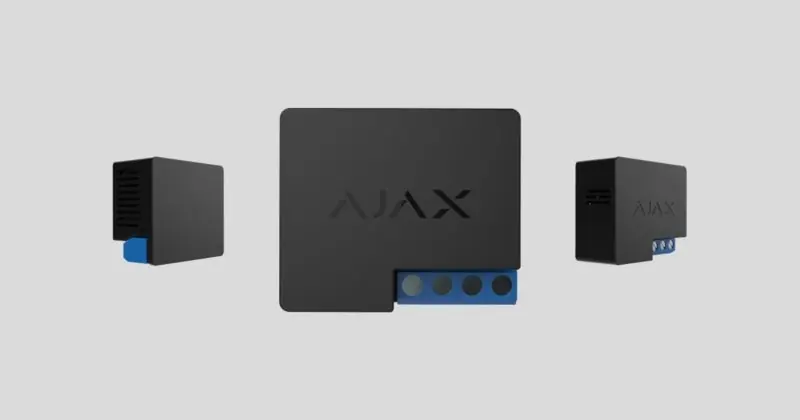
AJAX Relay Wireless Dry Contact Switch
Quick guide for the AJAX Relay wireless dry contact switch. Learn about installation, wiring, operation modes, and technical specifications for this low-voltage relay.
Table of contents
Manual images
Click an image to enlargeQuick guide from the manual
The AJAX Relay is a wireless, low-voltage relay with potential-free (dry) contacts, designed to remotely switch appliances on or off. It operates on a 7–24 V DC power supply and communicates with an Ajax hub via the Jeweller radio protocol. Important: Installation must be performed by a qualified electrician. The device is intended for indoor use and should not be installed in metal wiring boxes or panels to ensure proper radio signal transmission.
Functional Elements
The device consists of the following key components:
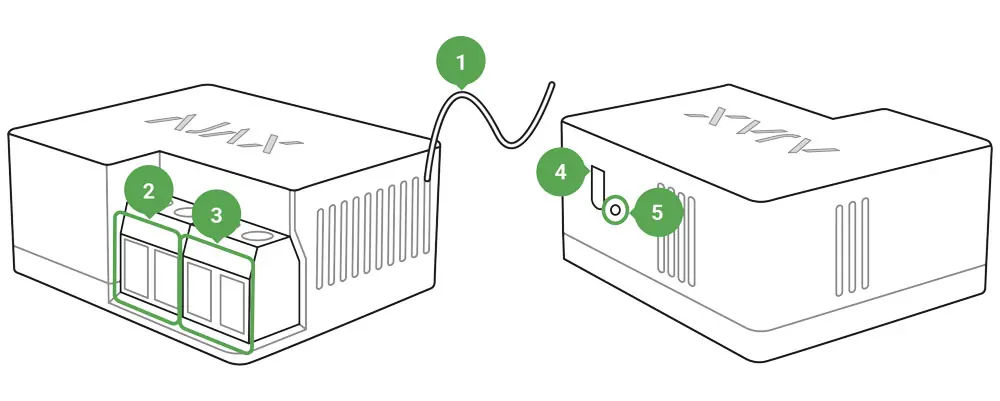
- Antenna: Used for radio communication. Should be placed outside of metal structures.
- Power supply terminal block: For connecting the 7-24 V DC power source.
- Contacts terminal block: Output terminals for the connected equipment.
- Function button: Used for pairing and testing.
- Light indicator: Displays device status.
Installation
Before installing, ensure the power cable is de-energized. Connect the grid wire to the Relay terminals according to the wiring scheme. When installing in a junction box, lead the antenna out and place it under the plastic frame of the socket to maximize signal strength. Do not shorten the antenna.
Do not install the relay:
- Outdoors.
- In metal wiring boxes or electrical panels.
- In places with temperature and humidity exceeding permissible limits.
- Closer than 1 meter to a hub.
Operation Modes
The Relay supports two operation modes, configurable via the Ajax app:
- Bistable: The relay opens or closes the contact and remains in that state until the next command.
- Pulse: The relay opens or closes the contacts for a pre-set time (from 0.5 to 255 seconds) and then switches back to the initial state.
Settings
Through the Ajax app, you can configure:
- Relay Mode: Choose between Pulse or Bistable.
- Contact State: Set to Normally Closed or Normally Open.
- Pulse Duration: Set the time for pulse mode (0.5 to 255 seconds).
- Scenarios: Program actions in response to alarms, button presses, or schedules.
Technical Specifications
- Supply Voltage: 7–24 V DC.
- Maximum Load Current: 5 A at 36 V DC, 13 A at 230 V AC.
- Protection: Voltage protection (6.5–36.5 V) and temperature protection (85°C inside).
- Communication Range: Up to 1000 m in line of sight.
- Operating Temperature: 0°C to +64°C.
- Dimensions: 39 × 33 × 18 mm.
Maintenance
The device does not require maintenance. If technical issues arise, contact support at [email protected].
Practical help
Common problems
Device fails to pair with the hub
Ensure the device is within the hub's coverage area, wait 30 seconds, and retry. Ensure the hub is not armed and has an active internet connection.
Low or unstable signal strength
Ensure the antenna is not inside a metal box. If the signal remains weak, use a ReX radio signal range extender.
Device not responding to commands
Check if the device has been deactivated in the app settings or if the power supply is disconnected.
Before use
- Ensure the power supply is 7-24 V DC.
- Verify the hub is online and not armed.
- Ensure you have administrator rights in the Ajax app.
- Check that the installation location is not in a metal box.
- Ensure the antenna is positioned away from metal structures.
Specs in practice
- Bistable Mode
- The relay switches and remains in that state until the next command.
- Potential-free (dry) contacts
- The contacts are not galvanically connected to the device's power supply, allowing them to switch circuits of various voltages.
Images and diagrams
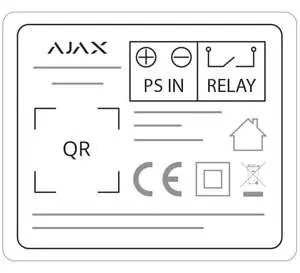
- Antenna: Must be placed outside of metal structures to avoid signal interference.
- PS IN: Terminals for connecting the 7-24V DC power supply.
- Relay Terminals: Output terminals for the controlled appliance.
Model compatibility
- Operates only with Ajax hubs and range extenders.
- Does not support connection via uartBridge or ocBridge Plus.

Manual page author
Emily Carter
User documentation editor
Prepares concise manual descriptions and highlights the most useful setup, operation, and maintenance information for readers.