Lighting / LED Lamps
Aladdin CAPE-LITE Bi-Color LED Light
A comprehensive guide for the Aladdin CAPE-LITE flexible LED panel, covering setup, power requirements, app control, safety warnings, and technical specifications.
Table of contents
Manual images
Click an image to enlargeQuick Start Guide
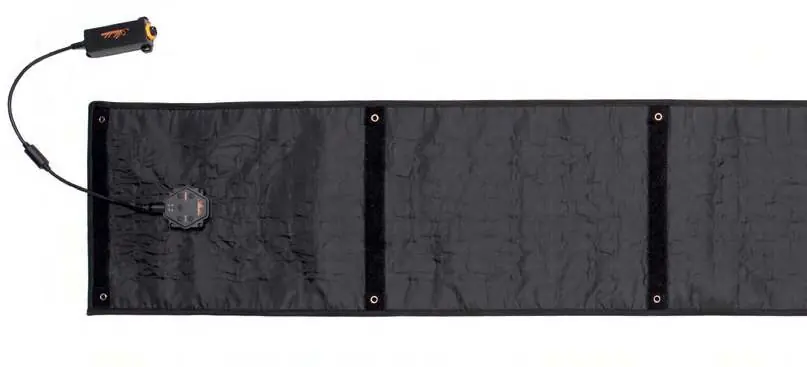
To begin using your Aladdin CAPE-LITE, unpack the panel and accessories. The panel features a built-in dimmer on the back. Connect your AC adapter or D-Tap cable to the input box on the panel. If the cable is too short, use the included extension cable. Once connected to a power source, the light is ready for operation.
Powering the Panel
The panel requires a power source capable of handling 140 watts. If using batteries, ensure they meet the following requirements:
- Voltage: 14.8V
- Working Current: At least 8.1A
- Example: A 14.8V, 100Wh/6.8Ah battery with a working current over 8A will provide approximately one hour of runtime.
App Control
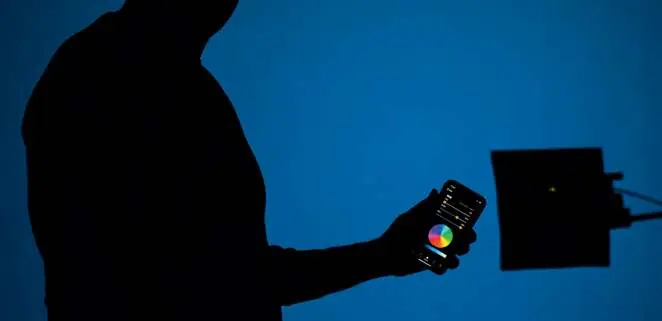
You can control the CAPE-LITE using the dedicated smartphone app, available for iOS and Android. The app allows you to store custom color filters, adjust Bi-Color values, and control hue and saturation. Download the app by scanning the QR codes provided in the manual or searching in your app store.
Optional Accessories
The system supports several optional attachments to enhance functionality:
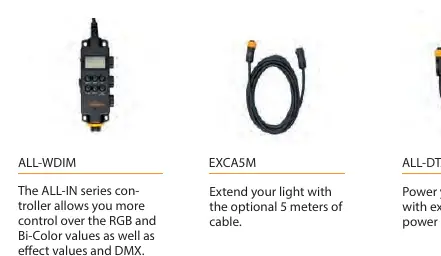
- DMX Attachment (ALL-DMXAT): Allows for DMX control.
- Wired Dimmer (ALL-WDIM): Provides manual control over RGB, Bi-Color values, and DMX.
- Extension Cable (EXCA5M): Extends the reach of your light by 5 meters.
- D-Tap Cable (ALL-DTAB): For powering the panel with external D-Tap sources.
Safety and Maintenance
Follow these guidelines to ensure safe operation and longevity of your product:
- Do not use near flammable materials or heaters.
- Do not expose the unit to direct sunlight for extended periods.
- Do not use the dimmer or extension wires to hang or mount the panel.
- Do not bend or fold the panel more than 90 degrees.
- Do not apply tape directly to the LEDs.
- Ensure the panel has adequate airflow to prevent overheating; use the X-BEND holder or frame.
- Operating temperature range: -10°C to +40°C.
- Allow the panel to cool down before storing it in a case.
Technical Specifications
The CAPE-LITE is a 120W Bi-Color LED light with a color temperature range of 2900K to 6100K. It features a beam angle of 140°, a CRI of Ra 97, and a TLCI of 98. The unit is rated IP32 and weighs 830g. It supports Bluetooth connectivity and DMX512 with an optional attachment.
Practical help
Common problems
Panel overheating during long use
Ensure the panel is mounted using the X-BEND holder or frame to allow sufficient airflow for heat reduction.
Battery not powering the light
Verify that your battery is rated for 14.8V and can provide a working current of at least 8.1A.
Panel damaged or not functioning
Stop using the product immediately if technical problems occur and contact your dealer or reseller.
Before use
- Ensure the battery provides at least 8.1A at 14.8V.
- Check that the ambient temperature is between -10°C and +40°C.
- Verify all cable connections are secure.
- Ensure the panel is not folded more than 90 degrees.
Images and diagrams
- 1: Switch between RGB and Bi-Color control
- 2: Dimming control
- 3: Color temperature control
- 4: Metal corner (for magnets)
- 7: Metal ring for mounting
Model compatibility
- Compatible with optional DMX Attachment (ALL-DMXAT).
- Compatible with optional Wired Dimmer (ALL-WDIM).
- Compatible with optional 5m extension cable (EXCA5M).
- Compatible with external D-Tap power sources using ALL-DTAB.

Manual page author
David Miller
Documentation analyst
Organizes user manual content into clear summaries, with attention to model details, product context, and everyday usability.