Home Appliances / Dehumidifiers
User Manual for AlorAir PureCare 1080/1080IG Air Filtration System
Quick guide for the AlorAir PureCare 1080/1080IG Air Filtration System. Includes installation steps, operation instructions, maintenance, and troubleshooting.
Table of contents
Manual images
Click an image to enlargeQuick guide from the manual
The AlorAir PureCare 1080/1080IG is an air filtration system designed to circulate air and filter dust. Key operational requirements include using a 115V/60Hz power source, keeping the unit at least 2 feet away from walls or obstructions, and ensuring filters are installed before operation. Two people are required for installation.
Product Description and Specifications
The unit is equipped with three lightweight filters to improve air purification. The PureCare 1080IG model includes an ionizer for ozone removal, while the standard 1080 model does not.
- Motor: 115 V / 60 Hz, 1.5 Amps max.
- Airflow: 780 / 1080 CFM.
- Filters: MERV-11 (90% 3-10 μm, 85% 1 μm).
- Weight: 22 lbs.
- Dimensions: 19.4" x 19.4" x 9.6".
- Remote Control Distance: 27 ft.
Safety Rules
Always operate in a well-ventilated area. Do not use in the presence of flammable liquids or gases. Ensure the unit is properly grounded. Do not use extension cords. Always unplug the unit before performing maintenance or changing parts.
Installation
The unit requires minimal assembly and can be installed in two ways:
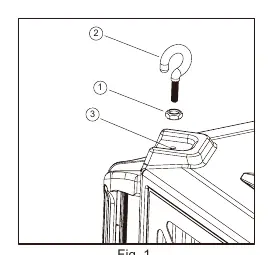
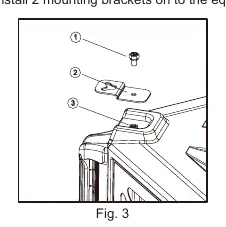
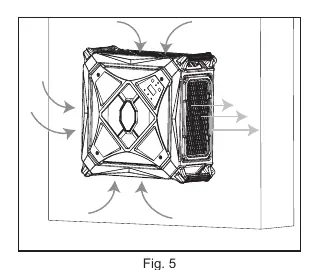
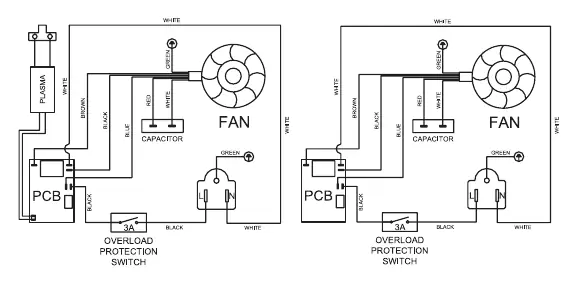
Ceiling Installation
- Thread locknuts onto hangers and install hangers into the four mounting holes on the top of the unit.
- Mark the ceiling (recommended size 22.8" x 22.8").
- Drill holes and install wood screw hooks into the building support structure.
- Attach chains to hooks and connect the hangers to the chains.
Wall Installation
- Install two mounting brackets onto the equipment using M6 screws.
- Measure the distance between brackets to mark the wall.
- Drill holes and insert expansion screws.
- Secure the unit to the wall using the nuts.
Operation
The unit can be operated via the control panel or remote control. It features a power-off memory function.
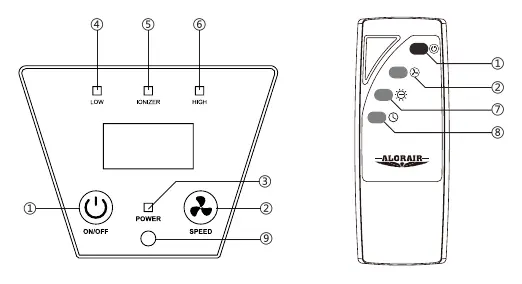
- Power: Use the ON/OFF button to start.
- Speed: Adjust airflow using the SPEED button.
- Ionizer: Toggle using the ionizer button (1080IG model only).
- Timer: Use the timer shutdown button to set a 1H to 9H shutdown interval.
Maintenance
Periodically check and change filters when clogged. Always wear a mask and gloves when changing filters. If the remote control range is short, replace the battery and clean the infrared receiver.
Troubleshooting
If the unit is noisy, check for blocked filters. If the unit does not power on, check the circuit breaker on the side of the unit and reset it if necessary.
Manufacturer information
AlorAir Solutions Inc.
Practical help
Common problems
Unit is noisy
The filter may be blocked; replace the filter.
Unit does not start
Check the circuit breaker on the side of the unit and reset it.
Remote control not working
Replace the AAA batteries and wipe the infrared receiver on the control panel.
Before use
- Ensure a 115V/60Hz power source is available.
- Keep the unit at least 2 feet away from walls or obstructions.
- Do not use extension cords.
- Ensure filters are installed before running the machine.
- Two people are required for installation.
Specs in practice
- MERV-11 Filter
- Filters 90% of 3-10 μm particles and 85% of 1 μm particles.
- 1080IG Model
- Includes an ionizer function for ozone removal.
- Power-off Memory
- The unit remembers the last operation settings after being powered off and on again.
Images and diagrams
- Fig 1: Ceiling installation showing hanger and locknut assembly.
- Fig 2: Ceiling placement overview.
- Fig 3-5: Wall installation steps using mounting brackets.
- Fig 4-5: Control panel and remote button layout.
Model compatibility
- PureCare 1080 does not have the ionizer feature; the ionizer button on the remote will not respond.
- Do not mount the unit to non-structural surfaces like drywall or false ceiling grids.

Manual page author
Michael Turner
Technical manual editor
Reviews PDF manuals for structure, safety notes, and practical product details so readers can find the right information quickly.