Home Appliances / Dehumidifiers
User Manual for AlorAir Storm SLGR 1250X Dehumidifier
Comprehensive user guide for the AlorAir Storm SLGR 1250X commercial dehumidifier. Includes setup, LCD display operation, maintenance, and troubleshooting.
Table of contents
Manual images
Click an image to enlargeQuick Guide from the Manual
The AlorAir Storm SLGR 1250X is a commercial dehumidifier designed for restoration and moisture control. Key operational requirements include a 115V/60Hz power supply with a GFCI outlet. Always ensure the unit is placed on a stable surface and that the drain hose is uncoiled and not blocked. For maximum efficiency, operate the unit with all windows and doors closed.
Safety Instructions
- Do not adjust or alter the unit in any way.
- Always unplug the unit before removing the cover.
- Inspect the power cord for damage before use.
- Use only with a 115V/60Hz circuit protected by a GFCI outlet.
- Do not use extension cords or plug adapters.
Installation and Guidelines
Proper installation is critical for performance:
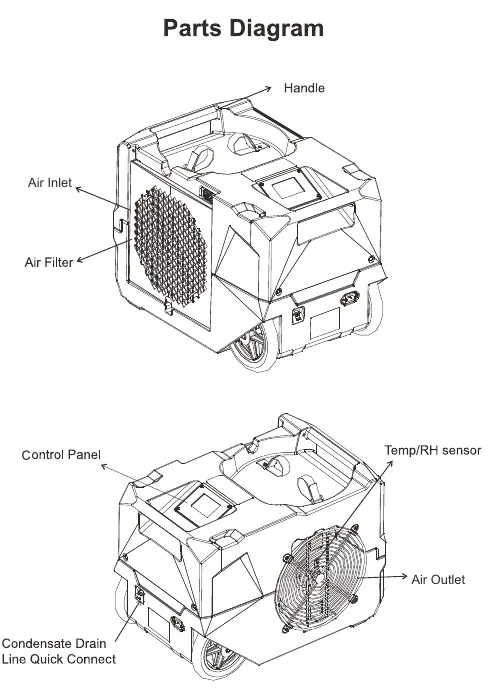
- Placement: Ensure the unit is on a stable surface. Do not block the air inlet or outlet.
- Drainage: The unit features an external drain line connection. Uncoil the entire hose before use and ensure the end of the hose is not higher than 15 feet.
- Transportation: Secure the dehumidifier during transport. If transported vertically, let it sit for 30 minutes before use.
LCD Display and Operation
The control panel allows for monitoring and configuration:
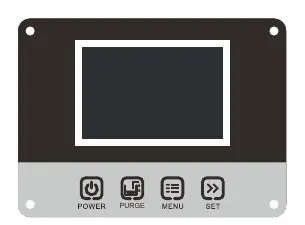
- Main Interface: Displays current temperature, humidity, and moisture content (GPP).
- Job/Life Hours: Tracks operating time. Job hours can be reset via the submenu.
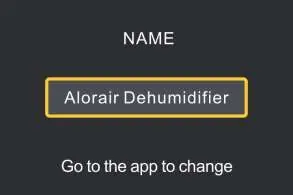
- WiFi: Factory setting is OFF. Can be enabled to transmit data and receive app commands.
- Humidistat Setpoint: Adjustable between 25% and 80%.
- Power Down Time: Adjustable fan run-time after shutdown (3-20 minutes) to assist with drainage.
Maintenance
Regular maintenance ensures longevity:
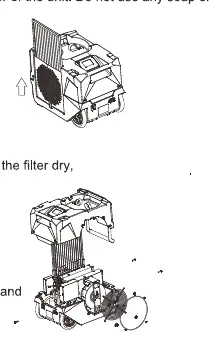
- Filter Maintenance: Unplug the unit, slide out the filter, and inspect for dirt. Clean MERV-8 filters by vacuuming or washing with warm water (no soap). Replace Carbon or HEPA filters if dirty.
- Coil Maintenance: Clean coils once per year using an approved, self-rinsing, foaming coil cleaner.
- Pump Maintenance: Remove housing screws to access the pump. Lift off the top of the pump and wipe out the base with a paper towel.
Troubleshooting
If the unit fails to operate, check the following:
- Display is Blank: Verify power connection and reset power.
- No Airflow: Clean the filter and check for blockages.
- Error Code E1: Humidity sensor or communication error.
- Error Code E4: Problem with the pump. Unplug for two minutes and restart.
- Error Code LO/HI: Room temperature is outside the operating range (below 33.8°F or above 110°F).
- Error Code E5: Refrigerant leak; contact your installer.
Manufacturer information
AlorAir Solutions Inc.
Practical help
Common problems
Display is blank
Verify that both ends of the power cord are plugged in and reset the power.
No airflow
Clean the filter and check the air inlet/outlet for blockages.
Error Code E1
Humidity sensor or communication error. Ensure the sensor wire is connected at both ends.
Error Code E4
Pump issue. Verify the pump is properly installed and functioning. Unplug the unit for two minutes, then restart.
Error Code LO/HI
Room temperature is out of range (below 33.8°F or above 110°F). Adjust room temperature.
Before use
- Check the power cord for signs of damage or fraying.
- Inspect the filter for dirt or obstructions.
- Ensure the unit is placed on a stable surface.
- Uncoil the drain hose completely.
- Verify the power source is a 115V/60Hz GFCI outlet.
Images and diagrams
- The Parts Diagram identifies the handle, air inlet, air filter, control panel, air outlet, and condensate drain line quick connect.
Model compatibility
- Requires a 115V/60Hz circuit protected by a GFCI outlet.
- Do not use extension cords or plug adapters.
- Operating temperature range is between 33.8°F and 110°F.

Manual page author
David Miller
Documentation analyst
Organizes user manual content into clear summaries, with attention to model details, product context, and everyday usability.