Power / Batteries & Chargers
User Manual for Amazon Basics 15W Wireless Charging Pad
Quick guide for the Amazon Basics 15W Wireless Charging Pad. Learn how to set up your charger, understand LED status indicators, and check compatibility requirements for fast charging modes.
Table of contents
Manual images
Click an image to enlargeQuick Start Guide
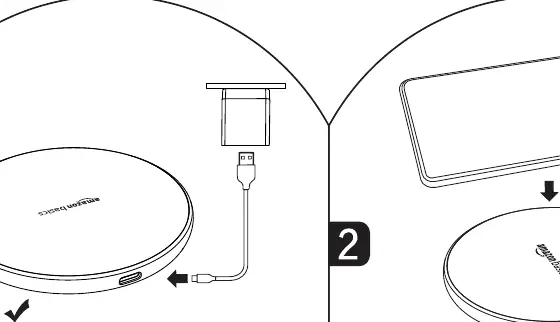
The Amazon Basics 15W Wireless Charging Pad is designed for simple, efficient charging. To begin, connect the charging pad to a power source. A blue flash indicates the device is powered on. Place your Qi-compatible device centrally on the pad to initiate charging.
Usage Instructions
For optimal performance, ensure your device is aligned centrally on the charging pad. Misalignment may result in slower charging or failure to charge.
LED Status Indicators
The LED light on the charging pad provides real-time status updates:
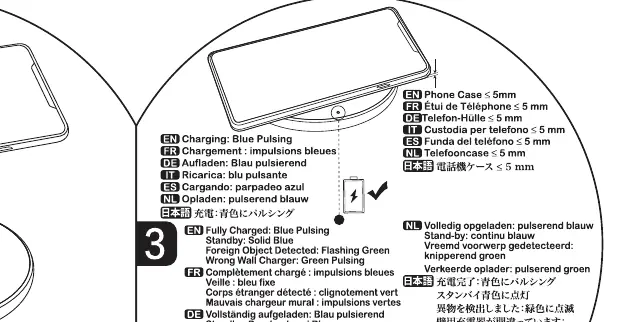
- Blue Pulsing: Device is currently charging.
- Solid Blue: Device is fully charged.
- Flashing Green: Foreign object detected. Ensure no metal or magnetic items are between the phone and the pad.
- Green Pulsing: Wrong wall charger detected. Ensure your power adapter meets the required specifications for the desired charging speed.
Important Safety Warnings
To prevent damage to your device or the charger, observe the following restrictions:
- Do not place magnets or magnetic attachments on the charging pad.
- Remove credit cards from the phone or case before charging.
- Remove metal cases, grips, or stands from the device.
- Only use compatible Qi-enabled devices.
Charging Specifications
Charging speed depends on the power adapter used and the device compatibility:
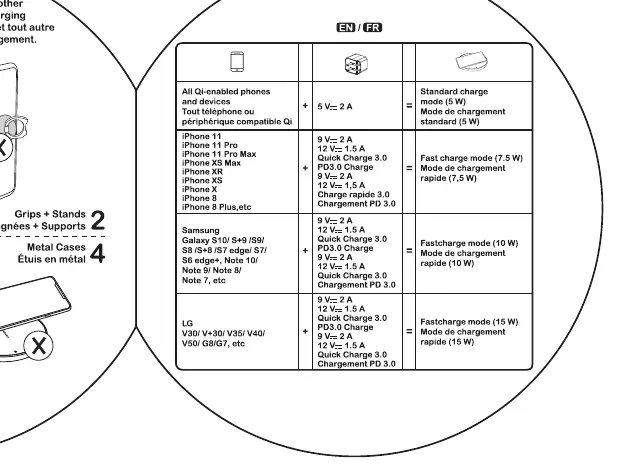
- 5W Mode: Standard charging speed.
- 7.5W Mode: Fast charging for compatible iPhones.
- 10W Mode: Fast charging for compatible Samsung devices.
- 15W Mode: Fast charging for compatible devices.
Practical help
Common problems
Flashing green LED
Foreign object detected. Remove any metal or magnetic items (like credit cards, grips, or metal cases) from the charging area.
Green pulsing LED
Wrong wall charger. Ensure the power adapter used supports the required voltage and amperage for the desired charging mode.
Device not charging
Ensure the device is aligned centrally on the pad and that no obstructions are present.
Before use
- Connect the charging pad to a power source.
- Verify the device is Qi-compatible.
- Remove any metal cases, grips, or stands from the phone.
- Remove credit cards or magnetic attachments from the phone case.
- Place the phone centrally on the charging pad.
Images and diagrams
- Blue pulsing light indicates active charging.
- Solid blue light indicates the device is fully charged.
- Flashing green light indicates a foreign object obstruction.
- Green pulsing light indicates an incompatible power adapter.
Model compatibility
- Requires a Qi-compatible device.
- Fast charging modes (7.5W, 10W, 15W) require specific power adapter outputs (e.g., Quick Charge 3.0 or PD 3.0).
- Metal or magnetic attachments will interfere with charging.

Manual page author
Emily Carter
User documentation editor
Prepares concise manual descriptions and highlights the most useful setup, operation, and maintenance information for readers.