Electronics / Security Systems
Installation Instructions for AMC MOUSE 02 Dual Technology Detector
Complete installation and configuration guide for the AMC MOUSE 02 and MOUSE 02/P dual technology detector. Includes wiring diagrams, DIP switch settings, EOL resistor configurations, and technical specifications.
Table of contents
Manual images
Click an image to enlargeQuick guide from the manual
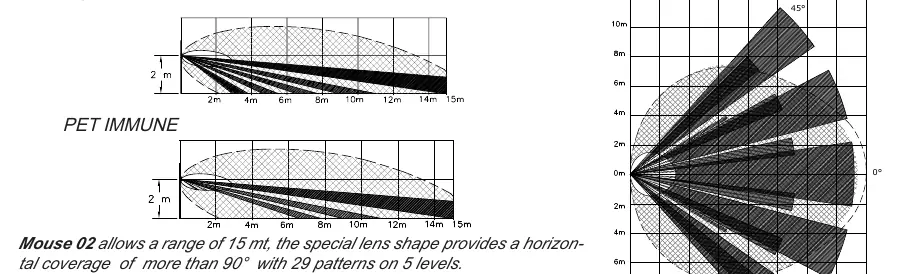
The AMC MOUSE 02 is a dual technology detector (PIR and Microwave) designed for indoor security. It features an anti-masking system, digital temperature compensation, and a 15-meter coverage range. The MOUSE 02/P variant is pet-immune up to 15kg. The device requires a 13.8V power supply and must be installed by qualified personnel.
Installation Procedure
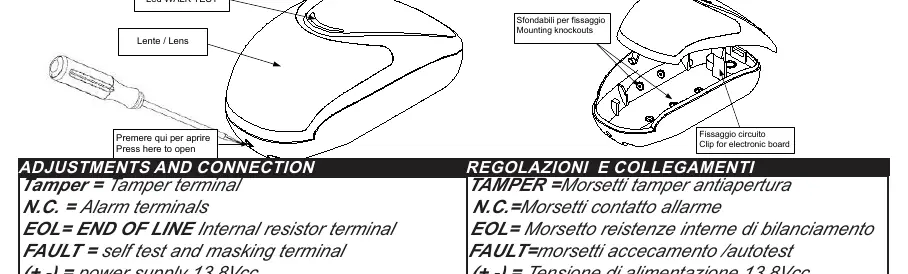
- Opening the housing: Use a thin screwdriver to push the round tooth on the bottom of the sensor and open the cover.
- PCB Removal: Remove the PCB from the base by levering on the ABS supports.
- Mounting: Pierce the knockouts on the base for fixing. The recommended installation height is 2 meters.
- Wiring: Slide the cable through the back guide and out the top hole. Connect the terminals according to the wiring diagrams provided in the manual.
Adjustments and DIP Switches
The sensor features four DIP switches to configure operation:
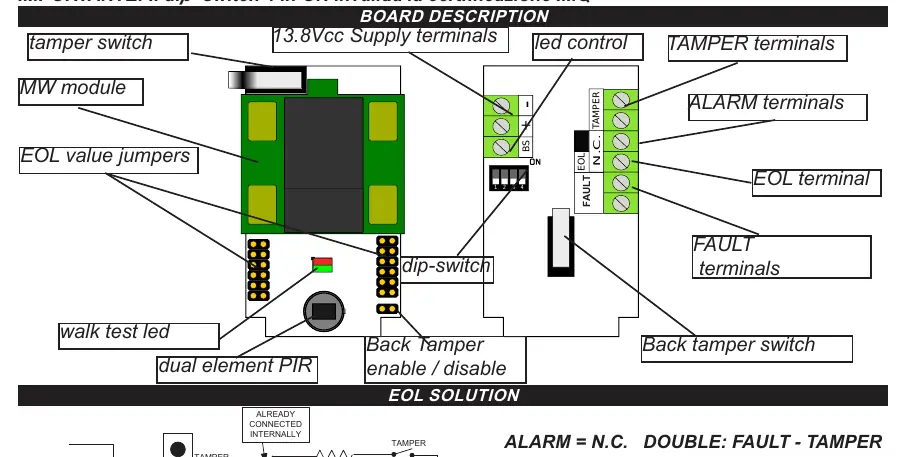
- DIP 1: Walk test LED. OFF = Disabled, ON = Enabled.
- DIP 2: Pulse counter. OFF = 1 Pulse, ON = 2 Pulses.
- DIP 3: Range. OFF = 7 meters, ON = 15 meters.
- DIP 4: Fault/Alarm output. OFF = Fault and Alarm together, ON = Only Fault output (Note: Setting this to ON invalidates IMQ approval).
Warm Up and Testing
Immediately after powering on, the device enters a 1-minute stabilization phase (Warm Up), during which the signaling LEDs light up alternately. After this period, you can perform range tests and mask detection. With DIP 1 set to ON, the LEDs indicate: Green (Microwave), Orange (PIR), Red (Alarm).
Troubleshooting and Fault Indications
The sensor performs a self-test every 10 hours. If a failure occurs, the FAULT output opens and the LED flashes to indicate the anomaly:
- Flashing Green: Microwave anomaly.
- Flashing Orange: Infrared (PIR) anomaly.
- Short Pulse Red: Power supply anomaly (voltage below 9.5V or above 15V).
- Flashing Red: Masking detected.
Technical Specifications
- Input Voltage: 9.5 to 15 V (13.8V nominal)
- Coverage: 15 meters, 90-degree angle
- Operating Temperature: -10°C to +55°C
- Alarm Period: 2 seconds
- Microwave Frequency: 9.3GHz / 9.9GHz / 10.525GHz
- Dimensions: 110 x 60 x 46 mm
Practical help
Common problems
Fault LED flashing green
Microwave anomaly detected. Check sensor environment.
Fault LED flashing orange
Infrared (PIR) anomaly detected.
Fault LED flashing red
Power supply anomaly. Ensure voltage is between 9.5V and 15V.
Alarm and Fault output active
Detection system is compromised or masking is detected.
Before use
- Ensure power supply is 13.8Vcc.
- Mount at recommended height of 2m.
- Check DIP switch settings for desired range (7m or 15m).
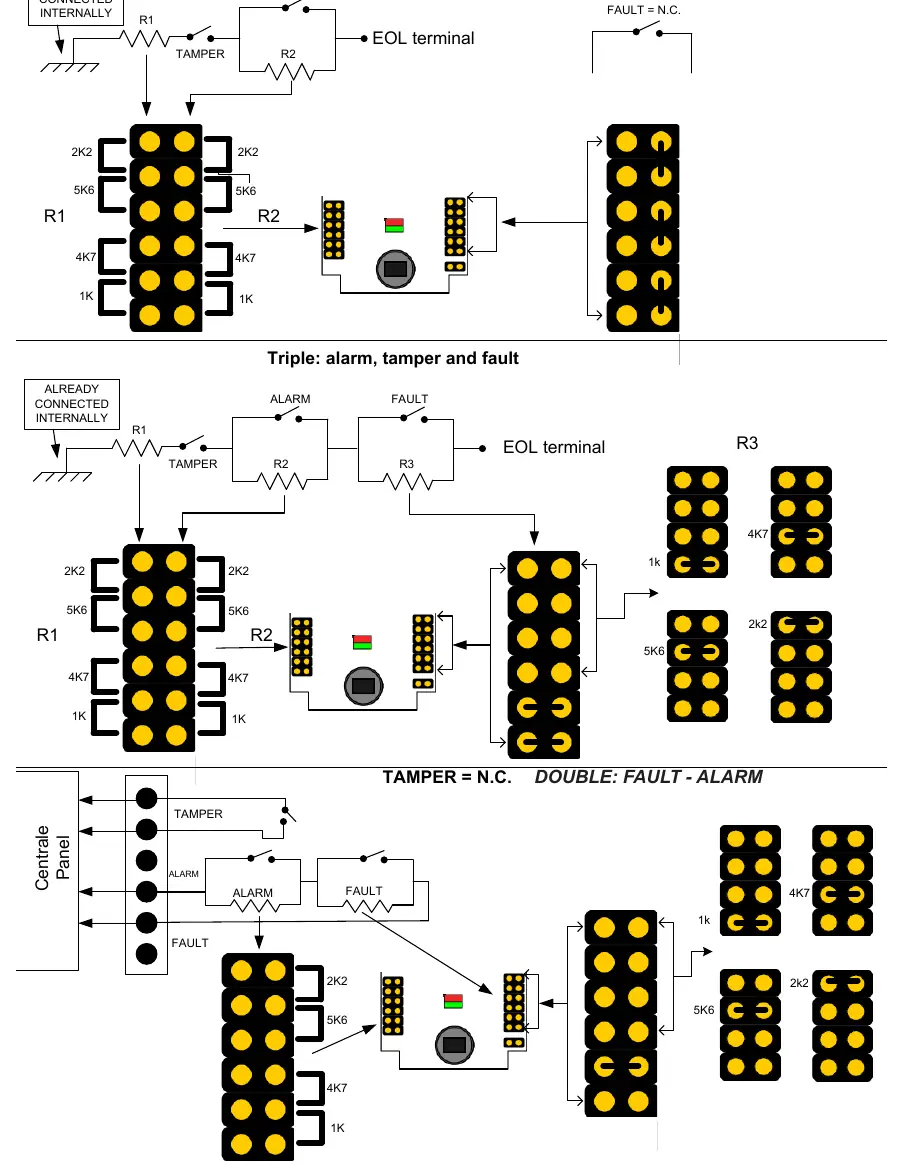
- Verify EOL resistor values match your control panel requirements.
- Perform walk test after 1-minute warm-up period.
Specs in practice
- Microwave frequency
- 9.3GHz / 9.9GHz / 10.525GHz.
- Operating Temperature
- -10°C to +55°C.
Images and diagrams
- General View: Shows how to open the housing and locate the PCB.
- Board Description: Identifies terminals for Tamper, Alarm, EOL, and Power.
- EOL Solution: Wiring diagrams for different resistor configurations.
Model compatibility
- MOUSE 02/P is the pet-immune version (up to 15kg).
- DIP switch 4 in ON position invalidates IMQ approval.

Manual page author
Emily Carter
User documentation editor
Prepares concise manual descriptions and highlights the most useful setup, operation, and maintenance information for readers.